407
Example
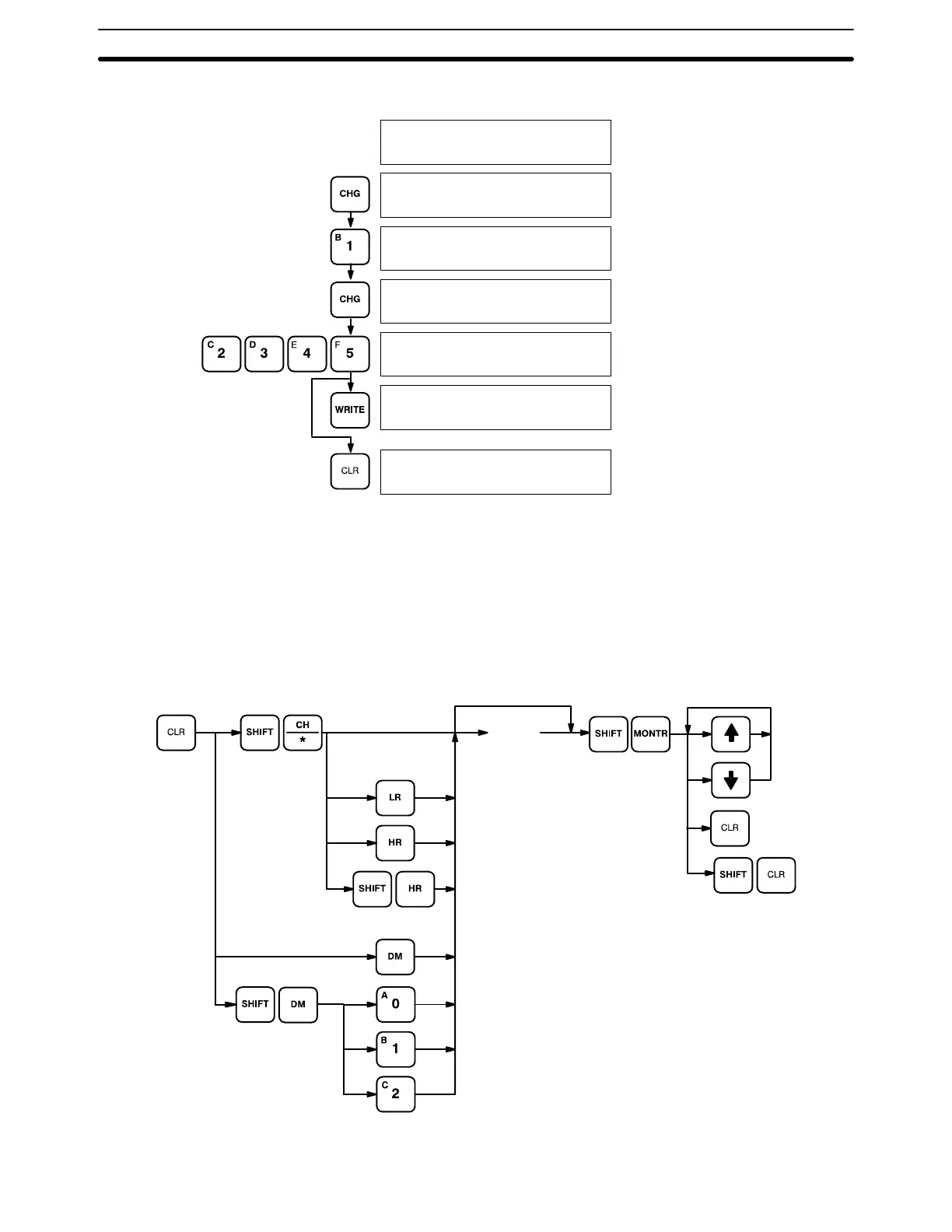
3-word Monitor
in progress.
Stops in the middle
of monitoring.
Resumes previous
monitoring.
D0002D0001D0000
0123 4567 89AB
D0002 3CH CHG?
0123 4567 89AB
D0002 3CH CHG?
0001 4567 89AB
D0002 3CH CHG?
00014567 89AB
D0002 3CH CHG?
00012345 89AB
D0002D0001D0000
0001 2345 89AB
D0002D0001D0000
0123 4567 89AB
Input new data.
7-2-11 Binary Monitor
You can specify that the contents of a monitored word be displayed in binary by
pressing SHIFT and MONTR after the word address has been input. Words can
be successively monitored by using the up and down keys to increment and
decrement the displayed word address. To clear the binary display, press CLR.
Key Sequence
[Word]
Binary
monitor clear
All monitor
clear
(EM area)
(EM bank 0, 1, or 2.)
Programming Console Operations Section 7-2





 To Next Page