409
7-2-12 Binary Data Modification
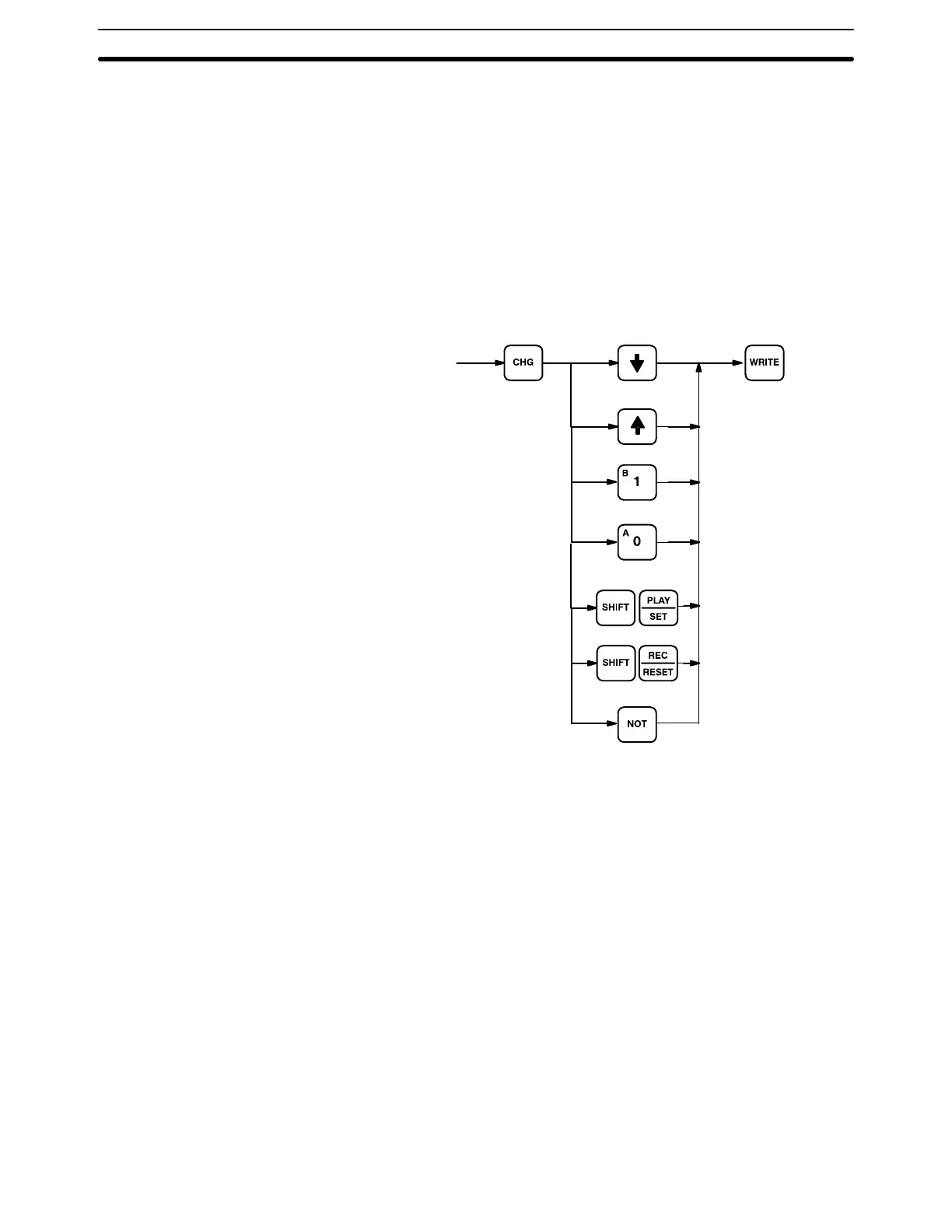
This operation assigns a new 16-digit binary value to an IR, HR, AR, DM, EM, or
LR word.
The cursor, which can be shifted to the left with the up key and to the right with the
down key, indicates the position of the bit that can be changed. After positioning
to the desired bit, a 0 or a 1 can then be entered as the new bit value. The bit can
also be Force Set or Force Reset by pressing SHIFT and either PLAY/SET or
REC/RESET. An S or R will then appear at that bit position. Pressing the NOT
key will clear the force status, S will change to 1, and R to 0. After a bit value has
been changed, the blinking square will appear at the next position to the right of
the changed bit.
Key Sequence
Word currently
displayed in binary.
(Force Status Clear)
Programming Console Operations Section 7-2





 To Next Page