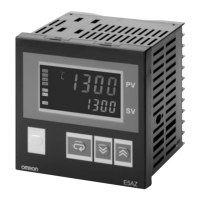
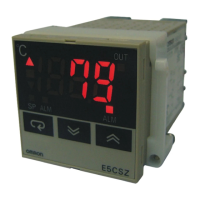
E5jJ
E5jJ
3
Specifications
Ratings
Supply
voltage
100 to 240 V
AC, 50 or 60 Hz 24 V AC/DC, 50 or 60 Hz
Operating voltage range
85% to 1
10% of rated supply voltage
Power consumption
E5AJ/E5EJ:
10 V
A (at 100 V
AC) to 14 V
A (at 240 V
AC)
E5BJ/E5CJ:
10 V
A (at 100 V
AC) to 12 V
A (at 240 V
AC)
10 V
A (at 24 V
AC)
6 W (at 24 VDC)
Input
Thermocouple (K/J/T/L/U/N) or platinum resistance thermometer (JPt100/Pt100), selectable
Current T
ransformer input Connect an exclusive Current T
ransformer unit (E54-CT1 or E54-CT3)
Control
E5AJ/E5BJ/E5EJ
Replaceable Output Unit (sold separately)
output
E5CJ
Relay output
SPST
-NO, 3 A at 250 V
AC (resistive load)
V
oltage output
20 mA at 12 VDC (with short-circuit protection)
Current output
4 to 20 mA DC with a load of 600
Ω
max. and a resolution of approx. 2600
Control mode
ON/OFF or PID control (2-PID) with fuzzy self-tuning and auto-tuning
Alarm output E5AJ/E5EJ:
Relay output, 2 independent SPST
-NO contacts; 3 A, 250 VAC
E5BJ/E5CJ:
Common 2 outputs, 2 independent SPST
-NO contacts;
E5CJ: 1 A, 250 VAC; E5BJ: 3 A, 250 V
AC
Setting method
Digital setting via Up and Down Keys
Indication method
Digital indications
Character heights:
E5AJ: PV
: 15 mm, SV
: 10.5mm
E5EJ/E5BJ: PV
: 14 mm, SV
: 9.5 mm
E5CJ: PV
: 12 mm, SV
: 8 mm
Event input
Contact input:
ON: 1 kΩ
max., OFF: 100 k
Ω
min.
No-contact input: ON: residual voltage: 3 V max., OFF: leakage current: 1 mA max.
Other functions
Key protection
Direct and reverse output selection
Multiple SP (four set points; up to four set points available on E5AJ/E5EJ by engineering level)
RUN/ST
OP (selected via external terminals) (E5AJ, E5EJ)
Heater burnout detection
Note: It
is possible to add other functions from
the engineering level. Refer to the
E5
j
J Operation Manual
, obtainable from your OMRON
representative,
for details.



 To Next Page
 Loading...