33
RFID System
User's Manual
Section 2 V600-CH1D-V2 Communications Preparation
Section 2
Communications Preparations
•Connection with the Host Device
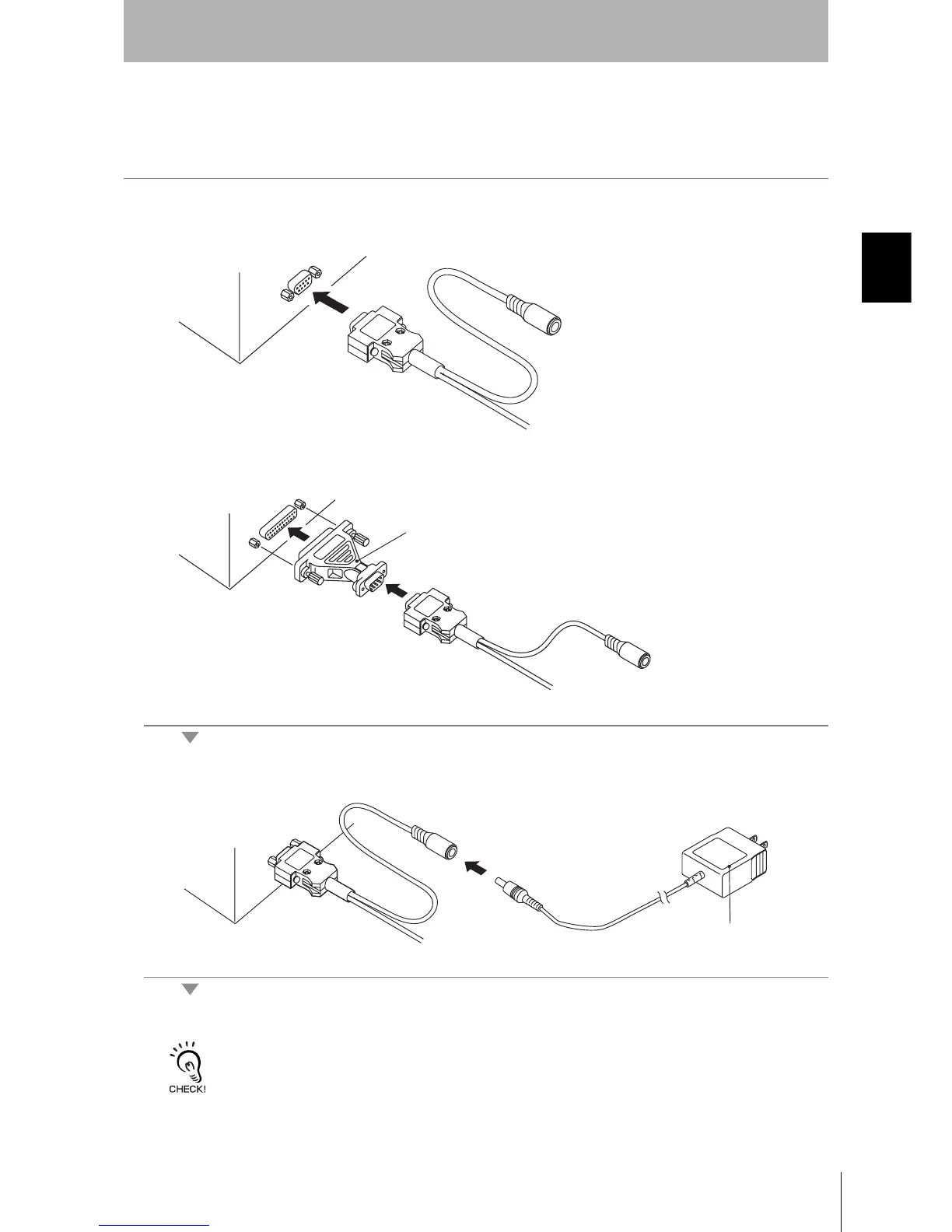
Use the following procedure to connect the V600-CH1D-V2 to the host device.
1. Connect the V600-CH1D-V2 to the RS-232C interface of the host device.
•When connecting to an IBM PC/AT or compatible:
•When connecting to a PC9801 series computer (D-Sub 25-pin connector):
To convert from a 9-pin connector to a 25-pin connector, use an SGC-X9P25P-2 conversion connec-
tor manufactured by Sunhayato, or an equivalent product.
2. Connect the V600-A22 AC Adaptor to the V600-CH1D-V2.
3. Plug the V600-A22 AC Adaptor into a 100- to 120-VAC power outlet.
• Do not use any AC adaptor other than the specified one (V600-A22).
• Using any AC adaptor other than the specified one may cause a malfunction, damage, or fire in the V600-CH1D-V2.
• Some host devices require a conversion connector.
SGC-X9P25P-2
V600-A22












 To Next Page