Advanced Settings
78
N300 WiFi ADSL2+ Modem Router (N300RM)
Remote Management
The remote management feature lets you upgrade or check the status of your N300RM
Modem Router over the Internet.
To set up remote management:
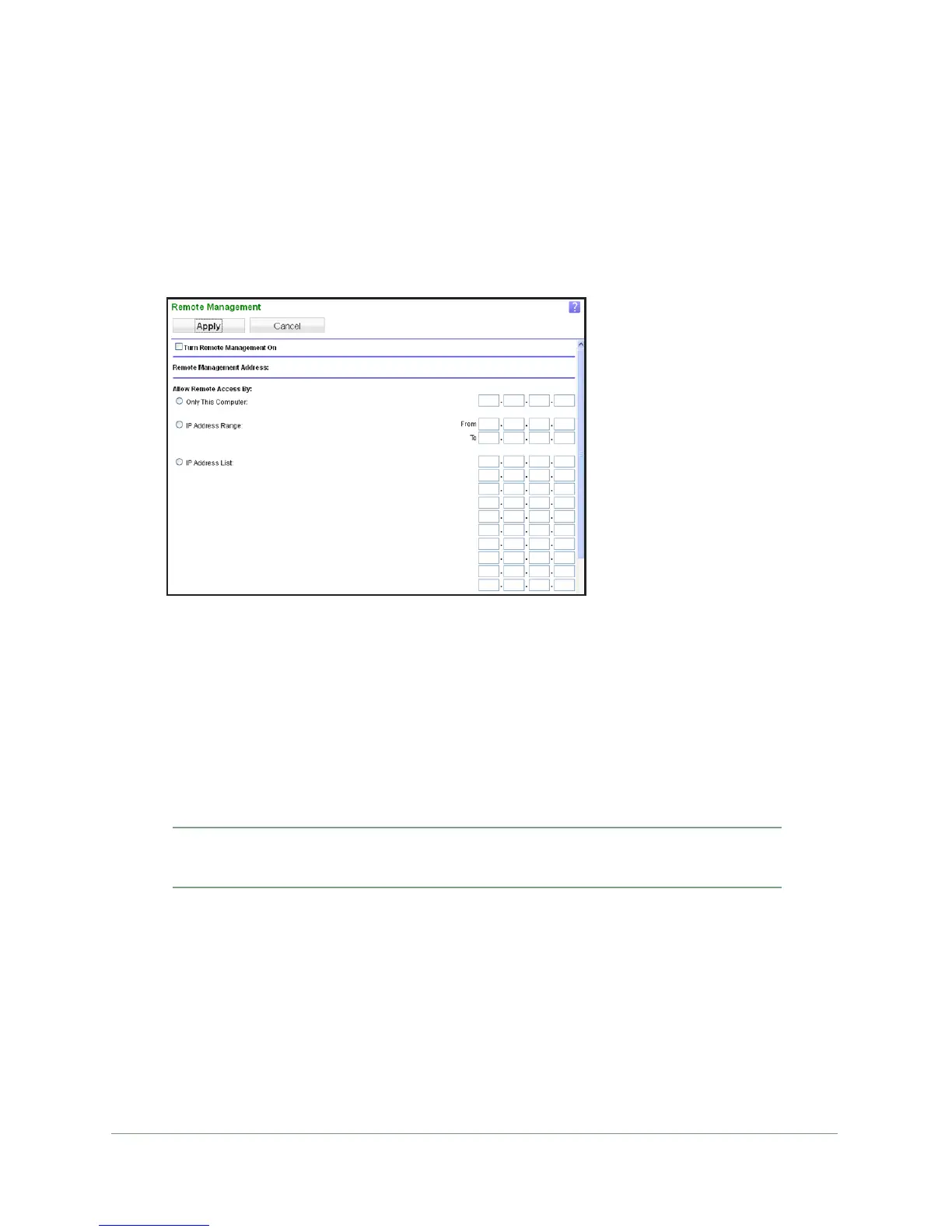
1. Select Advanced > Remote Management.
Note: Be sure to change the modem router’s default login password to a
secure password. The ideal password contains no dictionary words from any
language and contains upper-case and lower-case letters, numbers, and
symbols. It can be up to 30 characters.
2. Select the T
urn Remote Management On check box.
3. Under
Allow Remote Access By, specify the external IP addresses to be allowed to access
the modem router’s remote management.
Note: For enhanced security, restrict access to as few external IP
addresses as practical.
• T
o allow access from a single IP address on the Internet, select Only This
Computer. Enter the IP address that will be allowed access.
• T
o allow access from a range of IP addresses on the Internet, select IP Address
Range. Enter a beginning and ending IP address to define the allowed range.
• T
o specify IP addresses, select IP Address List and type in the allowed IP
addresses.
• T
o allow access from any IP address on the Internet, select Everyone.


 To Next Page
 Loading...