Virtual Private Networking
85
N300 WiFi ADSL2+ Modem Router (N300RM)
Activate the VPN Tunnel
There are three ways to activate theVPN tunnel:
• Use the VPN Status screen.
• Ping the remote endpoint.
• Start using the VPN tunnel.
To activate the VPN tunnel from the VPN Status screen:
1. Select Advanced > VPN Status.
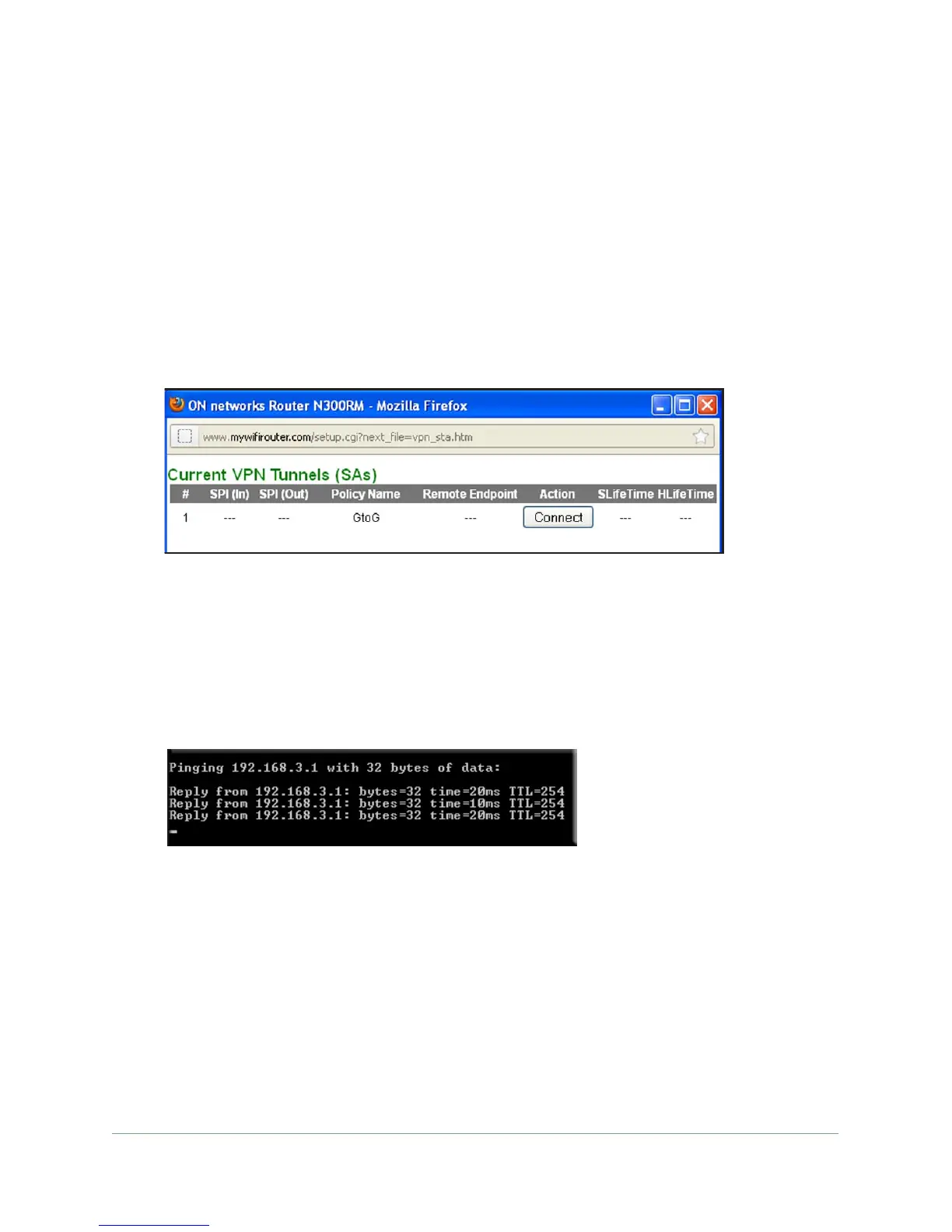
2. Click the VPN Status button to display the Current VPN
Tunnels (SAs) screen:
3. Click Connect for the VPN tunnel that you want to activate. View the VPN Status/Log
screen to verify that the tunnel is connected.
To activate the VPN tunnel by pinging the remote endpoint:
1. T
est the VPN tunnel by pinging the remote network from a computer attached to
Gateway A (the modem router).
2. Open a command prompt (for example, Start > Run > cmd).
3. T
ype ping 192.168.3.1 (substituting the endpoint of your remote gateway).
The pings might fail the first time. If they do, then try the pings a second time.
To use a VPN tunnel to activate the VPN tunnel:
Use a web browser to go to a URL whose IP address or range is covered by the policy for
that VPN tunnel.


 To Next Page
 Loading...