EasyManua.ls Logo

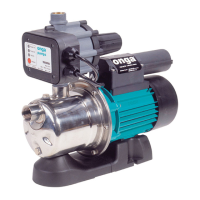
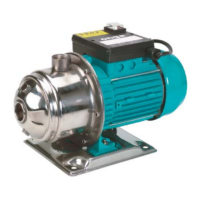
onga JS120 - User Manual

onga JS120
20 pages
Print Icon
To Next Page IconTo Next Page
Loading...
OWNER’S MANUAL
Should you the installer or owner be unfamiliar with the correct
installation or operation of this type of equipment you should contact
the distributor for the correct advice before proceeding with the
installation or operation of this product.
Jet Assisted Pumps
1000 Series
JMM100 JS100 JSM100 JSK110
JS110 JSP110 JSK120
JS120 JSP120
We recommend, for additional protection, the pump
to be supplied from socket outlet protected by a
Residual Current Device – RCD (also known as
an Earth Leakage Circuit Breaker – ELCB) with a
maximum rated residual current of 30mA.

Questions and Answers

  • J
    Jennifer RussellAug 7, 2025
    What to do if my onga JS120 does not start?
    • A
      ariasalexisAug 8, 2025
      If your Onga Water Pump isn't starting, ensure it's connected to a live outlet. Also, check the circuit breakers and fuses. If the pressure controller detects no water in the tank, make sure there's enough water and press the reset or start button. A blocked pump can also be the cause; disconnect it from the power and inspect the housing and discharge for any obstructions. If none of these steps work, the capacitor may be defective, and you should call a qualified service technician.
  • G
    Gabrielle AndersonAug 14, 2025
    Why does my onga JS120 have poor performance with low pressure?
    • J
      John MorrisAug 14, 2025
      To troubleshoot low pressure or flow in your Onga Water Pump, first, check the suction line for leaks, especially at the joints. If the tank water level is too far below the pump, consider discussing a better pump option with your Onga dealer or moving the pump closer to the tank. Also, a worn or damaged pump can cause poor performance, so ask your Onga dealer to investigate worn parts.
  • J
    Jeffrey GoodAug 20, 2025
    What to do if there is no water from Onga Water Pump?
    • M
      Mark PonceAug 20, 2025
      If your Onga Water Pump isn't providing water, first ensure the pump body and suction line are filled with water before starting. Check the suction line for leaks, particularly at the joints. Blockages in the pump or discharge can also prevent water flow, so disconnect the pump from power and inspect for foreign matter. Make sure all valves on the tank, pump, and outlets are open. If the tank doesn't have enough water, wait until it refills and then press the reset or start button on the pressure controller. Also, check and clean the pump if it's not producing enough pressure, and inspect/clean any in-line or tap filters that may be blocked. Finally, check system pressure and adjust the pressure switch accordingly.
  • M
    Matthew PachecoAug 26, 2025
    Why does my onga JS120 run intermittently?
    • R
      ryandonaldAug 26, 2025
      If your Onga Water Pump runs intermittently, start by checking for small leaks in your household plumbing and fix them. Ensure that the water temperature remains within the specified limits. Verify that the voltage is within the allowable limits as stated in the specifications, and correct if necessary. Also, make sure there's adequate ventilation for the motor cooling fan.
  • E
    Elizabeth ThomasAug 31, 2025
    What to do if onga JS120 Water Pump will not stop?
    • R
      Robert TownsendSep 1, 2025
      If your Onga Water Pump won't stop, even with no taps open, debris might be caught in the pressure controller; take it to your Onga dealer for service. Also, check for leaks in the household plumbing and fix them.

Summary

Model Data

Application

Installation

Preparation for Installation

Steps for inspecting the pump for damage and ensuring proper suction piping setup.

Pump Protection

Guidance on shielding the pump from environmental factors to maintain warranty and prevent damage.

Pipe Installation

Instructions on connecting pipes, supporting them, and using appropriate fittings to prevent damage.

Locating the Pump

Recommendations for placing the pump near the water source on a stable footing.

Power Source

Advice on installing a suitable electrical outlet for the pump, ensuring safety and accessibility.

Suction

Critical steps for suction line setup, including gate valves, filters, and pipe diameter for optimal performance.

Discharge

Considerations for discharge pipework, including length, diameter, and pressure ratings for efficient operation.

Pump Priming

Procedure for filling the pump and suction line with water before operation to ensure proper function.

Electrical Installation

Details on connecting the pump to the power supply, safety precautions, and recommended RCD protection.

Operation

Start-up; Operation

Guide to initial pump start-up, priming, and system pressurization for different model series.

Pressure Switch

Details on the installation and adjustment of the pressure switch for pump control.

Aqua Packs

Information on charging and maintaining Aqua Packs with correct air pressure for system performance.

Aqua Pack Tank Recharge Procedure

Steps for checking and recharging the air pressure in Aqua Pack tanks to prevent operational issues.

Service and Maintenance

General Care and Maintenance

Basic maintenance advice, including cleaning, storage, and periodic checks for potential failures.

Troubleshooting

Pentair Water Product Warranty

Terms and Conditions Applicable Internationally

Details of warranty coverage and duration for international customers.

Terms and Conditions Applicable in Australia and New Zealand

Specific warranty terms, coverage, and duration for Australian and New Zealand customers.

Spare Parts

Information on the availability and stocking of spare parts after product discontinuation.

How to Get Service

Instructions on how to claim warranty service, including necessary documentation and procedures.

Limitation of Implied Warranties

Legal disclaimers regarding implied warranties of merchantability and fitness for purpose.

Exclusion of Damages

Details on damages and losses for which Pentair Water is not liable under the warranty.

Effective Law

Explanation of specific legal rights and how the warranty interacts with consumer protection legislation.

onga JS120 Specifications

General IconGeneral
ModelJS120
CategoryWater Pump
TypeJet Pump
Max Head45 m
Frequency50 Hz
Inlet/Outlet Size1 inch

Related product manuals