FT-3200 MODBUS TCP/IP SUPPLEMENT
ONICON Incorporated • 727.447.6140 • www.onicon.com
Page 3
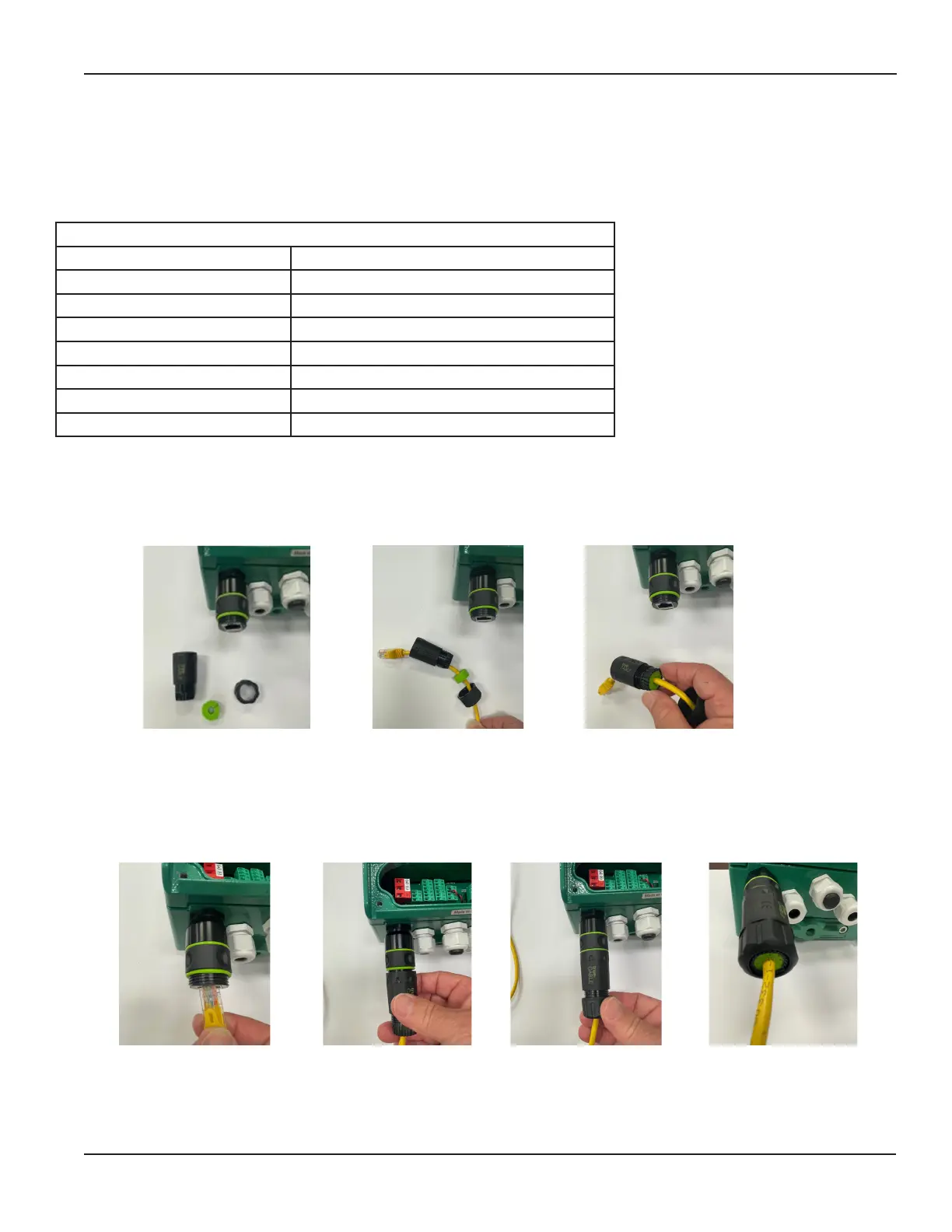
1. When ready to connect the TCP/IP network, rst thread the nut, then slip the green cable seal over the cable, then
the connection cover as shown.
2. Carefully insert the green cable seal into the end of the connection cover as shown - use caution to avoid
damaging the exible ngers on the end.
3. Connect the eld cable to the RJ-45 coupler, then carefully thread the connection cover on the coupler until it is
nger tight against the green o-ring. Use caution to avoid twisting the cable.
4. Thread the nut completely onto the connection cover to seal the cable gland - use caution to avoid twisting the cable.
1.1 PURPOSE OF THIS GUIDE
The purpose of this guide is to provide installation and operating instructions for the ONICON FT-3200 MODBUS TCP/IP
serial interface.
1.2 SPECIFICATIONS
Output Signal
Protocol MODBUS RTU
Transceiver TCP/IP, 10/100 Mbps, RJ45 Connection
Port 502
Baud Rate 38400
Parity None
IP Address 192.168.255.1
Mask 255.255.0.0
Gateway 192.168.0.1
SECTION 1.0 INTRODUCTION
1.3 NETWORK SIGNAL CONNECTIONS
NOTE: Meters shipped prior to September 2023 had an internal RJ-45 coupler - see next page.
Instructions for External RG-45 coupler for FT-32XX Meters with MODBUS TCP/IP Option
1 2
3 3 4



 To Next Page