FT-3200 MODBUS TCP/IP SUPPLEMENT
ONICON Incorporated • 727.447.6140 • www.onicon.com
Page 6
1.7 IP ADDRESS SETTING (IPv4)
Changing the IP address of the FT-3200 requires the use of a PC with an Ethernet card and an available port. The default
IP conguration of the FT-3200 is as follows:
IP Address 192.168.255.1
Mask 255.255.0.0
Gateway 192.168.0.1
To change these IP address settings:
• Connect the Ethernet cable to the RJ45 connector in
the transmitter.
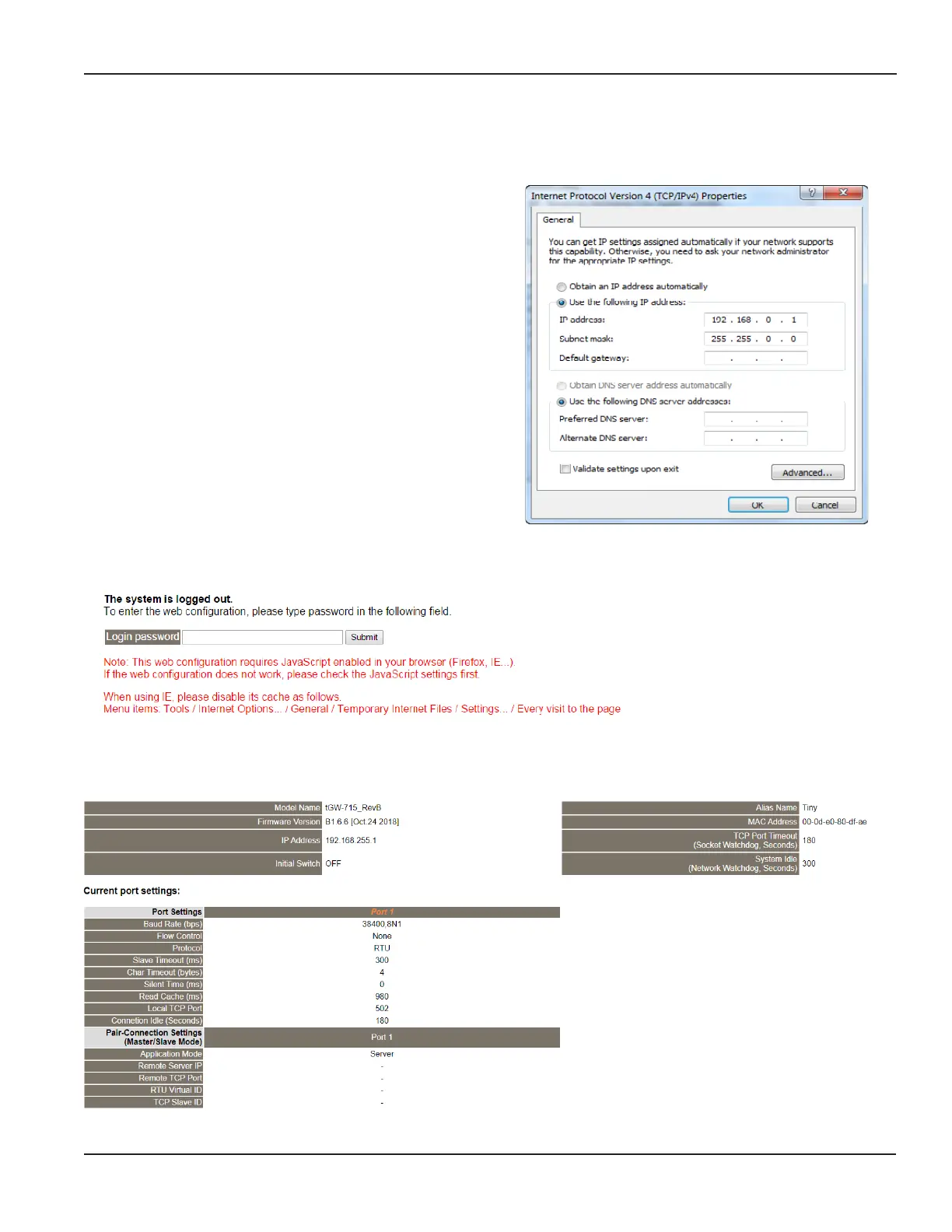
• Change the adapter settings in your PC as shown:
Next, open a web browser, and navigate to IP address 192.168.255.1. The following page will appear:
The interface shown above is used to congure the IP settings on the FT-3200. The Login Password is admin
(case sensitive). Press Submit after entering the password, and the following page appears:



 To Next Page