FT-3200 MODBUS TCP/IP SUPPLEMENT
ONICON Incorporated • 727.447.6140 • www.onicon.com
Page 5
1.6 ACCESSING THE MODBUS SETTINGS
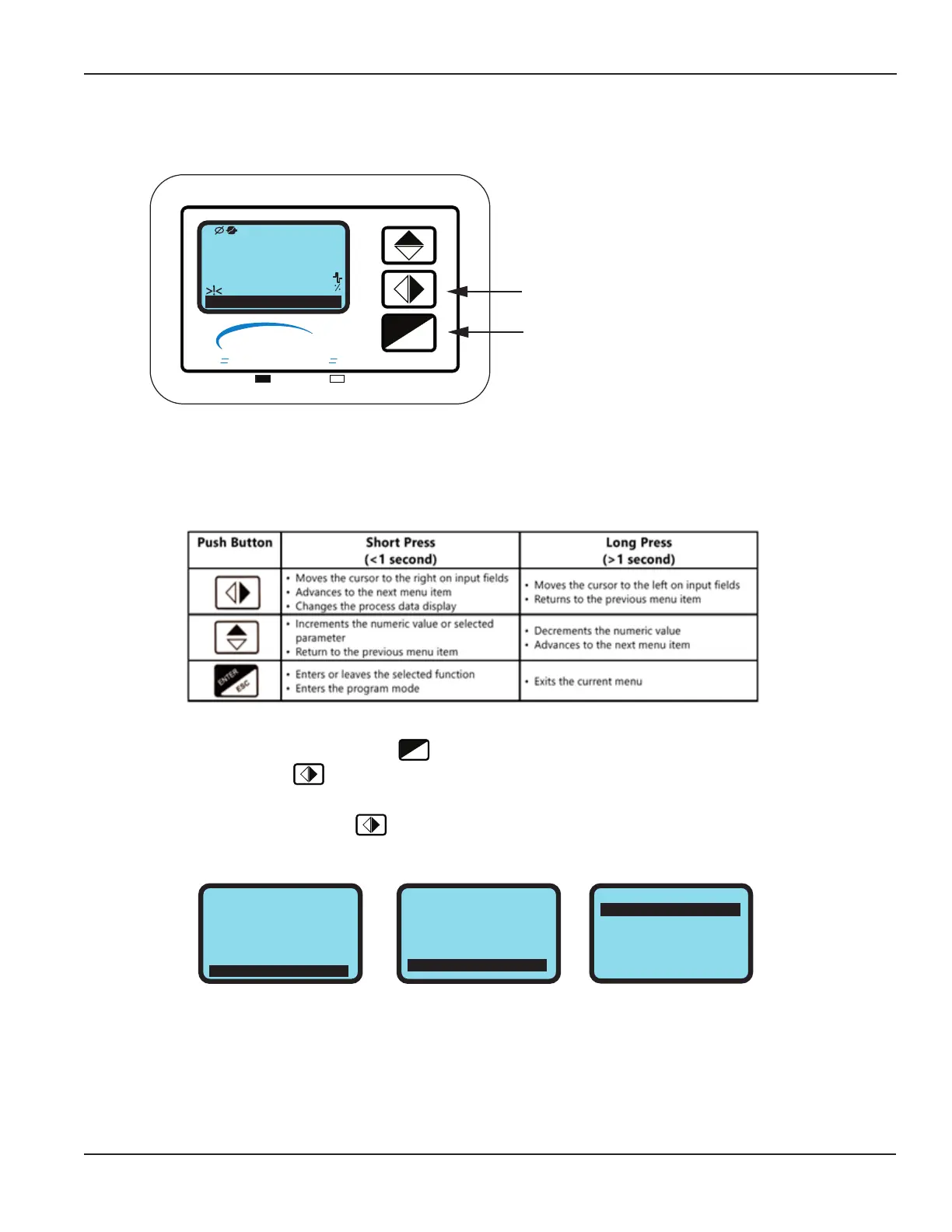
In order to change the MODBUS settings, you must rst enter the programming mode. Access to the programming menus
is password protected. The factory default access code is: 4********. The 3-user interface pushbutton functions change
when operating in the program mode. The functions are described below.
The menu can be accessed by briey pressing the
ESC
ENTER
key and entering the access code 4*******.
1. From Quick Start menu, push repeatedly until Main Menu is highlighted.
2. Enter into the Main Menu.
3. From the Main Menu repeatedly press until 8-Communication is highlighted and then press enter.
QUICK START
E. P. Detect=
R max=kohm
Pls2=Gal
Tpls2=ms
A1S=Gal/m
ON
0220
1000.0
0500.0
004500
Main Menu
MAIN MENU
3-Scales
4-Measure
5-Alarms
6-Inputs
7-Outputs
8-Communication
COMMUNICATION
Dev. Addr=
Speed=bps
Parity=
Delay=ms
C. timeout=
ice communic. address
001
19200
EVEN
20
2
ESC
ENTER
ON
I
CON
Flow and Energy Measurement
SHORT PUSH LONG PUSH
Briefly press the middle button to advance
to the next menu page.
The ENTER button is used in programming.
2 ALARM(S)
0
+0.00
Gal/m
1.5 DISPLAY AND USER INTERFACE
The FT-3200 transmitter is equipped with a lighted graphic display and 3-button user interface as shown below.



 To Next Page