EasyManua.ls Logo

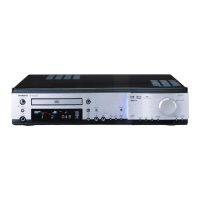
Onkyo DR-90 - User Manual

Onkyo DR-90
68 pages
Print Icon
To Next Page IconTo Next Page
Loading...
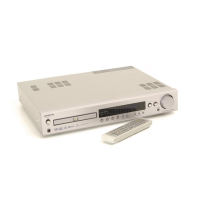
DVD Receiver
DR-90
Instruction Manual
Thank you for purchasing the ONKYO DVD Receiver.
Please read this manual thoroughly before making
connections and turning on the power.
Following the instructions in this manual will enable
you to obtain optimum performance and listening
enjoyment from your new DVD Receiver.
Please retain this manual for future reference.
Contents
6
20
33
58
61
Getting Started
Basic Operation
Advanced DVD/
VIDEO CD/
Audio CD
Operation
Additional Operation
Others
Before Using Your DVD Receiver 2
THIS DVD PLAYER IS MANUFACTURED FOR PLAYBACK
OF REGION 1 (USA, CANADA) ENCODED DVD
SOFTWARE. USE OF SOFTWARE NOT INTENDED FOR
REGION 1 PLAYBACK MAY RESULT IN UNDESIRABLE
PLAYER PERFORMANCE.

Other manuals for Onkyo DR-90

Questions and Answers

  • J
    Jessica HamptonSep 9, 2025
    Why is there no picture on my TV screen from my Onkyo DR-90 Receiver?
    • M
      Melissa VillegasSep 9, 2025
      Ensure that your TV is set to receive the input from the DVD Receiver. Check the video cable connections between the DVD Receiver and the TV. If only S video connection is made, make also video connection.
  • B
    Benjamin CarpenterSep 8, 2025
    What happens when no preset channels are selected on Onkyo DR-90 Receiver?
    • T
      Thomas MartinezSep 8, 2025
      If no preset channels are selected on your Onkyo Receiver, it's likely that the power cord was unplugged, or the main power was switched off for an extended period, causing the preset data in memory to be lost. You'll need to preset the radio stations again.
  • J
    John BurnsSep 7, 2025
    Why won't my Onkyo DR-90 Receiver record sound?
    • M
      Michael SmithSep 7, 2025
      If your Onkyo receiver is reproducing sound from the speakers but not recording, it could be because you are trying to record DTS Surround sound, which cannot be recorded regardless of the sound signal conversion method. Also, check that you have selected the correct sound signal conversion method for recording.
  • L
    Laura LeeAug 22, 2025
    Why does my Onkyo DR-90 Receiver have no sound?
    • S
      stewartjohnAug 22, 2025
      There could be several reasons why your Onkyo Receiver isn't producing sound. The muting function may be activated, so try deactivating it. Also, the connections to the receiver might be incorrect, so double-check them. Alternatively, the sound signal conversion method may be wrong, so verify that the correct one is selected.
  • J
    jonathan44Sep 4, 2025
    How to fix distorted playback picture on Onkyo DVD Receiver?
    • P
      Phillip GarciaSep 5, 2025
      If the playback picture on your Onkyo DVD Receiver is occasionally distorted, the disc may be dirty; eject it and clean it. Note that some picture distortion may appear during fast forward or fast reverse playback, which is not a malfunction.
  • J
    Jeremiah GuzmanSep 3, 2025
    How to fix no picture on TV screen from Onkyo DVD Receiver?
    • M
      Megan SimmonsSep 3, 2025
      If you're not seeing a picture on your TV screen from the Onkyo DVD Receiver, first ensure that your TV is set to the correct input for the DVD Receiver. Also, check that the video cable is securely connected between the DVD Receiver and the TV. If you're only using an S video connection, make sure you also have a video connection.
  • A
    Amber WilliamsSep 2, 2025
    How to fix if too much noise is heard or sound is interrupted occasionally on my Onkyo DR-90 Receiver?
    • E
      Eric VazquezSep 2, 2025
      If using FM stereo, switch the frequency receiving mode to mono, as FM stereo waves may produce hiss. Adjust the position, height, and direction of the FM aerial.
  • P
    Patricia FrancoSep 1, 2025
    How do I fix remote buttons that don't operate Onkyo DVD Receiver?
    • T
      Thomas WileySep 1, 2025
      If the buttons on your Onkyo DVD Receiver work but the remote controller buttons don't, first ensure that new batteries are inserted correctly into the remote. If batteries are new, try replacing them. Make sure you're pointing the remote controller directly at the remote sensor on the DVD Receiver and that you're within 16 feet (5 m) of the receiver. Finally, check that the DVD RECEIVER/LEVEL SETUP/TV switch is set to the correct position.
  • R
    Robert FrankAug 31, 2025
    Why is there no sound from my Onkyo Receiver playback source?
    • A
      allenmayAug 31, 2025
      If you're not hearing the sound from your playback source on your Onkyo Receiver, make sure that the appropriate input source is selected.
  • G
    gillanthonyAug 30, 2025
    Why is there no sound from the center speaker on my Onkyo DR-90?
    • M
      Mitchell WebsterAug 30, 2025
      If you're getting little to no sound from the center speaker on your Onkyo receiver, start by checking the speaker connections to ensure they are properly connected. Also, verify that the surround mode is not set to “STEREO”; if it is, select an appropriate surround mode. Then, adjust the volume level of the center speaker, and make sure the configuration of the center speaker is set to “LARGE” or “SMALL,” not “NONE.”

Summary

Safety and Precautions

Important Safeguards

Essential safety instructions to prevent hazards and damage.

General Precautions

General warnings and guidelines for safe operation and handling.

Getting Started

Product Overview

Key features, supplied accessories, and remote controller preparation.

Connections and Setup

Connecting to TV, audio/video equipment, speakers, antennas, power, and rear AC outlet.

Speaker Configuration

Setting up speakers and adjusting their relative volume balance.

Basic Operation

Disc Playback and Controls

Playing discs, speed controls, and common playback functions.

Radio Operation

Tuning, presetting, and selecting radio stations.

Playing Connected Sources

Selecting and playing external audio/video inputs.

General Functions

Volume, tone, display dimming, headphones, sleep timer, and muting.

Advanced DVD;VIDEO CD;Audio CD Operation

Playback Modes and Adjustments

Repeating content, custom order, random playback, zooming, and camera angles.

Language, Sound, and Display Settings

Selecting subtitles, audio, sound channels, and customizing display.

Operation Settings

Configuring pause mode, parental lock, and PBC.

Additional Operation

Recording Procedures

Steps for recording audio/video from connected sources.

Recording Signal Types

Recording digital/analog audio and video from various sources.

Others

Troubleshooting and Specifications

Diagnosing problems, finding technical specs, and parts index.

Onkyo DR-90 Specifications

General IconGeneral
Tuning rangeFM, MW
Power Output70 watts per channel into 8Ω (stereo)
Frequency Response20Hz to 20kHz
Input Sensitivity2.5mV (MM), 200mV (line)
Dimensions435 x 150 x 391mm
Weight11.3kg
TypeReceiver
Channels2.0
Total Harmonic Distortion0.08%
Signal-to-Noise Ratio80 dB (line)

Related product manuals