DR-C500
R
L
R
L
R
L
FRONT
SPEAKERS
A
B
SURROUND
SPEAKERS
CENTER
SPEAKER
FRONT L
FRONT R
SURROUND L
SURROUND R
CENTER
R654
(SURROUND R)
ADJUSTMENT PROCEDURES-1
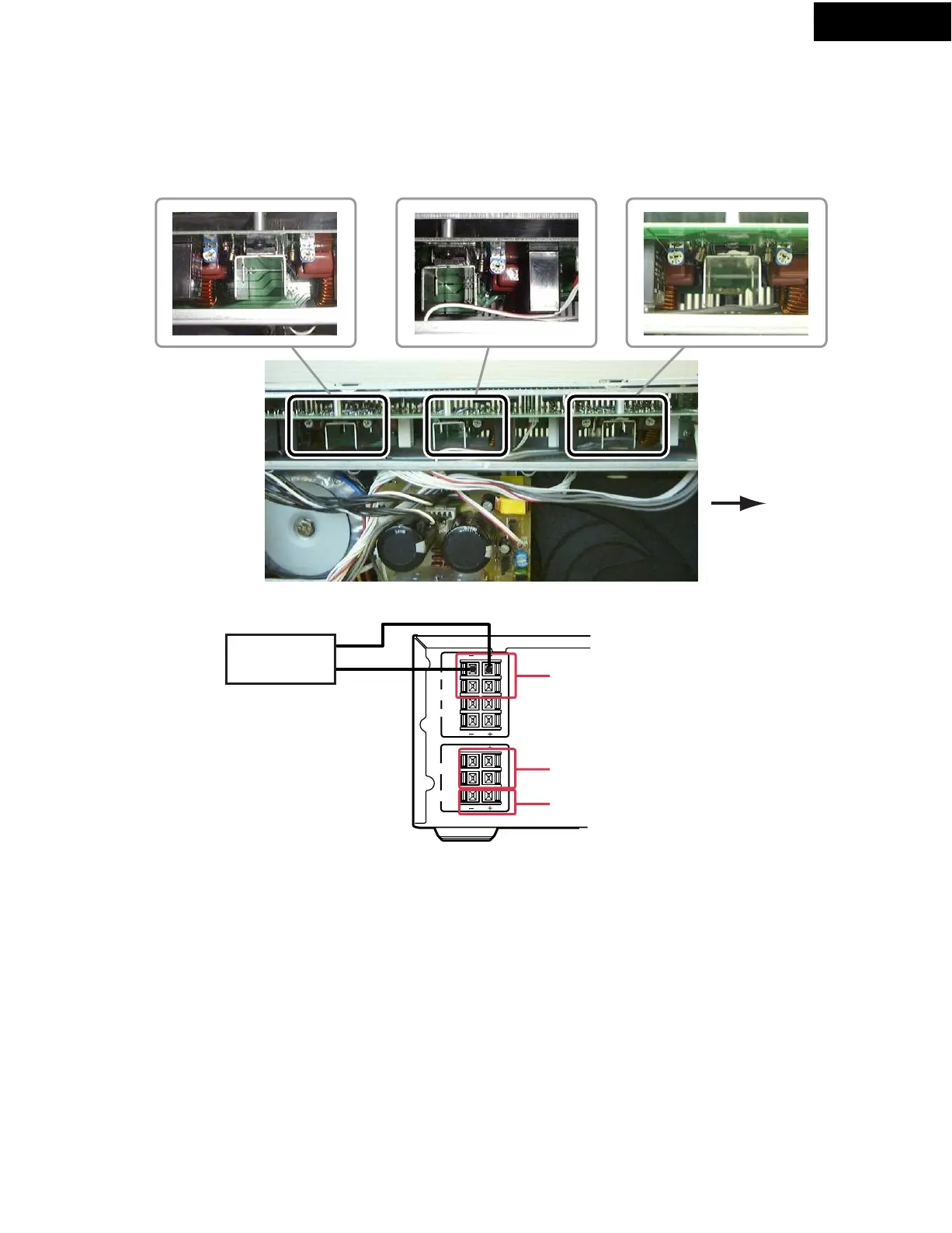
DC OFFSET ADJUSTMENT
[Note]
No load and No signal
1. Remove the top cover.
2. Power on the unit.
3. Connect the DC voltmeter to FRONT L SPEAKER terminals.
4. Adjustment trimming resistor R504 so that reading of DC voltmeter becomes -15 to +15mV.
5. Connect the DC voltmeter to FRONT R SPEAKER terminals.
6. Adjustment trimming resistor R554 so that reading of DC voltmeter becomes -15 to +15mV.
7. Connect the DC voltmeter to CENTER SPEAKER terminals.
8. Adjustment trimming resistor R704 so that reading of DC voltmeter becomes -15 to +15mV.
9. Connect the DC voltmeter to SURROUND SPEAKER L terminals.
10. Adjustment trimming resistor R604 so that reading of DC voltmeter becomes -15 to +15mV.
11. Connect the DC voltmeter to SURROUND SPEAKER R terminals.
12. Adjustment trimming resistor R654 so that reading of DC voltmeter becomes -15 to +15mV.
13. Disconnect the DC volt meter from SURROUND SPEAKER R terminals.
14. Attached the top cover.
1. ADJUSTMENT POINT
2. CHECK POINT
Front side
R554
(FRONT R)
R504
(FRONT L)
R704
(CENTER)
R604
(SURROUND L)
3. ADJUSTMENT
DC Voltmeter
For example adjustment
the DC offset of FRONT L


 To Next Page