2. Connecting Your Components
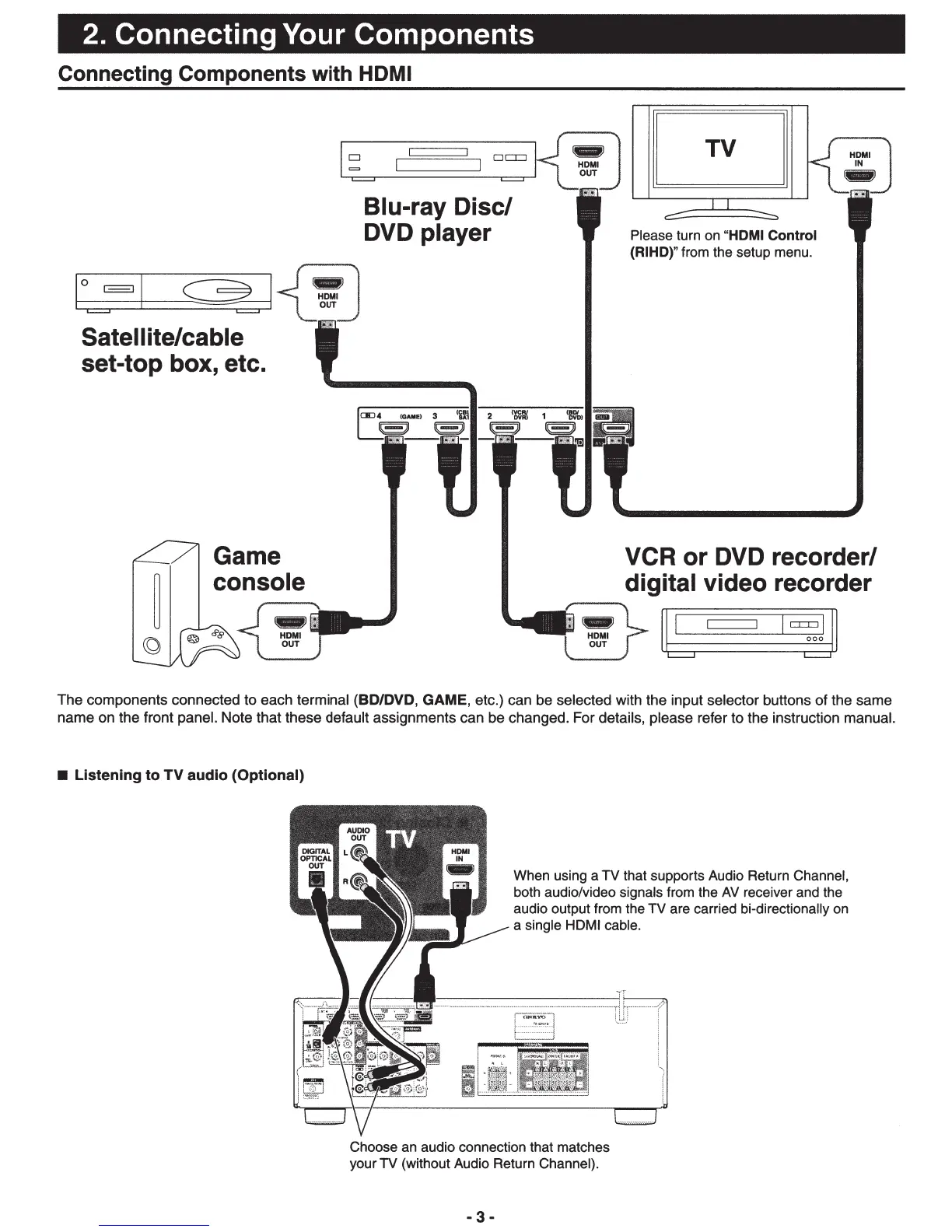
Connecting Components with HDMI
Sate
II
ite/cable
set-top box, etc.
D
Blu-ray Disc/
DVD player
TV
Please turn on
"HDMI
Control
(RIHD)" from the setup menu.
VCR or DVD recorder/
digital video recorder
I[
I
I~Jjj
The
components connected to each terminal (80/DVD, GAME, etc.) can be selected with the input selector buttons
of
the same
name
on the front panel. Note that these default assignments can be changed. For details, please refer
to
the instruction manual.
• Listening to
TV
audio (Optional)
When using a TV that supports Audio Return Channel,
both audio/video signals from the
AV
receiver and the
audio output from the TV are carried bi-directionally on
a single HDMI cable.
Choose an audio connection that matches
your TV (without Audio Return Channel).
-3-


 To Next Page