32
First Time Setup—Continued
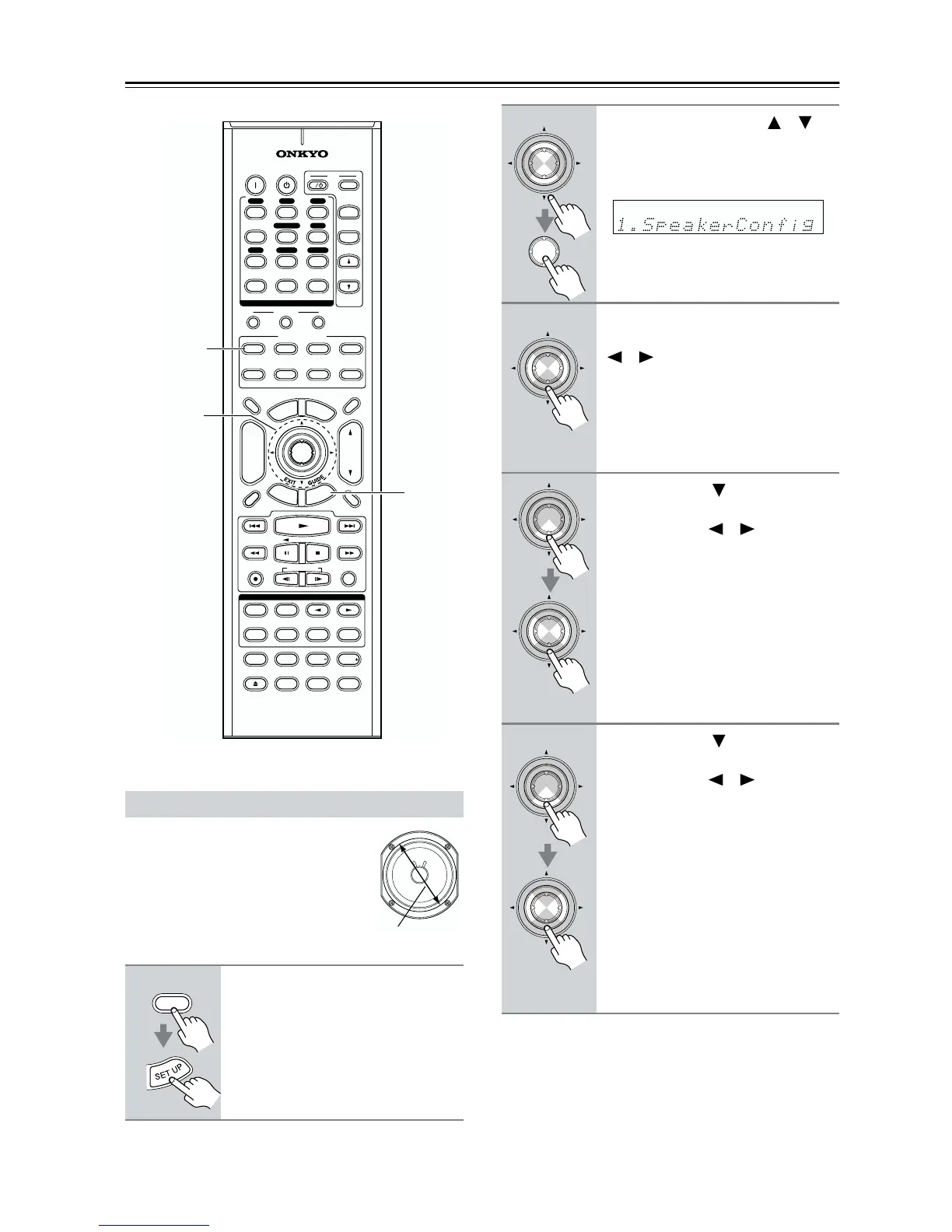
This section explains how to specify
your speaker configuration.
For speakers with a cone diameter
larger than 6-1/2 inches (16 cm),
specify Large. For those with a
smaller diameter, specify Small.
Speaker Configuration
1
Press the [RECEIVER] button,
followed by the [SETUP] button.
10
--/---
11 12
REMOTE MODE
HDD
RECEIVER
TAPE/AMP
DVD CD
SAT
TV
VCR
CABLE
MDCDR
STEREO
SURR
DIRECT
SUBTITLEAUDIO
ALLST
PLAY MODE
TEST TONE
CH SEL
VIDEO OFF
REPEAT
RANDOMREC
SP A SP B
PLAYLIST
OPEN/CLOSE
LEVEL LEVEL
L NIGHT
CINE FLTR
+
-
TV CH
TV VOL
ENTER
S
E
T
U
P
R
E
T
U
R
N
T
O
P
M
E
N
U
M
E
N
U
VOL
+
-
CH
DISPLAY
PREV
CH
DIMMER
SLEEP
MUTING
LISTENING MODE
INPUT SELECTOR
32
MACRO
1
+
10 0
CLEAR
123
456
789
INPUT
I
ON STANDBY
TV
CD
V1 V2 V3
MULTI CH
DVD
TAPE
TUNER
DISC
ALBUM
RC-632M
1
1, 9
2–8
Cone diameter
RECEIVER
2
Use the Up and Down [ ]/[ ]
buttons to select “1. Speaker
Config,” and then press the
[ENTER] button.
3
While the “Subwoofer” setting is
selected, use the Left and Right
[ ]/[ ] buttons to select Yes or
No.
Yes: Select if a subwoofer is con-
nected.
No: Select if no subwoofer is con-
nected.
4
Use the Down [ ] button to
select “Front,” and then use the
Left and Right [ ]/[ ] buttons to
select Small or Large.
Small: Select if the front speakers are
small.
Large: Select if the front speakers are
large.
Note:
• If the Subwoofer setting in step 3 is
set to No, this setting is fixed at Large
and does not appear.
5
Use the Down [ ] button to
select “Center,” and then use the
Left and Right [ ]/[ ] buttons to
select Small, Large,orNone.
Small: Select if the center speaker is
small.
Large: Select if the center speaker is
large.
None: Select if no center speaker is
connected.
Note:
• If the Front setting in step 4 is set to
Small, the Large option cannot be
selected.
ENTER
ENTER
ENTER
ENTER
ENTER
ENTER
ENTER



 To Next Page