34
Playing Your AV Components
Basic AV Receiver Operation
TONE
+
STEREO
LISTENING MODE
DISPLAY
DIGITAL INPUT
DIMMER MEMORY
TUNING MODE
RETURN
TUNING / PRESET
ENTER
SETUP
STANDBY
STANDBY/ON
CLEAR
PHONES
MULTl CH DVD VIDEO 1 VIDEO 2
VCR
VIDEO 3 TAPE TUNER CD
VIDEO
VIDEO 3 INPUT
AUDIO
LR
MASTER VOLUME
A SPEAKERS B
DISPLAY
MULTI CH
1
2
4
10
--/---
11 12
REMOTE MODE
HDD
RECEIVER
TAPE/AMP
DVD CD
SAT
TV
VCR
CABLE
MDCDR
STEREO
SURR
SUBTITLEAUDIO
PLAY MODE
REPEAT
RANDOMREC
SP A SP B
PLAYLIST
+
-
TV CH
TV VOL
ENTER
S
E
T
U
P
R
E
T
U
R
N
T
O
P
M
E
N
U
M
E
N
U
VOL
+
-
CH
DISPLAY
PREV
CH
DIMMER
SLEEP
MUTING
LISTENING MODE
INPUT SELECTOR
32
MACRO
1
+
10 0
CLEAR
123
456
789
INPUT
I
ON STANDBY
T
V
CD
V1 V2 V3
MULTI CH
DVD
TAPE
TUNER
DISC
ALBUM
4
1
1
2
1
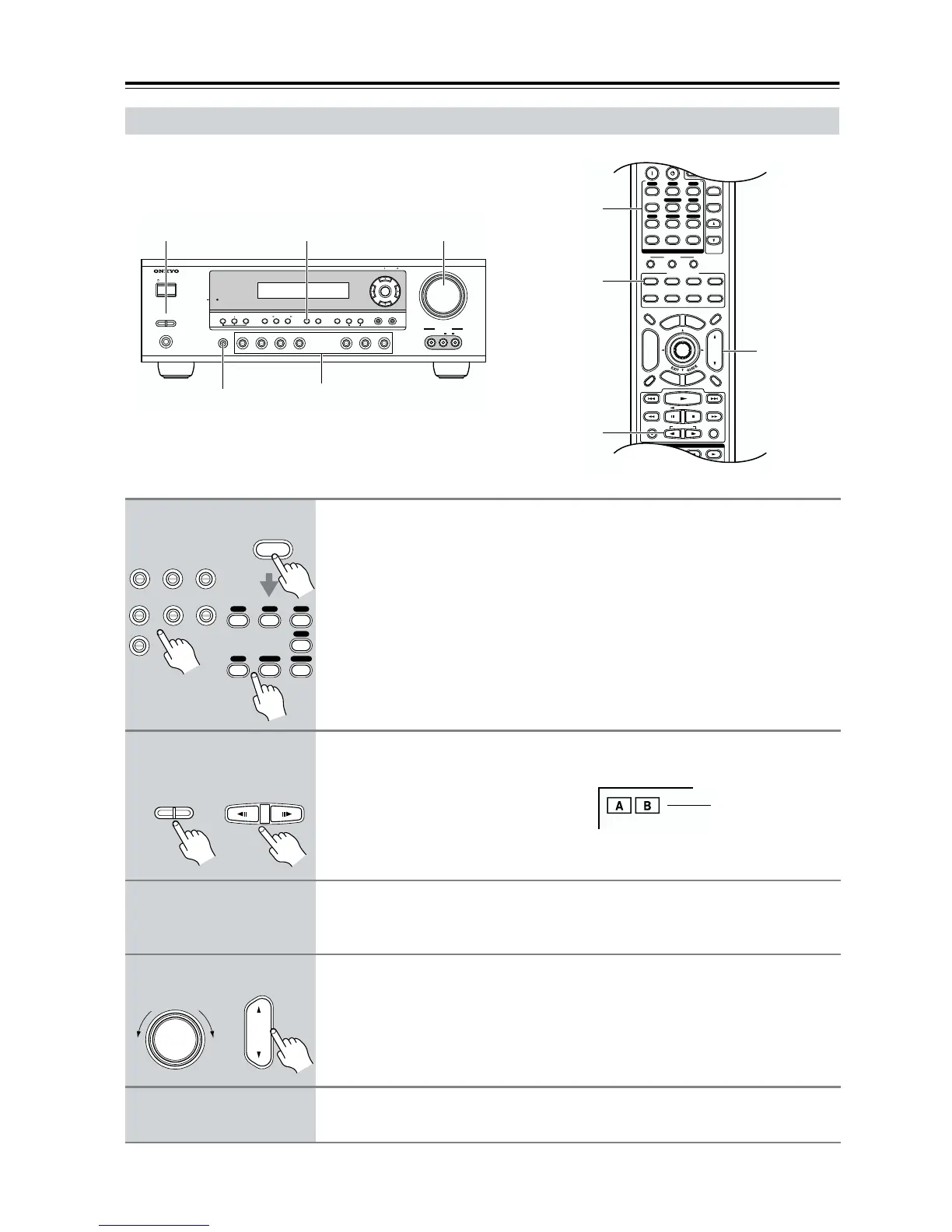
Use the AV receiver’s input selector buttons to select the input source.
To select the input source with the remote controller, press the
[RECEIVER] REMOTE MODE button, and then use the INPUT SELECTOR
buttons.
On the remote controller, the [V1], [V2], and [V3] buttons select the VIDEO 1,
VIDEO 2, and VIDEO 3 input sources respectively.
2
To turn the speakers on or off, use the AV receiver’s SPEAKERS [A] and
[B] buttons, or use the remote controller’s [SP A] and [SP B] buttons.
The A and B speaker indicators show
whether each speaker set is on or off.
Note that while speaker set B is on,
speaker set A is reduced to 5.1-channel
playback.
3
Start playback on the source component.
To watch a DVD or other video source, on your TV, select the video input that’s con-
nected to the AV receiver’s MONITOR OUT jack.
4
To adjust the volume, use the MASTER VOLUME control, or the remote
controller’s [VOL] button.
The volume can be set to MIN, 1 through 79, or MAX. Since the AV receiver is
designed for home theaters, it has a wide volume range for precise adjustment.
5
Select a listening mode and enjoy!
See “Using the Listening Modes” on page 44.
RECEIVER
DVD VIDEO 1 VIDEO 2
VCR
VIDEO 3 TAPE TUNER
CD
123
6
789
CD
V1 V2 V3
DVD
TAPE
TUNER
Remote
controller
AV receiver
A SPEAKERS B
SP A SP B
Remote
controller
AV receiver
Indicators
VOL
MASTER VOLUME
Remote
controller
AV receiver



 To Next Page