Home
Opel mobile
Cell Phone
BigButton M
Page 32 (Typing Letters and Modes)
Opel mobile BigButton M - Typing Letters and Modes
134 pages
Manual
Save Page as PDF
To Next Page
To Next Page
To Previous Page
To Previous Page
Loading...
32
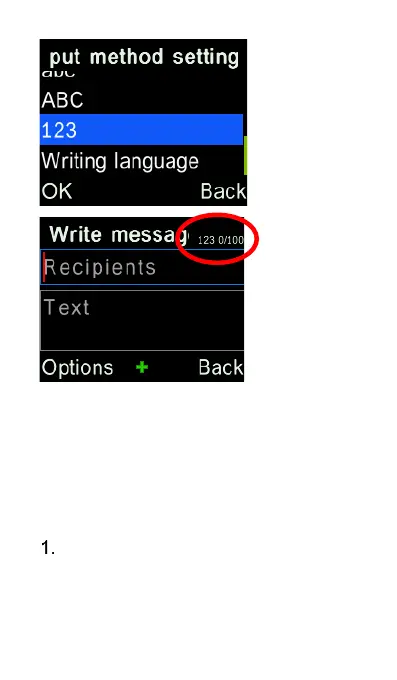
Typing Letters
(en/En/EN/Abc/abc/ABC
modes)
To
type in letters, press the “Hash”
# key to choose between En, en,
EN, Abc, abc, ABC modes, once
31
33
Table of Contents
Main Page
Table of Contents
2
Safety Information
5
Quick Setup Guide
15
Turn the Phone on for the First Time
20
Overview of the Phone
22
Phone Status Icons
26
Quick User Guide
29
Predictive Text (En/En/En Modes)
34
Symbols (Except 123 Mode)
37
Main Interface
38
M1/M2/M3 and Speed Dial
40
Photo Dial
42
Phone Contacts
45
Call Logs
58
Messages
63
Sound Profiles
71
Alarm Clock
75
Camera / Video Recorder
76
Gallery / Image Viewer
80
Video Viewer
82
Music
85
FM Radio
88
Sound Recorder
91
World Clock
93
Calendar with Voice Note
96
Calculator
102
Magnifier
103
File Manager
104
Sos
106
Torch
109
Related product manuals
Opel mobile BigButton X
18 pages
Opel mobile BigButtonPhone
26 pages
Opel mobile SmartJX
77 pages
Opel mobile Lite 4G
125 pages
Opel mobile FlipPhone
27 pages
Opel mobile SmartFlip
44 pages
Opel mobile TouchFlip
104 pages
Opel mobile EasySmart
34 pages
Opel mobile FlipPhone2
50 pages
Opel mobile EasySmart 2
54 pages
Opel mobile FlipPhone 4
76 pages
Opel mobile EasyBigButton
72 pages















 To Next Page