WIRING TO LEGACY PANELS AND MOBILE GATEWAY
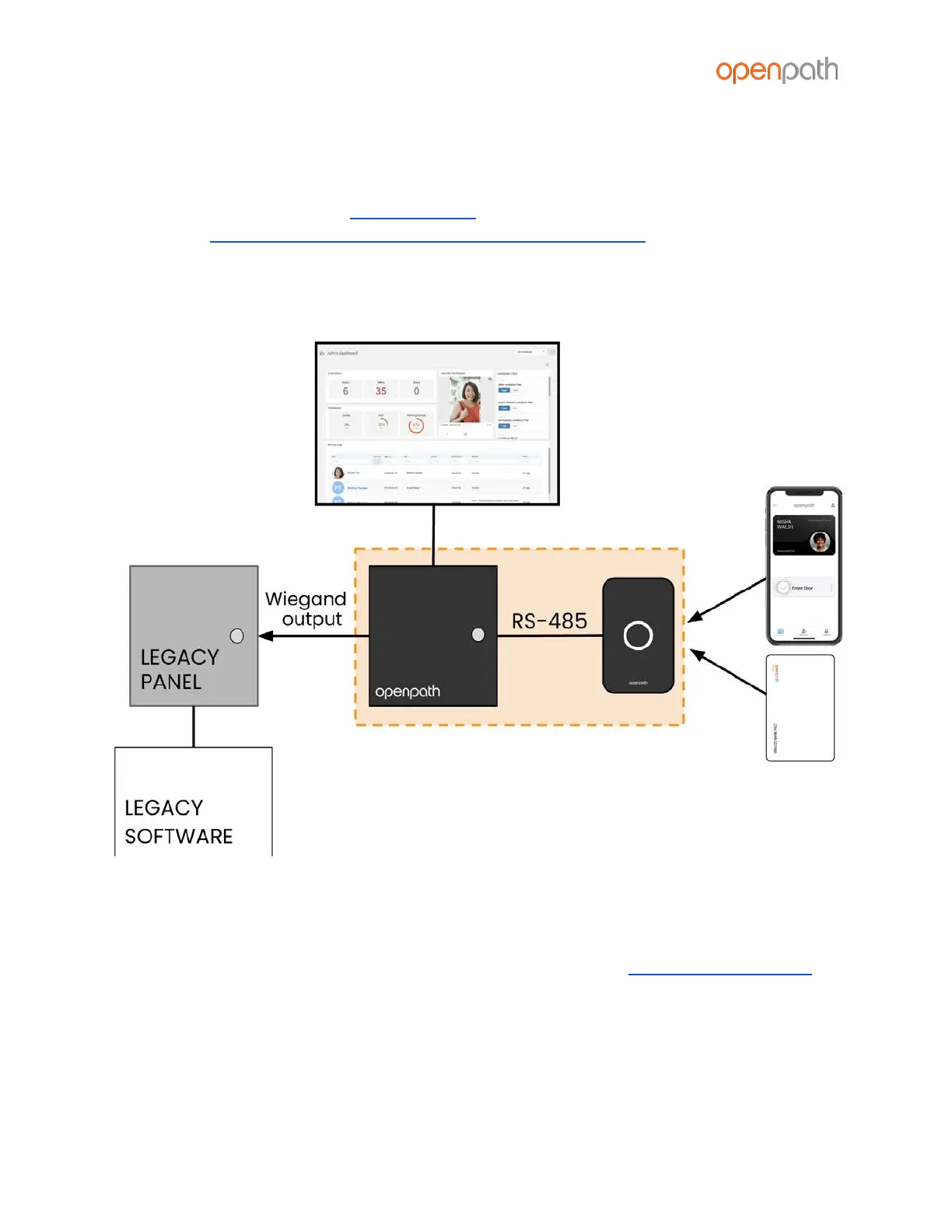
To add mobile credential features to a legacy access control system:
1. Install the Openpath ACU between the Openpath Readers and the legacy
panel, with the ACU’s Wiegand input configured as output to the legacy panel
(see Configuring Wiegand Devices in the Control Center).
2. Replace low frequency (LF) Wiegand readers with LF Openpath Readers and
high frequency (HF) Wiegand readers with HF Openpath Readers, or replace
either with Smart Reader v2 which supports both.
Figure 16: Wiring ACUs to Legacy Panels
In this configuration, the legacy panel controls all locking hardware and entry
mechanisms while the Openpath system lets you use the Openpath mobile app,
Smart Reader, and Wave to Unlock functionality. Refer to the Openpath User Guide
for more information on configuring Mobile Gateway settings.
CHANGING I/O TYPES
While I/Os on the 4-Port and 8-Port Boards are labeled REX and CONTACT by default,
you can use these I/Os interchangeably or as generic inputs, by modifying their type



 To Next Page