in the Control Center. You can also change them to Wiegand inputs, which requires a
few extra steps. See Configuring Wiegand Devices in the Control Center.
To change input types in the Control Center:
1. Go to control.openpath.com and log in
2. Go to Hardware > ACU Management, then click on the ACU to edit it
3. Click on the Ports tab
4. Click Port next to the input you’d like to repurpose
5. Select a different type from the Input Type dropdown, then click Save
WIRING TO WIEGAND DEVICES ON CORE SERIES SMART HUBS
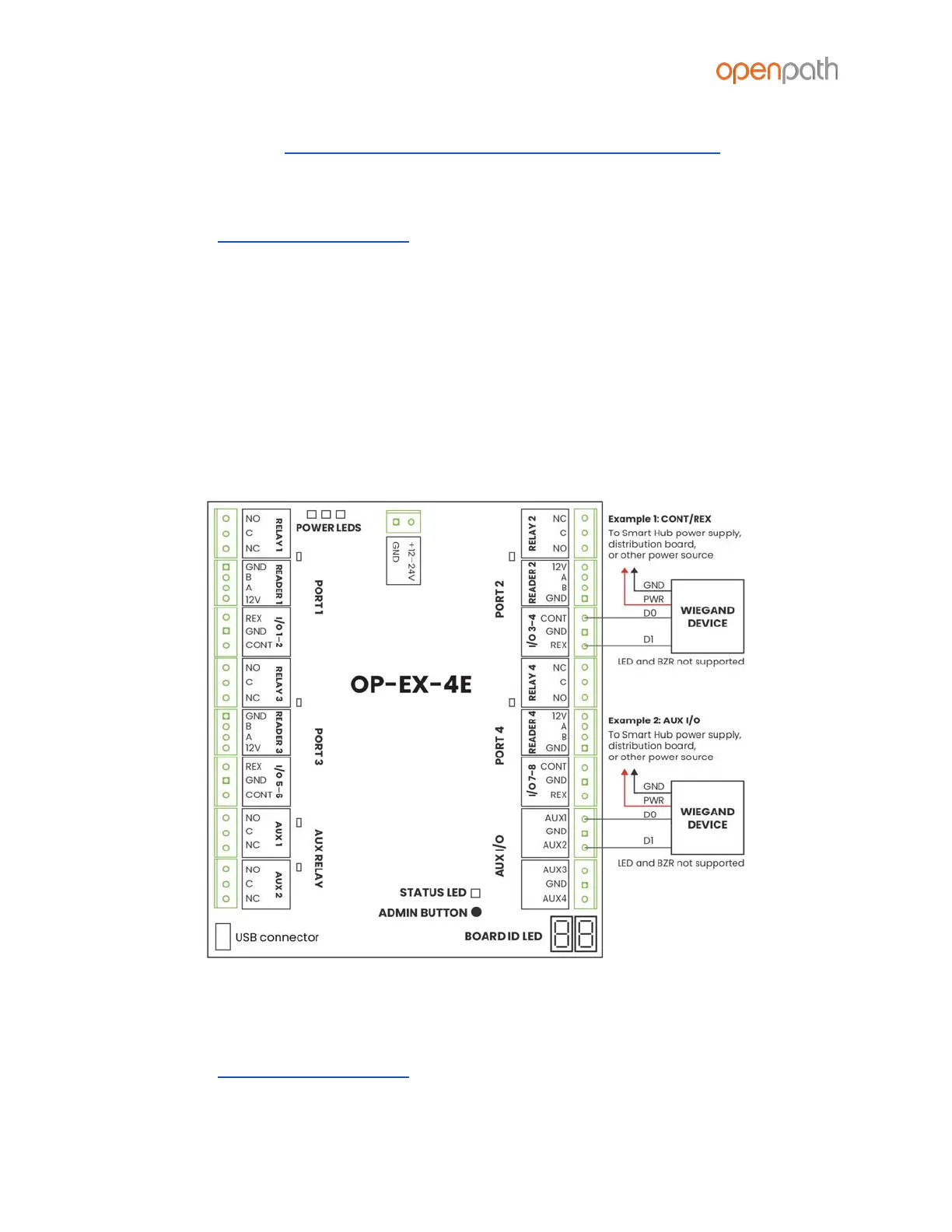
You can wire third party Wiegand readers and panels to the ACU to support
integrations or in the case of Mobile Gateway. The extra Auxiliary I/Os on the 4-Port
and 8-Port Boards are helpful for wiring Wiegand Devices, however any I/O pair may
be used (including Contact and REX inputs).
Figure 17: Wiring a Wiegand Device to a Core Series Smart Hub
To configure Wiegand Devices in the Control Center:
1. Go to control.openpath.com and log in
2. Go to Hardware > ACU Management, then click on the ACU to edit it



 To Next Page