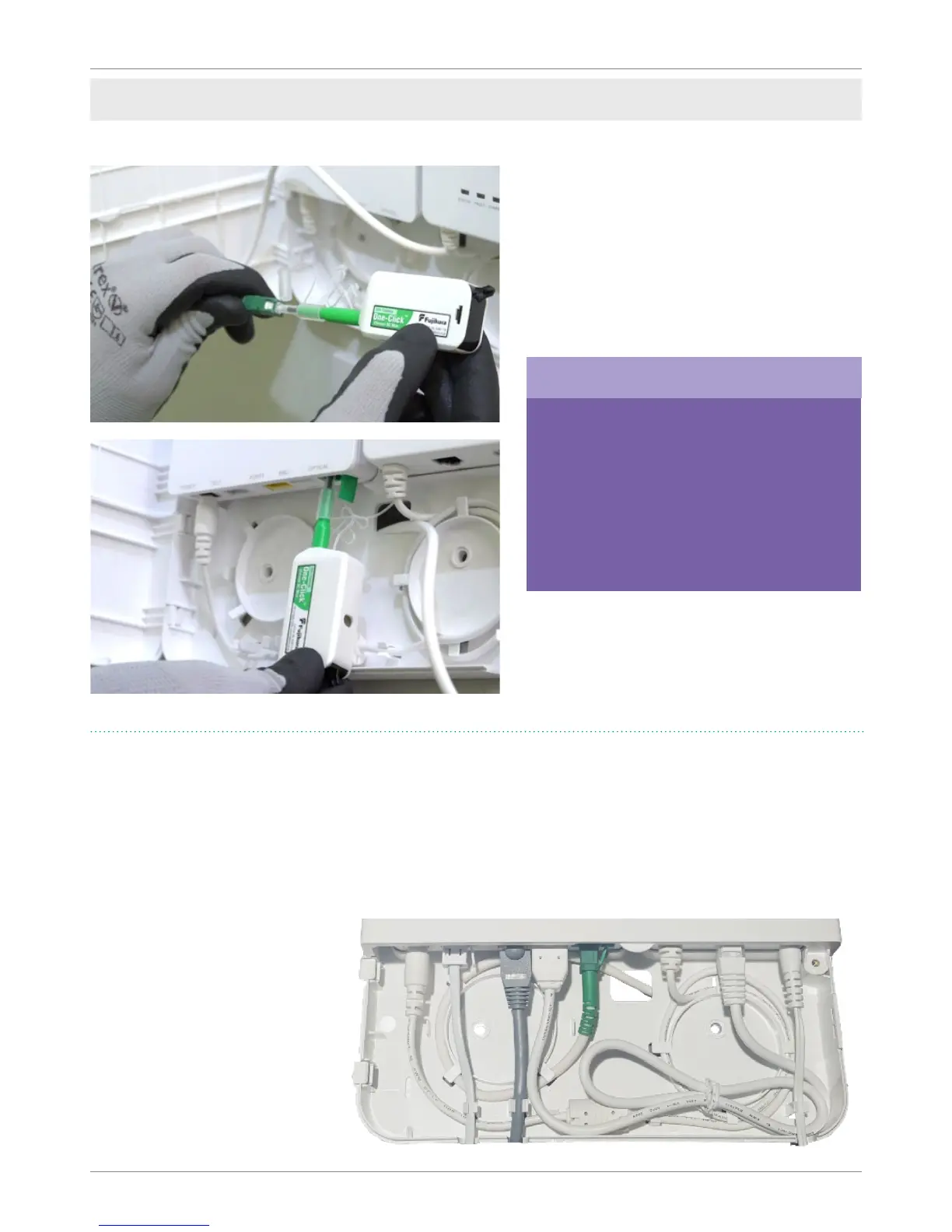
Remove the cap from the green bre
connector and use the One Click cleaner to
clean both the connector and the optical
port on the ONT. Once cleaned plug into
the Optical port on the ONT. Care must be
taken at this stage not to contaminate the
end of the bre connector to avoid any dirt
from inhibiting the data signal.
Open the green ap on the Optical port and
insert the bre cable. The cable is designed
to t only one way, so ensure the raised
nodule is facing the wall when inserting.
• Connect the alarm lead between the RJ45 socket on the BBU and the BBU port on the ONT.
• Connect the ethernet cable to the PORT 1 port on the ONT. The other end of this cable will be
connected to the CP router once ordered.
• Connect the telephone cable to the TEL 1 port on the ONT and plug into the Slave socket on the
wall (this cable is a separate item and will be provided by your FBC).
• Connect the mains
adaptor to the BBU
and plug into the mains
socket.
• You can see the nal
layout and cable
connections here,
ensure the cable lengths
are correctly positioned
within the enclosure
before continuing.
Developer self-install
Fujikura are our chosen producer of
bre cleaners. The One Click cleaner
shown here can be found at the
following link:
www.fujikura.co.uk/products/bre-
and-optical-devices/connectivity-
and-cleaning/one-click-cleaners/
Please note


 To Next Page