11
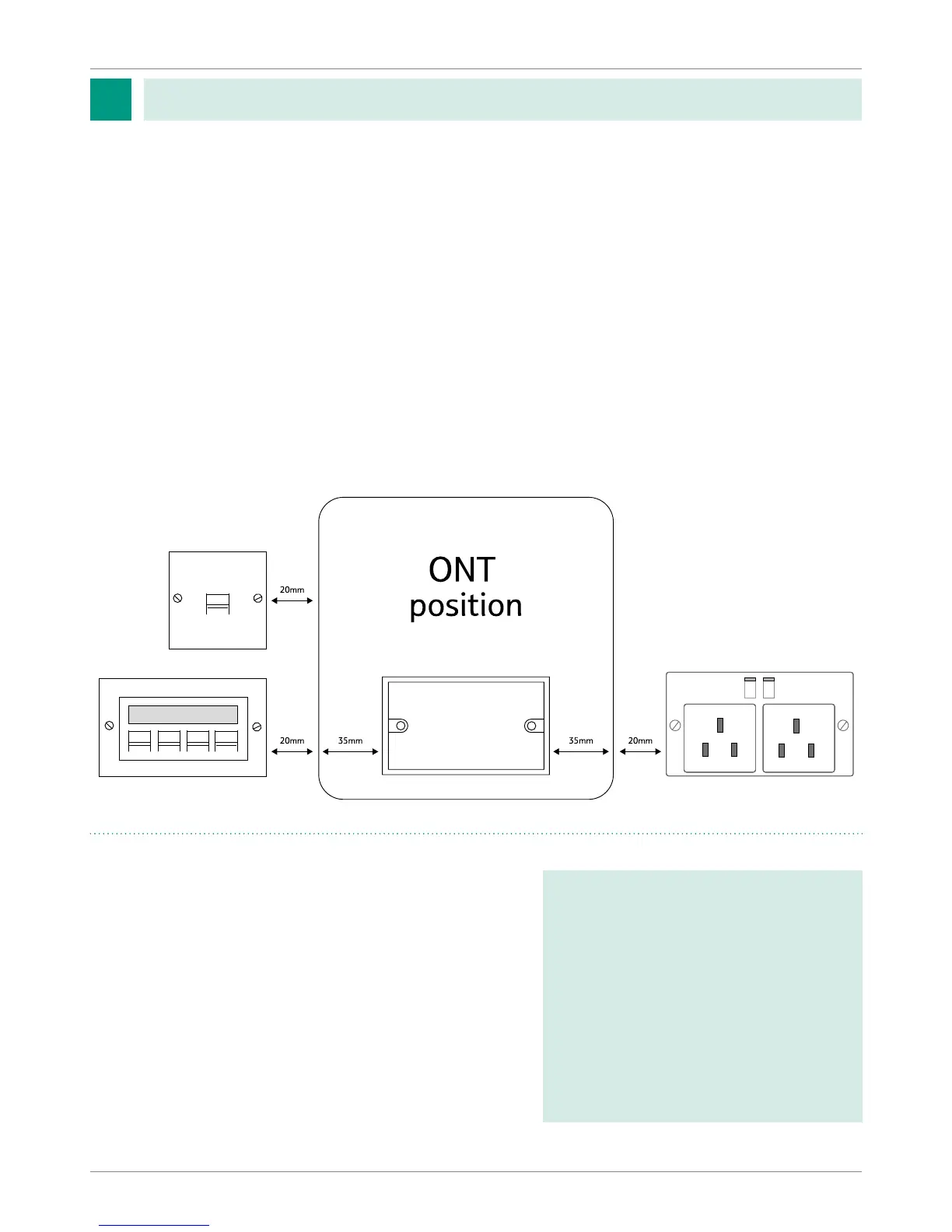
• Fit the double electrical socket to the wall.
• Fit the double back box to the wall.
• Fit the slave voice socket to the wall (can be modular to house one voice port and one data port).
• Fit RJ45 modular boxes. The number of these are to be determined by you the developer
Openreach recommend a minimum of two are tted, one for the communications provider
router and the other to the room requiring streaming media for example for streaming
high denition TV. See the internal wiring section for further information.
• All internal wiring to be run back to this point (daisy chain for voice and point to point for data).
• See below for the recommended layout of sockets on the wall, the layout can be mirrored.
Internal Work at dened ONT and Communications
Provider router position
Single Dwelling Unit at second
x (Internal Work)
• Fit the enclosure to the wall over the double back
box using the supplied template.
• Take the pre-connectorised cable from back box to
the ONT position.
• Connect the BBU to the ONT power port.
• Clean both the pre-connectorised cable and the
optical port of the ONT before inserting the cable.
A video showing the installation
of the internal equipment can be
found on the Openreach developer
website at the following link:
https://www.ournetwork.
openreach.co.uk/property-
developers/developer-handbooks-
and-extra-services.aspx
Developer self-install
3
How to build a fibre network - version 7.1


 To Next Page