14
TIMING ADJUSTMENT
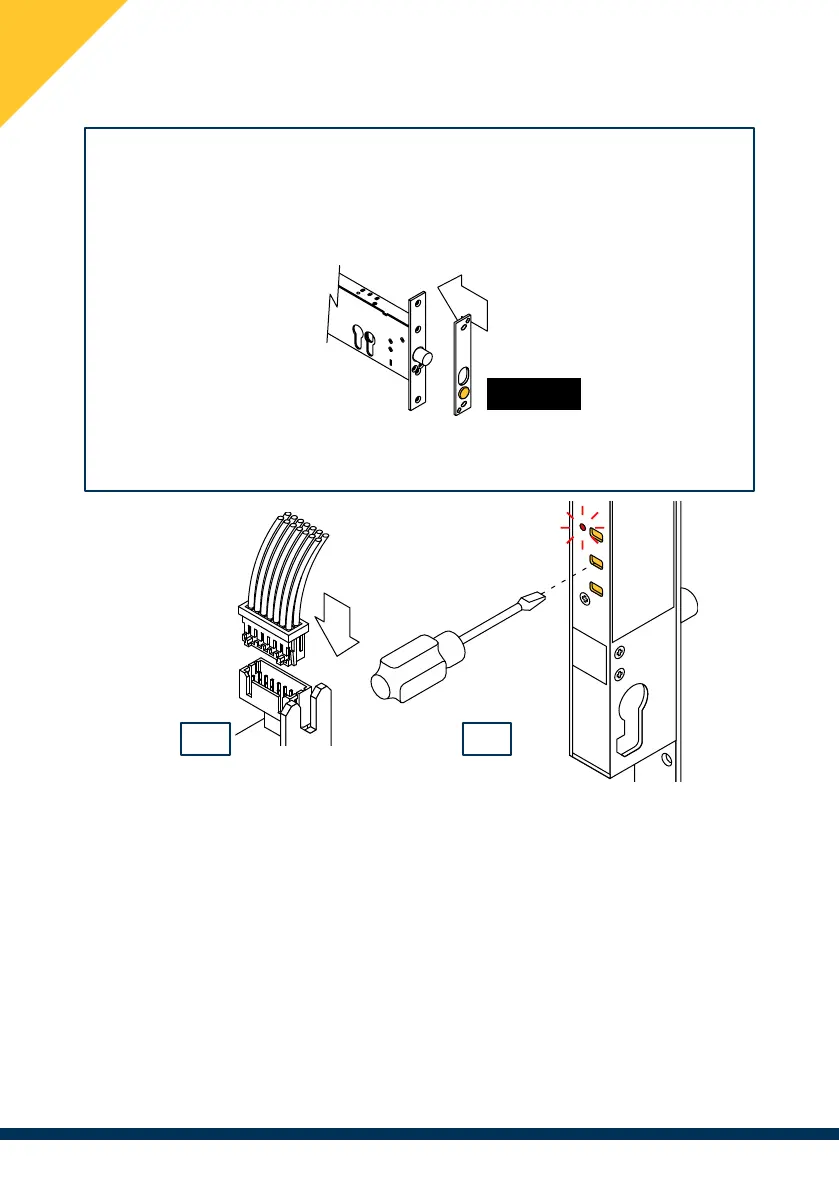
Perform this operation with the solenoid lock in hands (not mounted)!
Simulate the opening or closing of the door with the disassembled striking plate
magnet. To simulate the door closing, bring the striking plate close to the
solenoid lock, aligning the hole with the bolt and with the magnet facing outwards.
NOTE : timing adjustment not available on items 25910/25918
Timings are factory-set according to the Default settings (see table in facing page).
(1) Connect the electric lock to the power supply.
(2) Gently insert a small slotted screwdriver into holes T1, T2 or T3, located
on the back of the lock, pressing the button positioned inside. Hold down the
button until the LED lights up steadily (1 sec), after which the LED makes a double
flash at each timing interval. Count the number of double flashes and release
the button at the desired timing interval. The LED will flash again to con�rm the
number of seconds set.
In order to set the timing to “0” remove the screwdriver within 1 sec of the LED
lighting up. The LED will subsequently light up steadily for 1 sec.
1 2
Magnete


 To Next Page