
 To Next Page
A
Anthony RogersAug 1, 2025
Why is my Optelec Magnifier not working even when the power is on?
- JJacob WongAug 1, 2025
If your Optelec Magnifier isn't working even when powered on, the battery may be exhausted. Please recharge the unit.

Why is my Optelec Magnifier not working even when the power is on?
If your Optelec Magnifier isn't working even when powered on, the battery may be exhausted. Please recharge the unit.
What to do if my Optelec Magnifier switches off as soon as I turn it on?
If your Optelec Magnifier shuts off immediately after being turned on, it's likely that the batteries are exhausted. Recharge the device to resolve this issue.
How to turn off an Optelec Magnifier when the power button doesn't work?
If you are unable to turn off your Optelec Magnifier using the power button, press and hold both the return and menu buttons simultaneously for about 2 seconds.
Covers charging, power on/off, battery status, stand-by, and viewing modes.
Includes setup, zoom, viewing modes, and contrast for close-up text and objects.
Details setup, zoom, viewing modes, and contrast for distance viewing.
Learn to open, navigate, and modify menu settings like contrast, light, language, and image protection.
How to connect the FarView to external monitors or TVs using a VGA cable.
Steps to connect the FarView to a computer via USB for file transfer.
 General
| Display Type | LCD |
|---|---|
| Brightness | Adjustable |
| Reading Line | Yes |
| Freeze Frame | Yes |
| Warranty | 2 years |
| Connectivity | USB, HDMI |
| Color Modes | Full color, black on white, white on black |
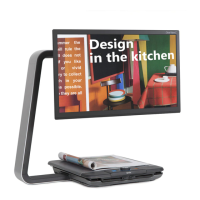
| Stand | Integrated stand for writing and reading |