13
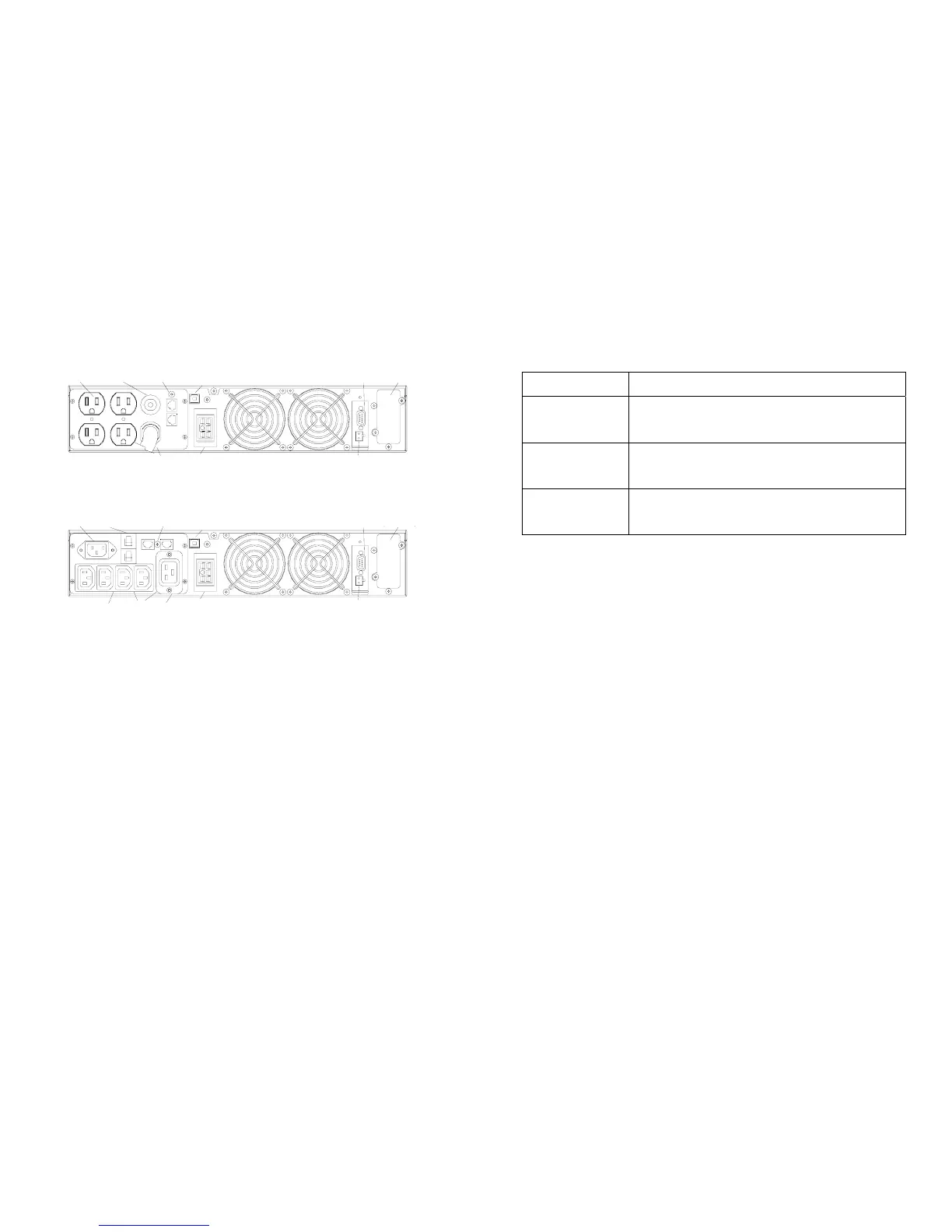
RM (2U) 2K-3KVA Rear Panel
RS232
EPO
CIRCUIT
BREAKER
BATTERY
BACKUP
OUTLETS
BATTERY
BACKUP
OUTLETS
DATA LINE
PROTECTION
EXTENDED BATTERY CONNETOR
SMART SLOT
EXTENDED BATTERY CONNETOR
(100/110/120V)
(220/230/240V)
USB
DATA LINE
PROTECTION
SMART SLOT
USB
RS232
EPO
GROUP 2
GROUP 1
CIRCUIT
BREAKER
INPUT
INPUT
14
5.3 Connection to mains and loads (1000 - 3000 VA)
The accessories with UPS
100/110/120V UPS Accessory
1000 – 1500 VA
User’s Guide x 1 Input Power Cord x 1
Telephone Line x 1 RS232 x 1
Software x 1
2000 VA
User’s Guide x 1 Telephone Line x 1
Input Power Cord(built-in) RS232 x 1
Software x 1
3000 VA
User’s Guide x 1 Telephone Line x 1
Input Power Cord(built-in) RS232 x 1
Software x 1
z Ensure that the UPS is disconnected from mains and loads while connecting the External
Battery Cabinets, if needed.
z Use the battery cable that comes with the External Battery Cabinet to connect the
External Battery Cabinet to the UPS. Connect a second battery cabinet to the first one
with the cable provided if more than one is to be installed.
z Be aware of UPS parameters and changing the Battery pack quantity when using the
external battery cabinets (see chapter 7.2)
z Connect the Input cable to the UPS and connect the other end to a grounded outlet. The
batteries will automatically charge when connected to the mains. Please realize that
although you may start using the UPS immediately, maximum back-up time will still not
be available, so it is recommended to charge the batteries for a minimum of 8 hours
before use.
z If unit instantly shows a “Site Wiring Fault”, rotate the connector (Schuko) (see chapter
7.4).
z After charging, connect the loads to the UPS (see the example in fig 3).
z Do not connect any devices that have the possibility of overloading the UPS or drawing
half-wave rectified current, such as hair dryers or vacuum cleaners.
z Should computer or alarm connections be used, use connections according to chapter 6
of the manual provided with that option. The connections can be referred to on the rear
panel.
z The installation is now complete



 To Next Page