9
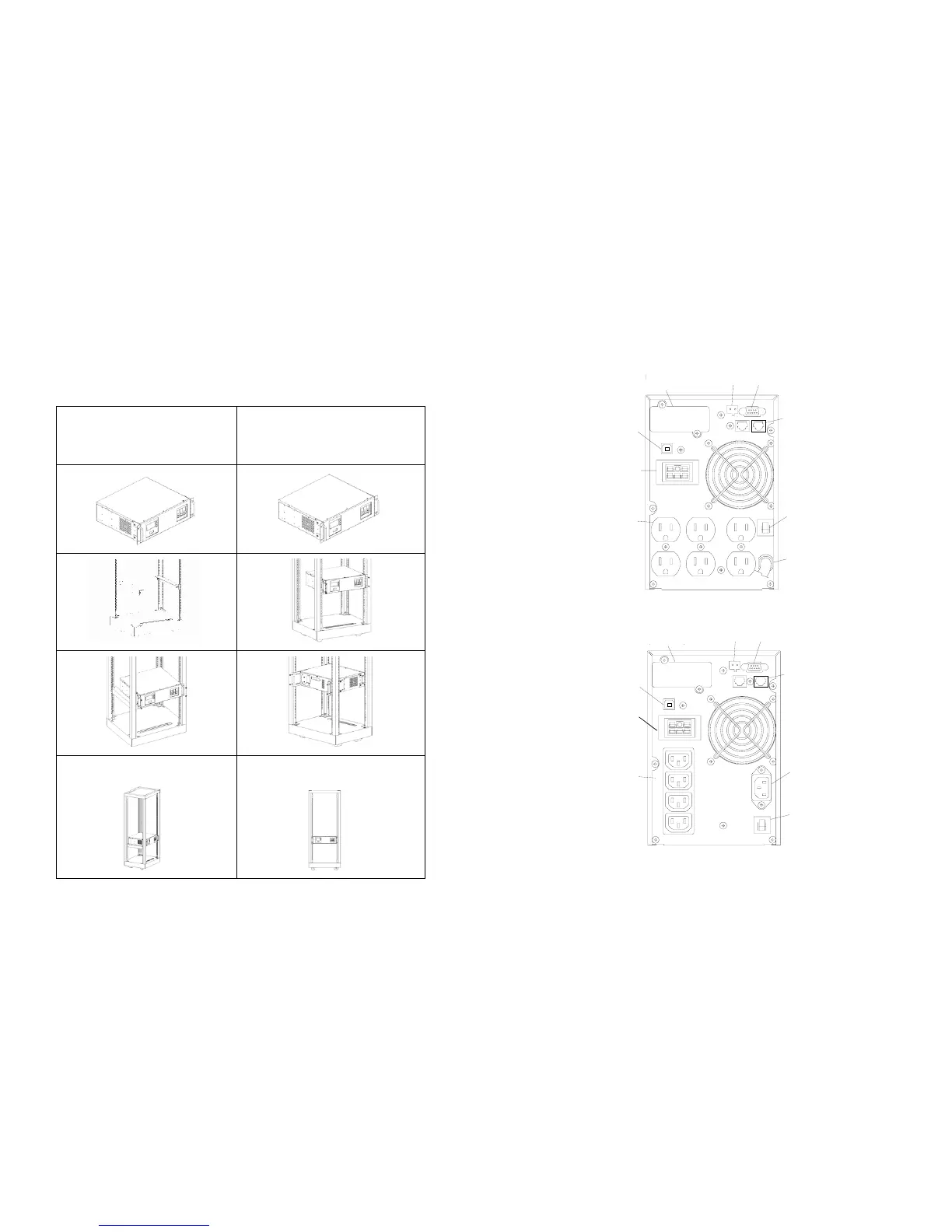
Installation with accessories of “Rack-mounted” types:
Please install the types of units according to the following illustration.
Note: The product diagrams below are used for illustrating installation procedure only.
They may not be exactly the same with the product you purchased.
Installation with bottom bracket.
Part No: RMB-06, 2 PCS.
Screw: M5*11, 4 PCS.
Installation with rear bracket
Part No: RMB-01, 2PCS.
Screw: M5*11, 4 PCS.
10
5.2 Rear panel views
1KVA - 1.5KVA Rear Panel
SMART SLOT
(OPTIONAL)
DATA LINE
PROTECTION
BATTERY
BACKUP
OUTLETS
EXTENDED
BATTERY
CONNECTOR
USB
SMART SLOT
(OPTIONAL)
DATA LINE
PROTECTION
BATTERY
BACKUP
OUTLETS
EXTENDED
BATTERY
CONNECTOR
USB
(100/110/120V)
EPO RS232
CIRCUIT
BREAKER
INPUT
(220/230/240V)
EPO RS232
CIRCUIT
BREAKER
INPUT



 To Next Page