7
Accumulation
● The accumulated function is used to add multiple weights and total them together
● You can add up to 999 different weights together
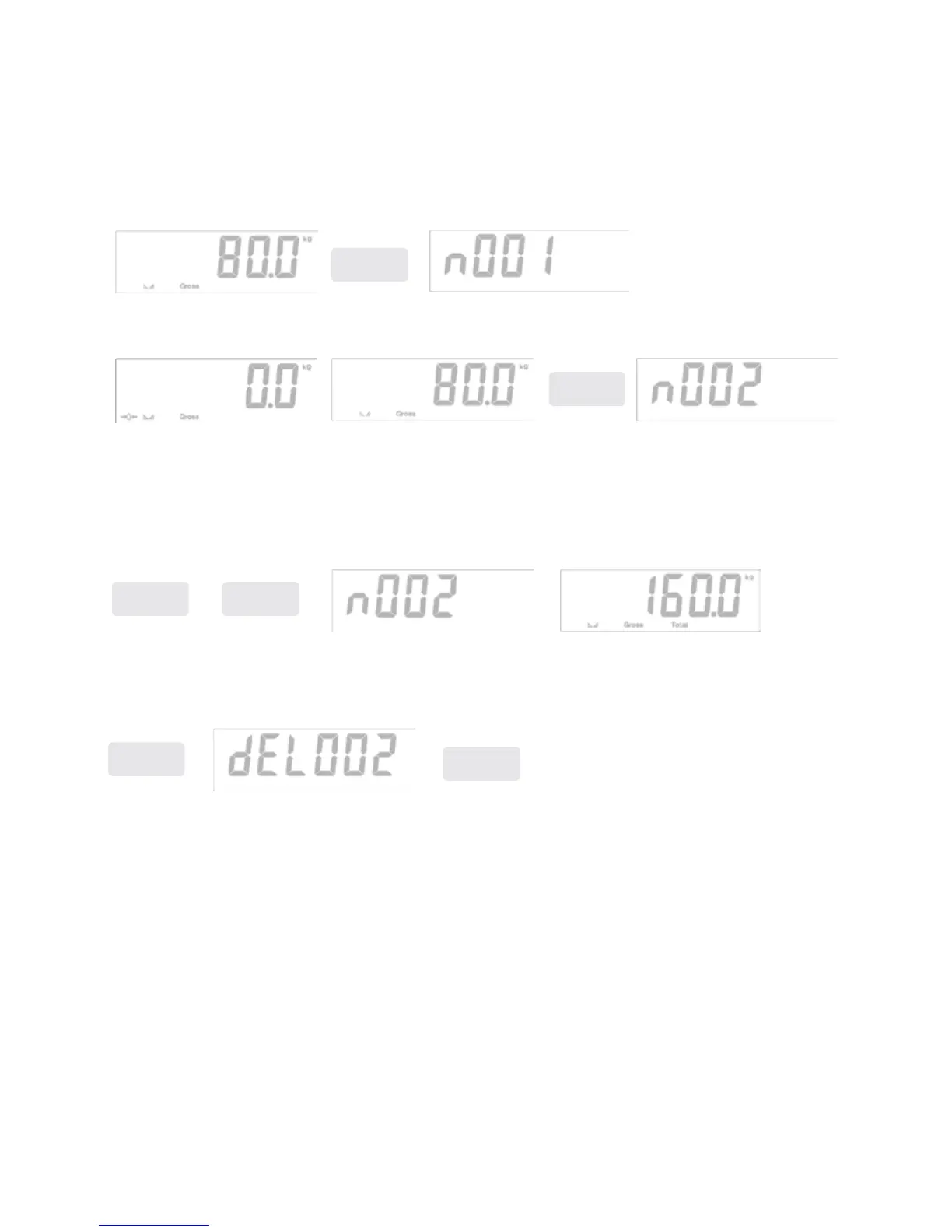
● In weighing mode load the rst weight, once stable press the TOTAL key to enter
the accumulated mode. The “total” light will display
● Remove the rst weight and add the second weight to the scale
● Once stable press TOTAL key to add the weight to the
accumulated total
● Repeat previous steps until all desired weights have been added to the total (max 999
times)
● When you are done and want to display the accumulated total, press the TOTAL and
SET key together. The accumulated number “
n
###” (the number of weights you
are adding together) will ash on the display followed by the total
● If you want to print the accumulated total, hold the PRINT key for one second
● To exit accumulated mode, press the ESC key
● To delete the saved weights press the DEL key followed by the set key to conrm
● Repete this process to cleaer all saved weights
TOTAL
TOTAL
TOTAL SET
+
DEL
SET
Print
● If the indicator is connected to a printer and the weight on the scale is stable press the
PRINT key to print the current weight
Note: In tare mode the printer can not print if negative weight is shown


 To Next Page