3
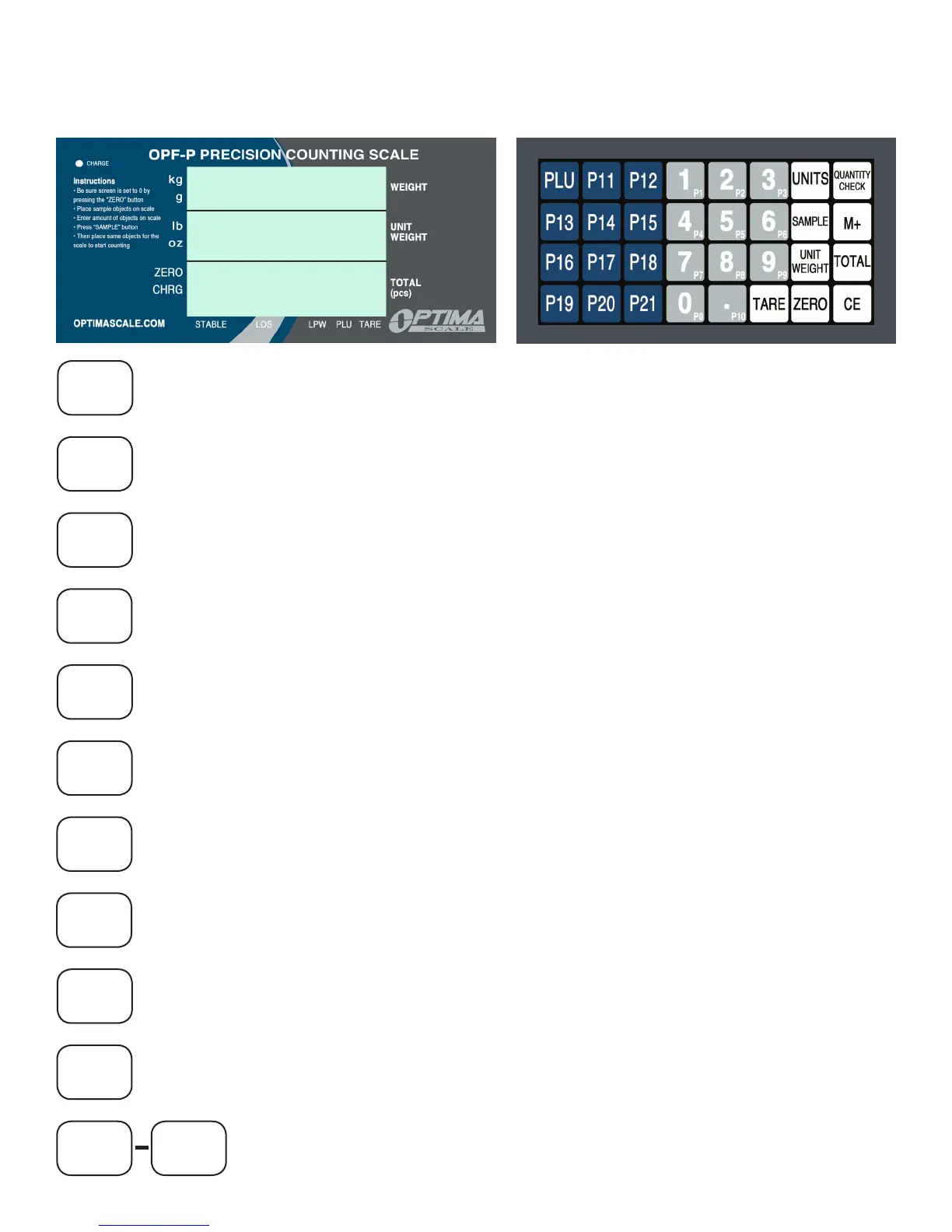
DISPLAY AND KEY DESCRIPTION
LCD DISPLAY KEYBOARD
UNITS
QUANTITY
CHECK
SAMPLE
M+
UNIT
WEIGHT
TOTAL
TARE
ZERO
CE
PLU
P0 P21
In the weighing mode there are 4 units available (kg, g, lb, oz)
Setting the counted sample numbers on the platform into the scales memory
This is for setting an upper and lower limitation alarm
In accounting mode: Accumulate counting
In setting mode: save settings and shift to the next function selection
Is used for recalling the counts data, which restored each time and total
weight, which is accumulated
In weighing mode: setting the unit weight data
In setting status: exit key
In weighing mode: Tare
In setting mode: increase value
In weighing mode: Cancel the set numerical data and input new data
In setting mode: Deleting PLU value
In weighing mode: Zero
In setting mode: decrease value
PLU unit keys, used to memorize unit weight
Used to enter PLU mode or setting PLU unit weighing mode
In PLU mode: exit key



 To Next Page