Version 1.0.3 - 2022-04-06 83Translation of original instruction
D17 Pro│D23 Pro│D26 Pro│D33 Pro EN
D17Pro_D23Pro_D26Pro_D33Pro_GB_3.fm
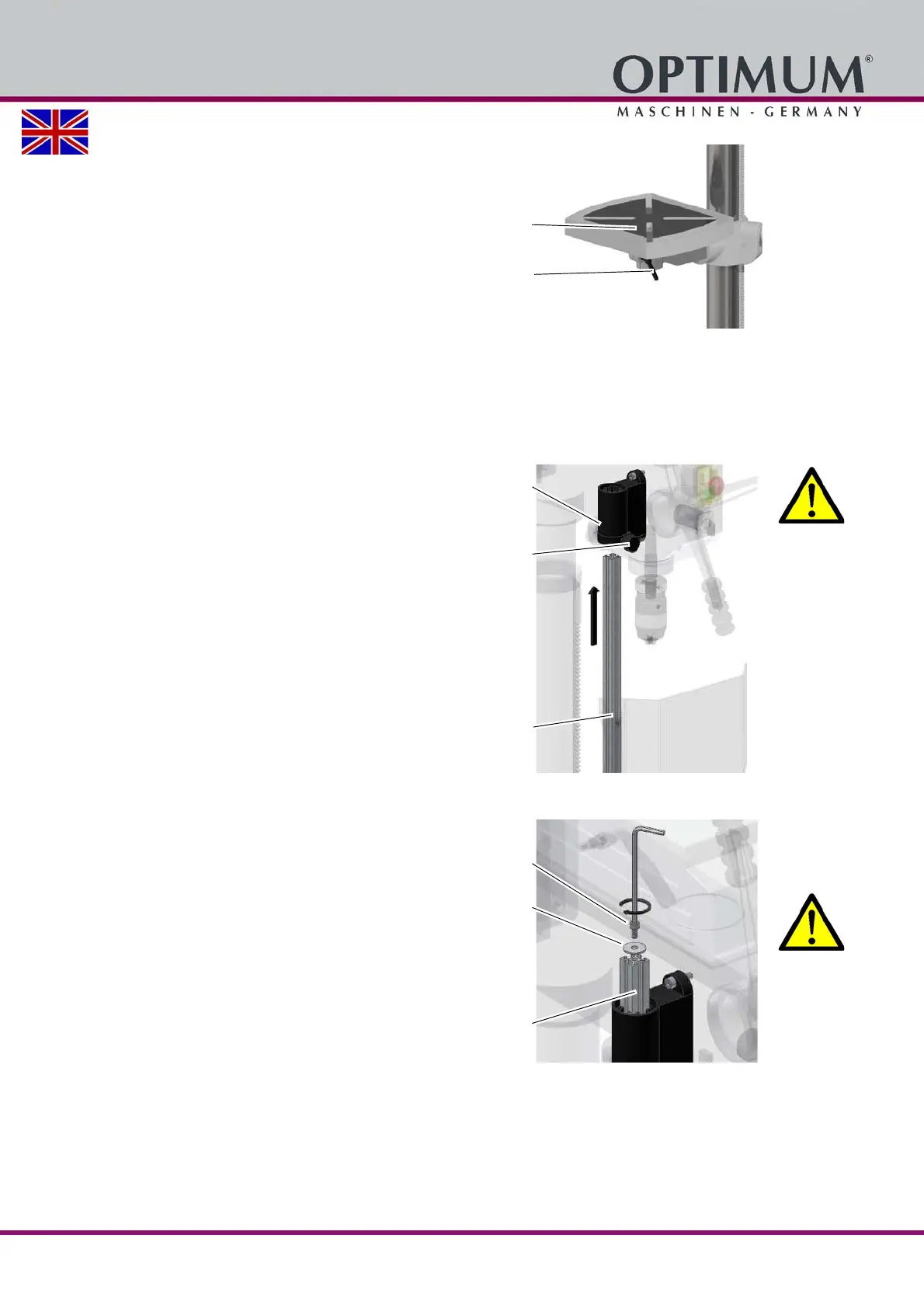
Insert the drilling table in the drilling
table support and clamp it with the
clamping lever.
Img. 3-4: D26Pro
Fitting the quick-action drill chuck
Before starting work on page 96
Assembly of the drill chuck protection
WARNING!
Never operate drilling machines without
drill chuck protection.
1. Shift the aluminium profile including the
mounted safety screen (plastic screen)
into the fixture which is mounted on the
drilling head.
2. After assembly of the aluminium profile
screw down the adjusting screw.
Img. 3-5: Assembly 1
3. Screw the hexagon socket screw with
the locking washer into the aluminium
profile.
WARNING!
Make sure that the hexagon socket
screw and the locking washer are
mounted and tightly screwed.
Otherwise the aluminium profile would
slide out of the fixture when the setting
screw is screwed off.
Img. 3-6: Assembly 2
Drilling table
Clamping lever
Fixture
Adjusting screw
Aluminium profile
including mounted
safety screen
Hexagon socket
screw
Locking washer
Aluminium profile




 To Next Page