EasyManua.ls Logo

Optimus STA-7500 - Setting the Volume; Basic Operation; Tuning to a Radio Station

Optimus STA-7500
20 pages
Print Icon
To Next Page IconTo Next Page
To Previous Page IconTo Previous Page
Loading...
OPERATION
SELECTING
A
PROGRAM
SOURCE
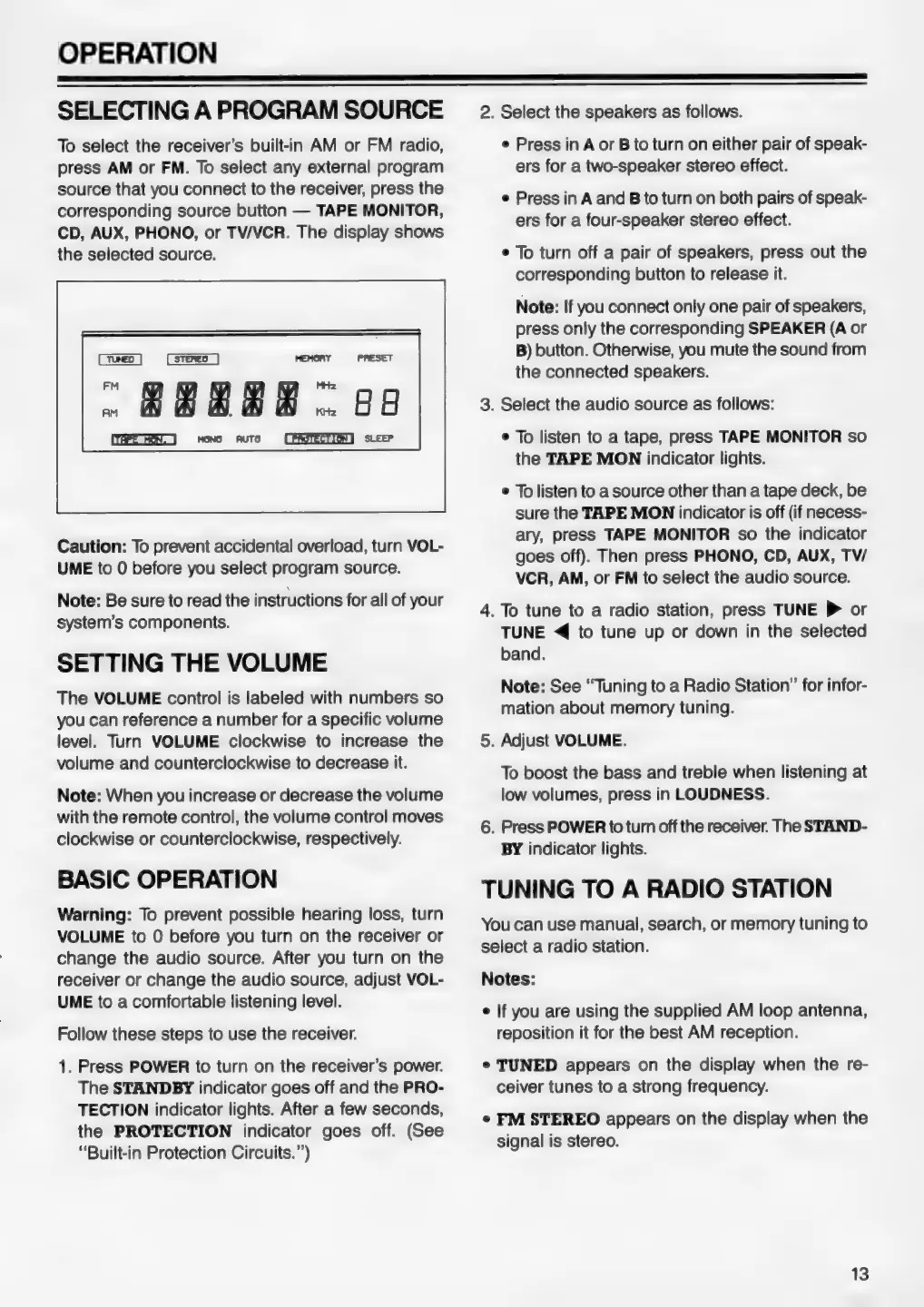
To
select
the
receiver’s
built-in
AM
or
FM
radio,
press
AM
or
FM.
To
select
any
external
program
source
that
you
connect
to
the
receiver,
press
the
corresponding
source
button
—
TAPE
MONITOR,
CD,
AUX,
PHONO,
or
TV/VCR.
The
display
shows
the
selected
source.
(xe)
(steno)
PRESET
"
#8888
oe
(RPE
ON
=
MOND AUTO
[PROTECTION]
SLEEP
Caution:
To
prevent
accidental
overload,
turn
VOL-
UME
to
0
before
you
select
program
source.
Note:
Be
sure
to
read
the
instructions
for
all
of
your
system’s
components.
SETTING
THE
VOLUME
The
VOLUME
control
is
labeled
with
numbers
so
you
can
reference
a
number
for
a
specific
volume
level.
Turn
VOLUME
clockwise
to
increase
the
volume
and
counterclockwise
to
decrease
it.
Note:
When
you
increase
or
decrease
the
volume
with
the
remote
control,
the
volume
control
moves
clockwise
or
counterclockwise,
respectively.
BASIC
OPERATION
Warning:
To
prevent
possible
hearing
loss,
turn
VOLUME
to
0
before
you
turn
on
the
receiver
or
change
the
audio
source.
After
you
turn
on
the
receiver
or
change
the
audio
source,
adjust
VOL-
UME
to
a
comfortable
listening
level.
Follow
these
steps
to
use
the
receiver.
1.
Press
POWER
to
turn
on
the
receiver’s
power.
The
STANDBY
indicator
goes
off
and
the
PRO-
TECTION
indicator
lights.
After
a
few
seconds,
the
PROTECTION
indicator
goes
off.
(See
“Built-in
Protection
Circuits.”’)
2.
Select
the
speakers
as
follows.
e
Press
in
A
or
B
to
turn
on
either
pair
of
speak-
ers
for
a
two-speaker
stereo
effect.
e
Press
in
A
and
B
to
turn
on
both
pairs
of
speak-
ers
for
a
four-speaker
stereo
effect.
e
To
turn
off
a
pair
of
speakers,
press
out
the
corresponding
button
to
release
it.
Note:
If
you
connect
only
one
pair
of
speakers,
press
only
the
corresponding
SPEAKER
(A
or
B)
button.
Otherwise,
you
mute
the
sound
from
the
connected
speakers.
3.
Select
the
audio
source
as
follows:
e
To
listen
to
a
tape,
press
TAPE
MONITOR
so
the
TAPE
MON
indicator
lights.
¢
To
listen
to
a
source
other
than
a
tape
deck,
be
sure
the
TAPE
MON
indicator
is
off
(if
necess-
ary,
press
TAPE
MONITOR
so
the
indicator
goes
off).
Then
press
PHONO,
CD,
AUX,
TV/
VCR,
AM,
or
FM
to
select
the
audio
source.
4.
To
tune
to
a
radio
station,
press
TUNE
P
or
TUNE
<<
to
tune
up
or
down
in
the
selected
band.
Note:
See
“Tuning
to
a
Radio
Station”
for
infor-
mation
about
memory
tuning.
5.
Adjust
VOLUME.
To
boost
the
bass
and
treble
when
listening
at
low
volumes,
press
in
LOUDNESS.
6.
Press
POWER
to
turn
off
the
receiver.
The
STAND-
BY
indicator
lights.
TUNING
TO
A
RADIO
STATION
You
can
use
manual,
search,
or
memory
tuning
to
select
a
radio
station.
Notes:
¢
If
you
are
using
the
supplied
AM
loop
antenna,
reposition
it
for
the
best
AM
reception.
¢
TUNED
appears
on
the
display
when
the
re-
ceiver
tunes
to
a
strong
frequency.
¢
FM
STEREO
appears
on
the
display
when
the
signal
is
stereo.
13