EasyManua.ls Logo

Optimus STA-7500 - Connecting Speakers; Speaker Placement; Speaker Connections

Optimus STA-7500
20 pages
Print Icon
To Next Page IconTo Next Page
To Previous Page IconTo Previous Page
Loading...
CONNECTIONS
This
section
describes
components
you
can
con-
nect
to
create
a
complete
audio/video
system.
Your
local
Radio
Shack
store
has
a
wide
selection
of
audio/video
components
to
suit
almost
every
appli-
cation
and
budget.
Caution:
Do
not
plug
in
or
turn
on
the
receiver
until
you
complete
all
connections
for
the
speakers,
audio
sources,
and
antennas.
CONNECTING
SPEAKERS
You
can
connect
up
to
four
speakers
to
the
receiver.
You
can
set
up
one
pair
of
speakers
in
your
main
listening
area
and
another
pair
in
a
second
listen-
ing
area.
Or
set
up
both
pairs
in
a
single
listening
area
for
a
“Surround
Sound”
effect.
Your
stereo
system
can
sound
only
as
good
as
your
speakers
allow,
so
choose
the
best
speakers
possible.
For the
best
performance
from
your
system,
select
from
Radio
Shack’s
fine
line
of
Optimus
speakers.
Radio
Shack
also
has
more
economical
speakers
that
provide
superb
performance
as
auxiliary
speakers
or
main
speakers
when
used
in
smaller
rooms.
Speaker
Guidelines
¢
Be
sure
your
speakers
can
handle
the
receiver’s
maximum
power
output
of
70
watts.
If
you
consis-
tently
listen
to
music
at
a
higher
volume
level,
we
recommend
speakers
with
a
higher
power
rating.
e
Use
only
speakers
with
an
impedance
of
8
to
16
ohms.
©
Connect
no
more.
than
two
pairs
of
speakers
to
the
receiver.
e
Use
18-gauge
speaker
wire
if
your
speakers
are
within
25
feet
of
the
receiver.
Use
16-gauge
speaker
wire
for
distances
greater
than
25
feet.
e
Use
only
the
length
of
wire
necessary
to
connect
the
speakers.
¢
Be
sure
that
stray
wire
strands
from
one
speaker
terminal
do
not
touch
another
speaker
terminal.
Speaker
Placement
Use
the
following
information
to
help
you
determine
the best
location
for
your
speakers.
You
might
want
to
experiment
with
various
speaker
placements.
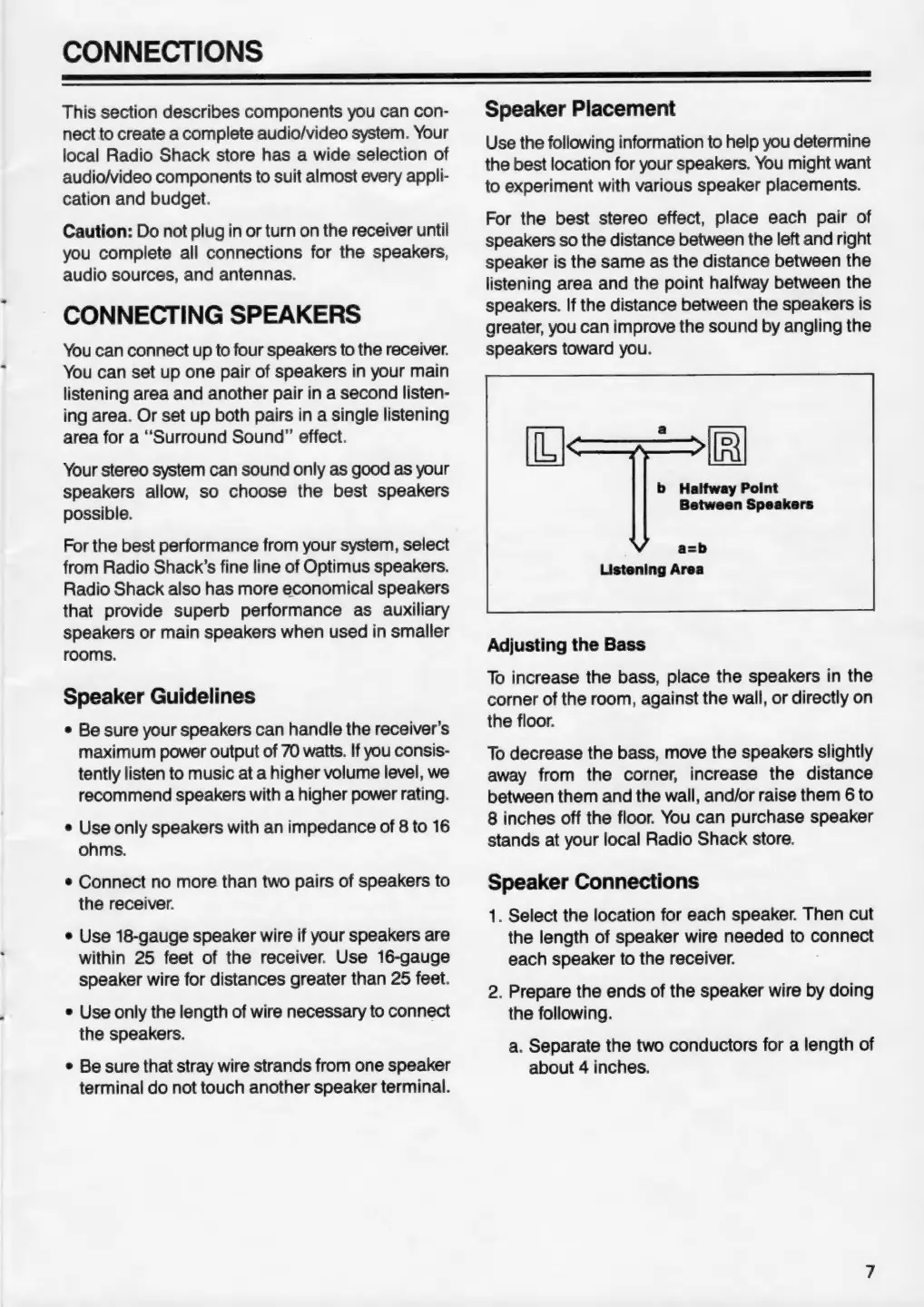
For
the
best
stereo
effect,
place
each
pair
of
speakers
so
the
distance
between
the
left
and
right
speaker
is
the
same
as
the
distance
between
the
listening
area
and
the
point
halfway
between
the
speakers.
If
the
distance
between
the
speakers
is
greater,
you
can
improve
the
sound
by
angling
the
speakers
toward
you.
b
Halfway
Point
Between
Speakers
a=b
Listening
Area
Adjusting
the
Bass
To
increase
the
bass,
place
the
speakers
in
the
corner
of
the
room,
against
the
wall,
or
directly
on
the
floor.
To
decrease
the
bass,
move
the
speakers
slightly
away
from
the
corner,
increase
the
distance
between
them
and
the
wall,
and/or
raise
them
6
to
8
inches
off
the
floor.
You
can
purchase
speaker
stands
at
your
local
Radio
Shack
store.
Speaker
Connections
1.
Select
the
location
for
each
speaker.
Then
cut
the
length
of
speaker
wire
needed
to
connect
each
speaker
to
the
receiver.
2.
Prepare
the
ends
of
the
speaker
wire
by
doing
the
following.
a.
Separate
the
two
conductors
for
a
length
of
about
4
inches.

Related product manuals