4
»
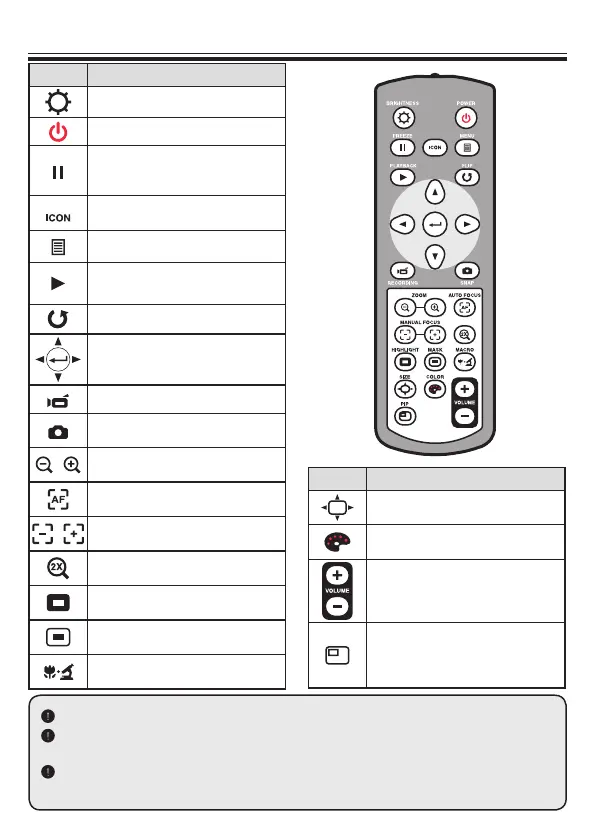
Remote Control
Button Function
Brightness hotkey
Power on / off
Freeze current image.
* Pause the clip while playing
videos
Show or hide on-screen icons
To show or hide OSD menu
Playback mode to display
recorded pictures and video clips
Invert image 180°
Select and adjust
Record a video clip
Capture a still image
/ Zoom out / Zoom in
One-shot auto focus
/
Use the level bar to adjust the
focus manually
2X or 4X digital zoom
Highlight function on / off
Mask function on / off
Macro / Normal switch
Infraredremotecontrolcanonlybeusedinproximitytotheunit.
Removethebatterycoverandloadthebatteriesintothebatterycompartmentcor-
rectlyaccordingtothe“+”and“-”symbols.
BesuretousetwoAAAbatteries.Donotusenewandoldbatteriesordifferentbat-
terytypestogether.
Button Function
Adjust highlighted / masked area
size
Set color for highlighted / masked
area
Increase / decrease the sound
volume.
Picture in Picture function on / off
*For displaying a still image as
an insert while displaying another
image.



 To Next Page