6
»
Basic Operation
• Menu options in Preview Mode
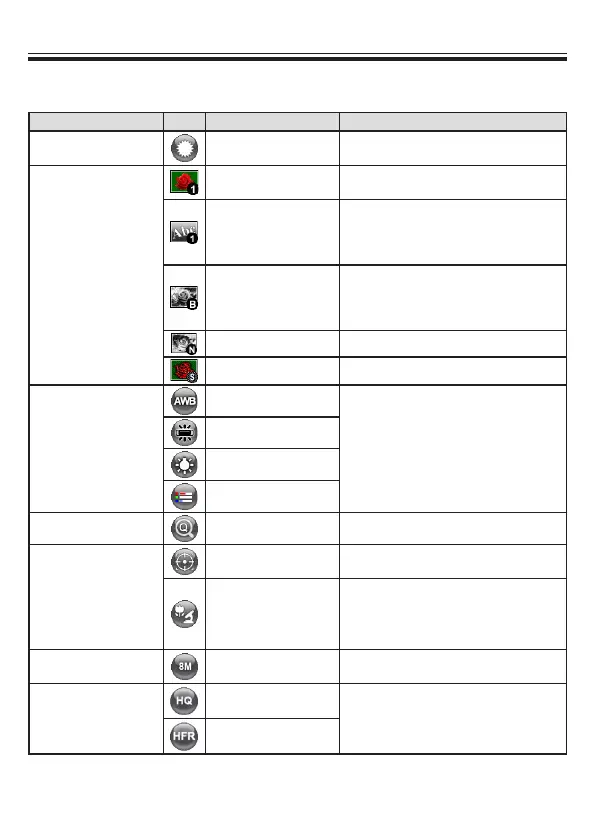
Name Icon Option Description
Brightness -
Use the Right / Left buttons to make
the image brighter / darker
Effect
Graphic
To improve the tint of color-based
subjects such as pictures or gures.
Text
The function is designed especially for
text-based documents to which can
be enhanced white and black subjects
such as characters and lines.
B&W
To output a black & white camera
image.To make the image easier to
view,select this when shooting black &
white documents etc.
Negative To output a negative image.
Sketch To output a sketch image
White Balance
Auto
There are various modes (Auto,
Flurescent, Tungsten and Custom)
for user to choose and t in different
surroundings.
Fluorescent
Tungsten
Custom
Quick Zoom 2X / 4X Set the quick zoom to 2X or 4X.
Marco
Normal
Select standard mode for focus
distance from 25cm to innite.
Macro /
Microscope
Select Macro/Microscope mode to
take close-ups or while connecting to
a microscope.
Image Size 0.8M / 2M / 5M / 13M
Select the desired still image
resolution.
Video Mode
High Quality
Select the desired video quality.
High Frame Rate



 To Next Page