7
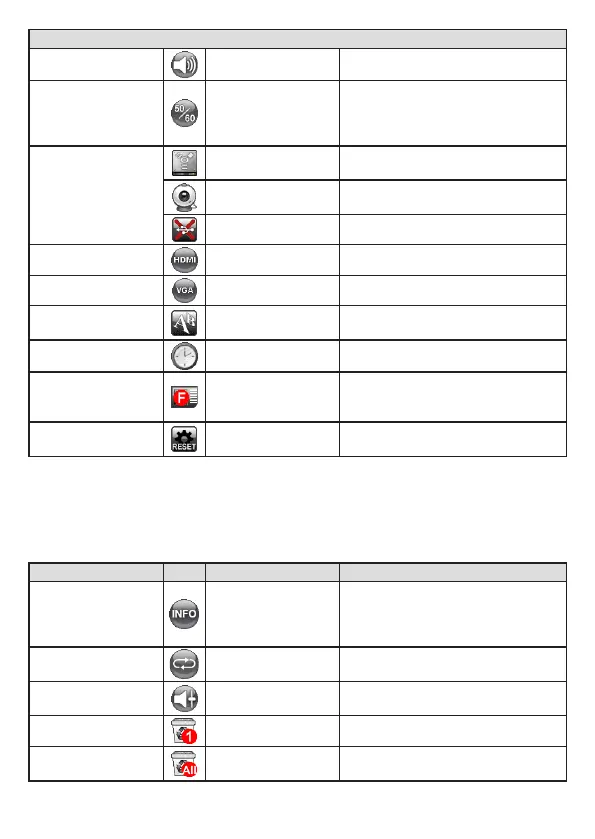
Setting
Beep On / Off Enable beep sound on / off
Flicker 50Hz / 60Hz
Set icker frequency to 50Hz or
60Hz. The icker setting is based on
the frequency standard of your local
power supply.
USB Connection
Disk
Select “Disk” to enter Mass storage
Mode
PC cam
Select “PC Cam“ to enter PC Cam
Mode
Off Disable USB function
HDMI Out
720p / 1080i / 4K
Select output resolution
VGA Out
XGA / UXGA / 720p / WXGA
Select output resolution
Language -
Allows you select the language used
for OSD
Clock - Set date and time
Format No / Yes
Format the storage medium. Note that
all les stored in the medium will be
gone.
Reset default No / Yes
Restore factory defaults. Note that
your current settings will disappear.
• Menu options in Playback Mode
Function Icon Option Description
File Info -
View the le’s title , saved date and
time , size
and the length of recording.
Slide show On / Off
Start a slide show with selected
interval time.
Volume -
Use the Right / Left buttons to adjust
volume
Delete one Yes / No Delete current le.
Delete all Yes / No
Delete all images of the same type
stored in the memory.



 To Next Page