EasyManua.ls Logo

Optoma ML500 - MUSIC PLAYBACK AND SETTINGS MANAGEMENT; Configuring Music Settings

Optoma ML500
25 pages
Print Icon
To Next Page IconTo Next Page
To Previous Page IconTo Previous Page
Loading...
1010
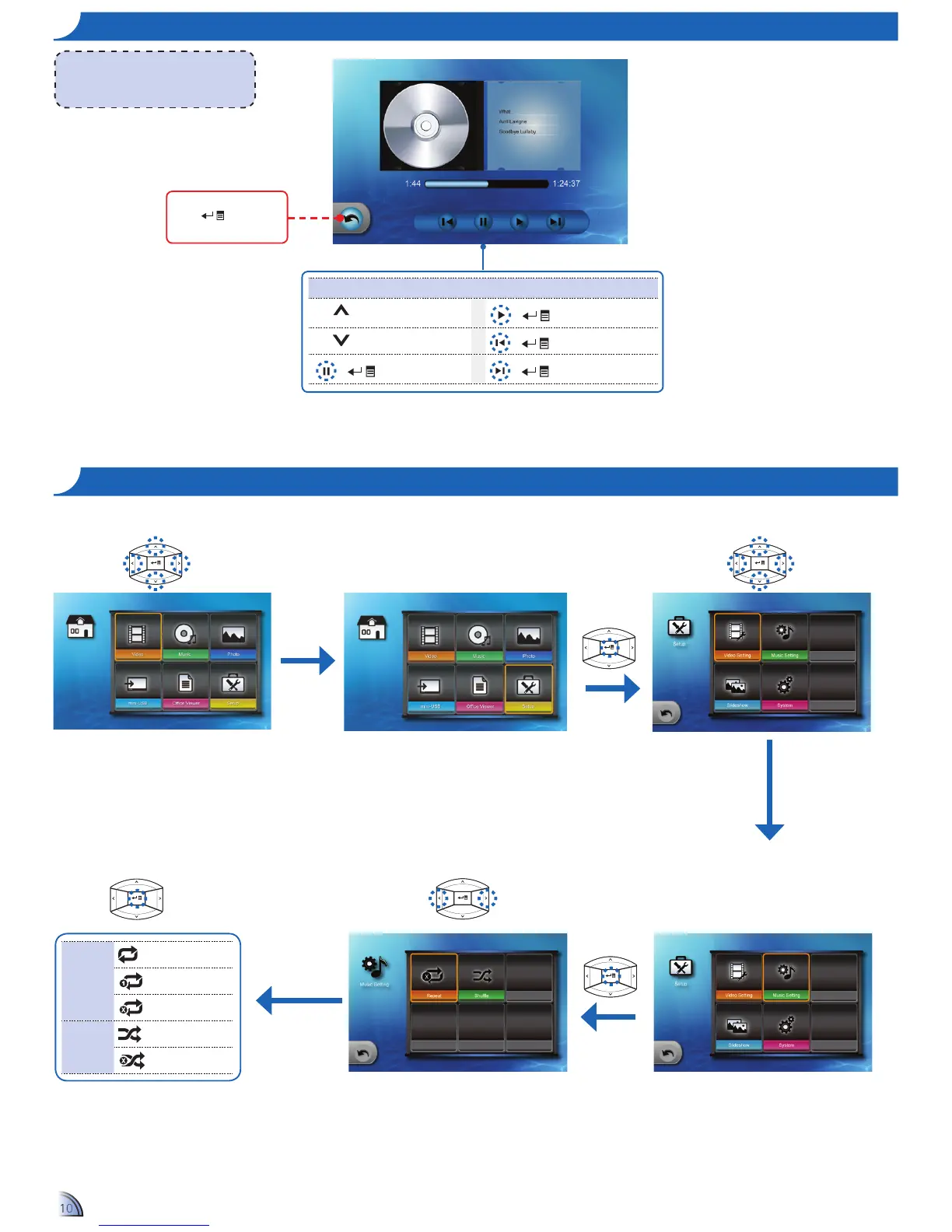
ho W t o pl a y mu S I c - pl a y B a c K mo D e
<Note>
The button guide disappears when the
keypad is not used for 3 seconds.
To display the button guide, press any key.
Media Playback Control
Increase volume
+
Play
Decrease volume
+
Previous track
+
Pause
+
Next track
Highlight this icon and
press
to exit
music playback mode.
mu S I c Se t t I n g S
Repeat
Repeat all
Repeat one
Repeat disabled
Shufe
Shufeon
Shufeoff
Home menu
1.
Select "Setup"
2.
Enter "Setup" Menu
3.
Select "Music Setting"
6.
Select Option
5.
Select Setting
4.
Enter "Music Setting" Menu

Other manuals for Optoma ML500

Related product manuals