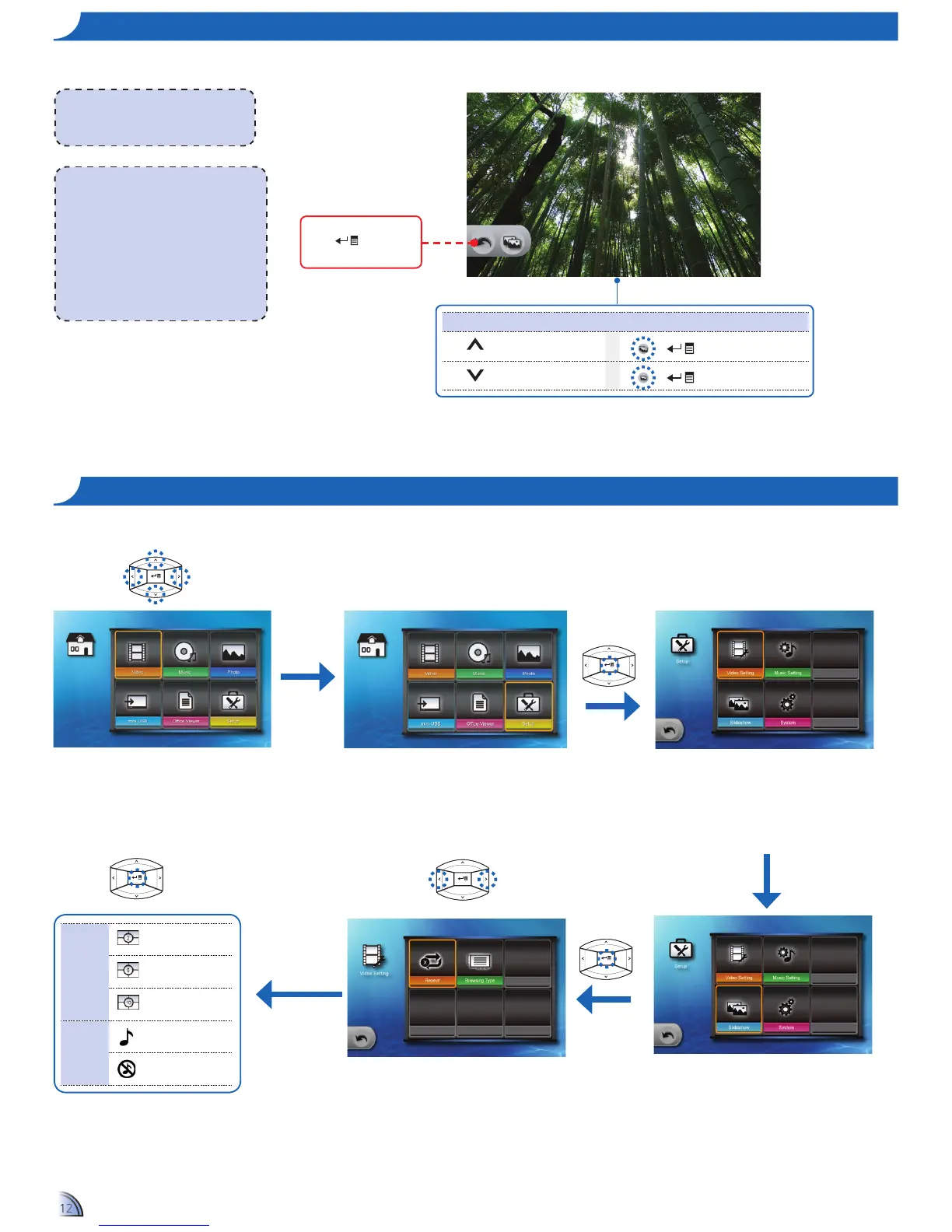
Ho w t o Vi e w PH o t o s - Mo d e : sl i d e s H o w a t Fu l l sc r e e n
During slideshow, photos are played continuously at a specied interval time while playing music stored in the internal memory as background.
<Note>
To change slideshow interval settings and •
enable/disable background music, see
Slideshow Settings below.
Make sure that background music setting is •
"On" to enable this feature.
Save the music les (*.mp3 format) under •
the "/mnt/disk/bgm" folder in the internal
memory via data transfer function.
Only music les stored in the internal •
memory "/mnt/disk/bgm" folder can be
played as background music.
<Note>
The button guide disappears when the
keypad is not used for 3 seconds.
To display the button guide, press any key.
Timer
Timer: 2-second
interval
Timer: 5-second
interval
Timer: 10-second
interval
Music
Background music
on
Background music
off
sl i d e s H o w se t t i n g s
Home menu
1.
Select "Setup"
2.
Enter "Setup" Menu
3.
Select "Slideshow"
6.
Select Option
5.
Select Setting
4.
Enter "Slideshow" Menu
Media Playback Control
Increase volume
+
Slideshow on
Decrease volume
+
Slideshow off
Highlight this icon and
press
to exit
slideshow mode.



 To Next Page