EasyManua.ls Logo

Optoma ML500 - DOCUMENT VIEW MODE AND LANGUAGE SELECTION; Changing Menu Language

Optoma ML500
25 pages
Print Icon
To Next Page IconTo Next Page
To Previous Page IconTo Previous Page
Loading...
14
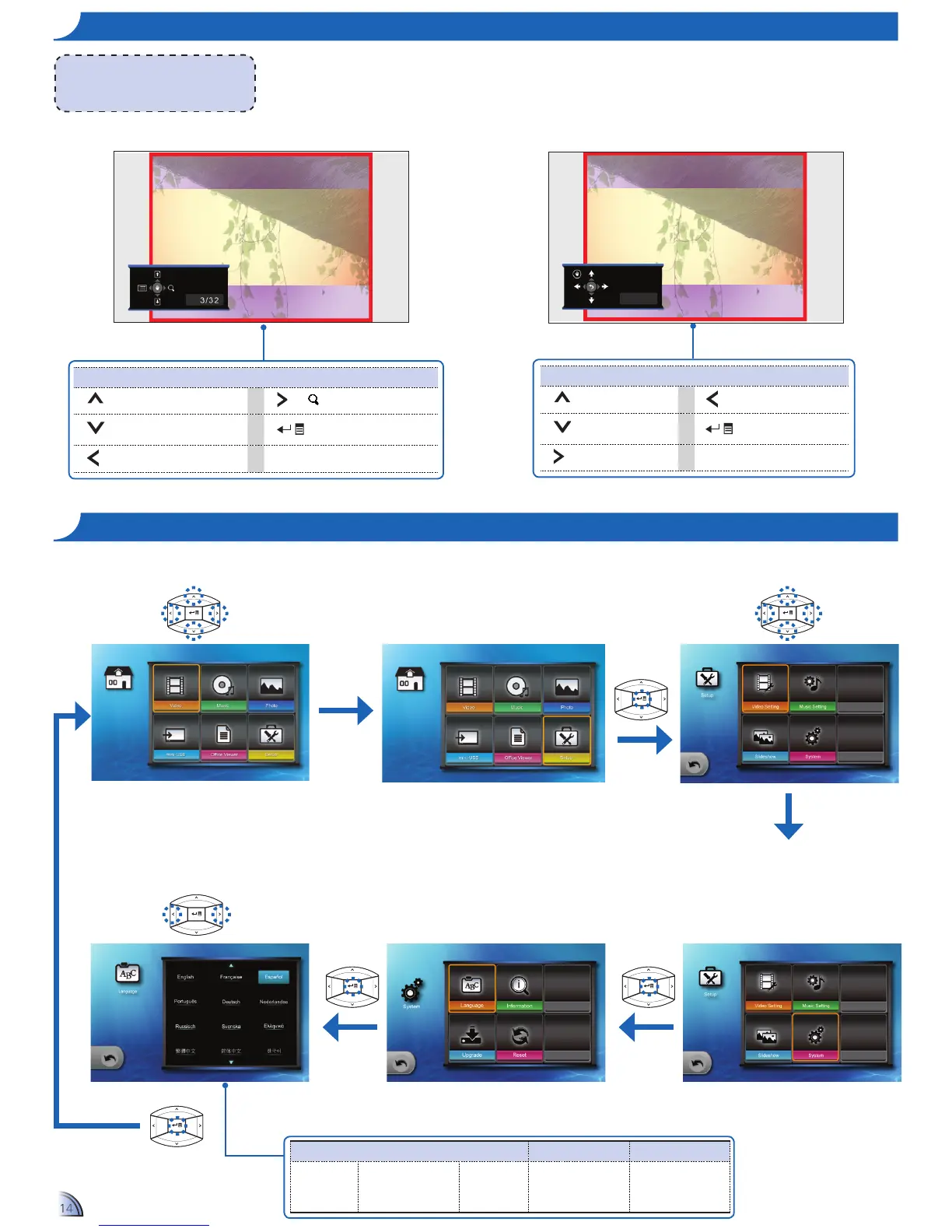
Media Playback Control
Previous page Zoom in/out page
Next page
Enter advanced menu
mode
Returntolelist
Media Playback Control (Advanced Menu Mode)
Page up Move to the left
Page down
Exit advanced menu
mode
Move to the right
or
14
ho W t o vI e W Do c u m e n t S - vI e W mo D e
Report
<Note>
The button guide disappears when the
keypad is not used for 3 seconds.
To display the button guide, press any key.
Report
Se l e c t me n u la n g u a g e
Select your preferred menu language:
English
French
Spanish
Portuguese (Brazilian)
German
Italian
Russian
Polish
Dutch
Swedish
Greek
Traditional Chinese
SimpliedChinese
Korean
Japanese
Advanced menu mode
Full screen view
Select item
Home menu
Conrmselection
1.
Select "Setup"
2.
Enter "Setup" Menu
3.
Select "System"
6.
Select Language
5.
Enter "Language" Menu
4.
Enter "System" Menu

Other manuals for Optoma ML500

Related product manuals