EasyManua.ls Logo

Optoma ML500 - USB MODE OPERATIONS AND MODES; USB Display Mode Usage Guide; Data Transfer Mode Usage Guide

Optoma ML500
25 pages
Print Icon
To Next Page IconTo Next Page
To Previous Page IconTo Previous Page
Loading...
1818
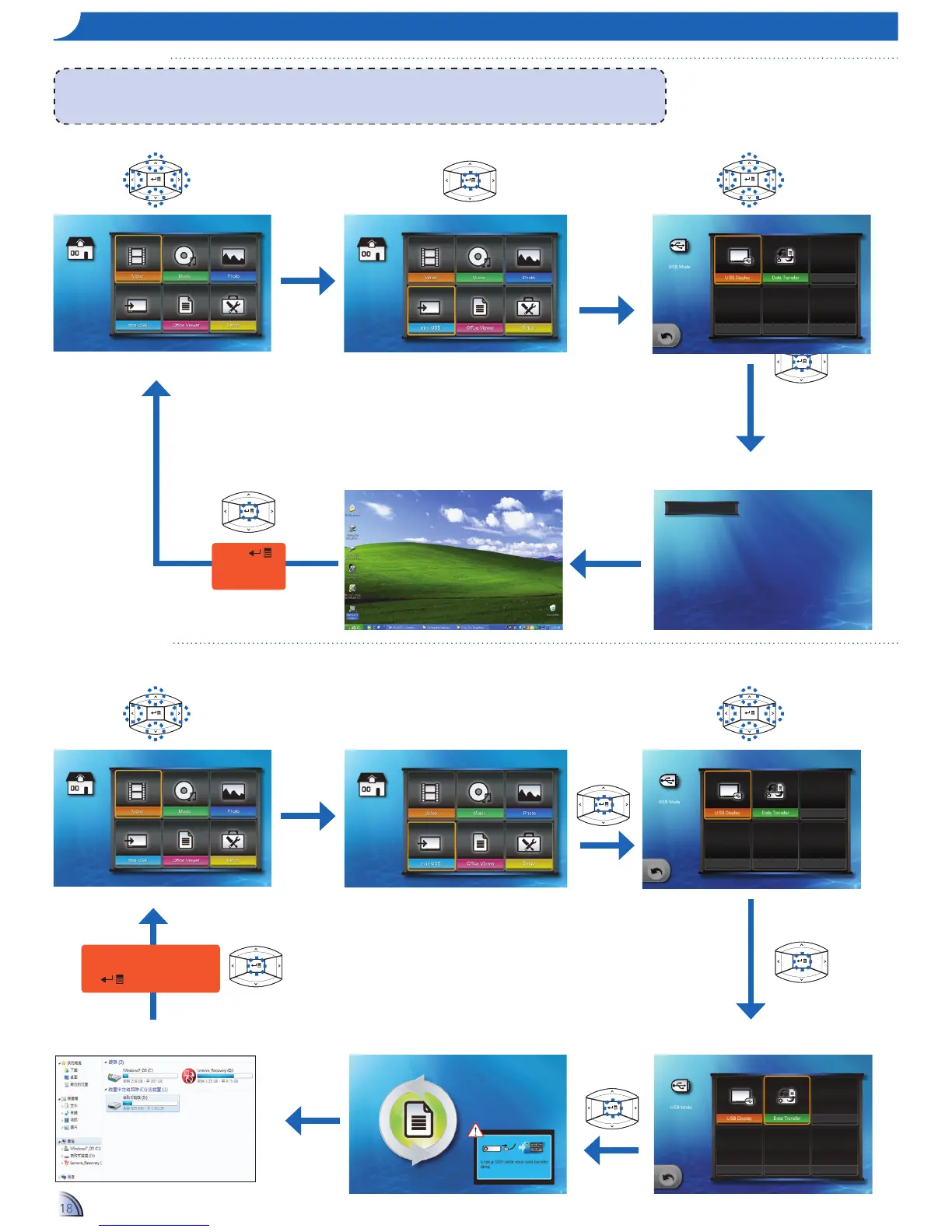
uSB mo D e
USB Display Mode
Data Transfer Mode
Home menu
When data transfer completes,
unplug the USB cable or press
to exit PC mode.
Press
to exit USB
display mode.
Prepare DOUSB...
Home menu
1.
Select "mini-USB"
2.
Enter "mini-USB" Menu
3.
Enter "USB Display" Mode
5.
View PC Display
4.
Connect to PC
1.
Select "mini-USB"
2.
Enter "mini-USB" Menu
3.
Select "Data Transfer"
5.
Connect to PC
4.
Enter "Data Transfer" Mode
6.
Start Transfer Data
<Note>
WhenusingUSBDisplayfunctionforthersttime:
1. From the Windows desktop, browse for "USB Display V1.0.1" drive and double-click "dlusb_launcher.exe", see "Data Transfer Mode" below.
2. USB display is not MAC compatible.

Other manuals for Optoma ML500

Related product manuals