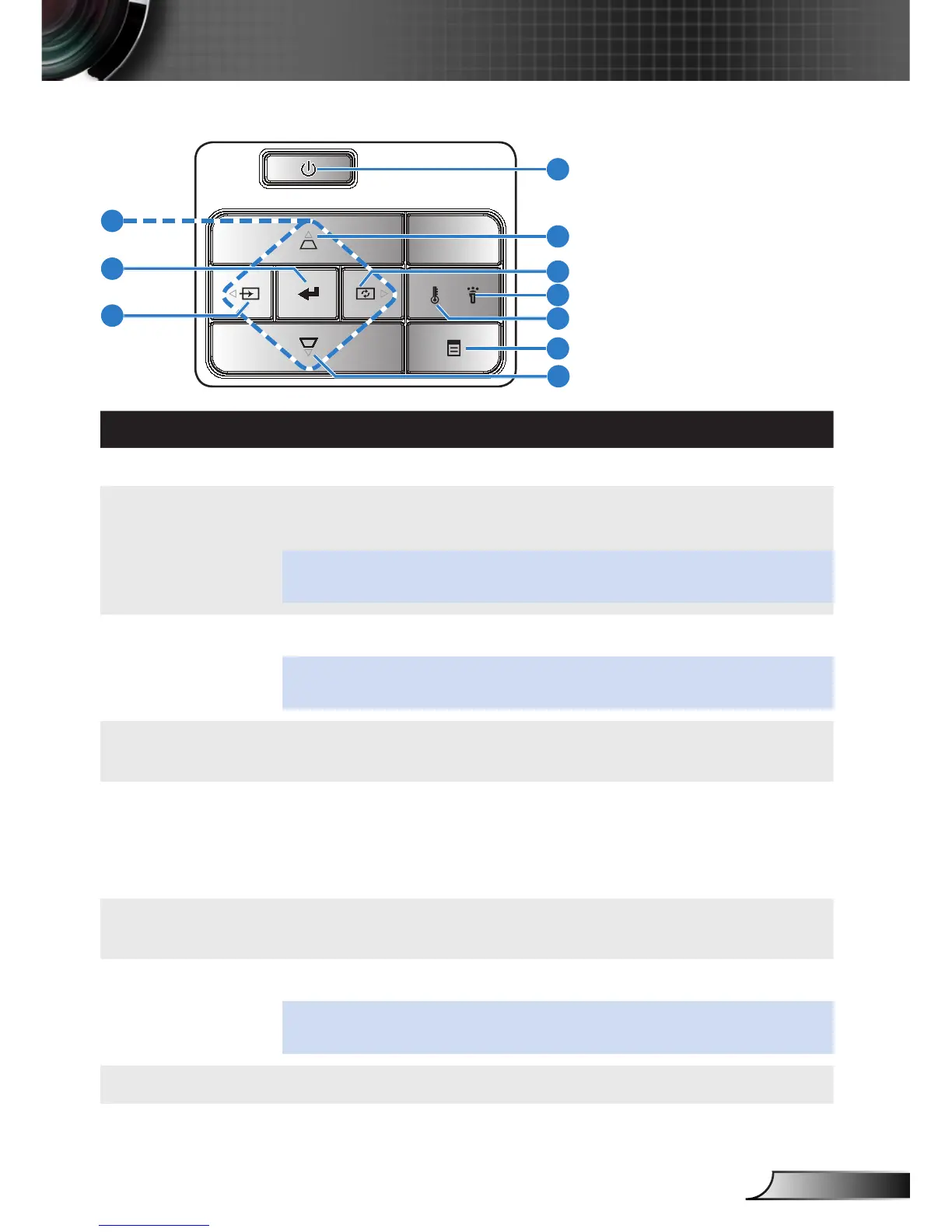
Control Panel
# Name Description
1 Power Turns the projector on or off.
2 Keystone ad-
justment
Press to adjust image distortion caused by tilting the projector
(+/-40 degrees).
NOTE: This function is not supported on Multi-Media function.
3 Auto adjust Press to synchronize the projector to the input source.
NOTE: Auto Adjust does not operate if the on-screen display (OSD) is
displayed.
4 Error LED Error LED is solid amber, one of the LED has failed. The projector
will automatically shut down.
5 Temp LED If the TEMP amber indicator is blinking, one of the following prob-
lems could be occurring:
Internal temperature of the projector is too high. y
The fans has failed. y
6 Menu Press to activate the OSD. Use the directional keys and the Menu
button to navigate through the OSD.
7 Source Press to enter Source menu and select an input source.
NOTE: This function is not supported on Multi-Media function.
8 Enter Press to confirm the selection item.
9 Four Direction-
al Select Keys
Press to navigate through the On-Screen Display (OSD) Menu
items.
1
2
3
4
5
6
7
8
9
8



 To Next Page