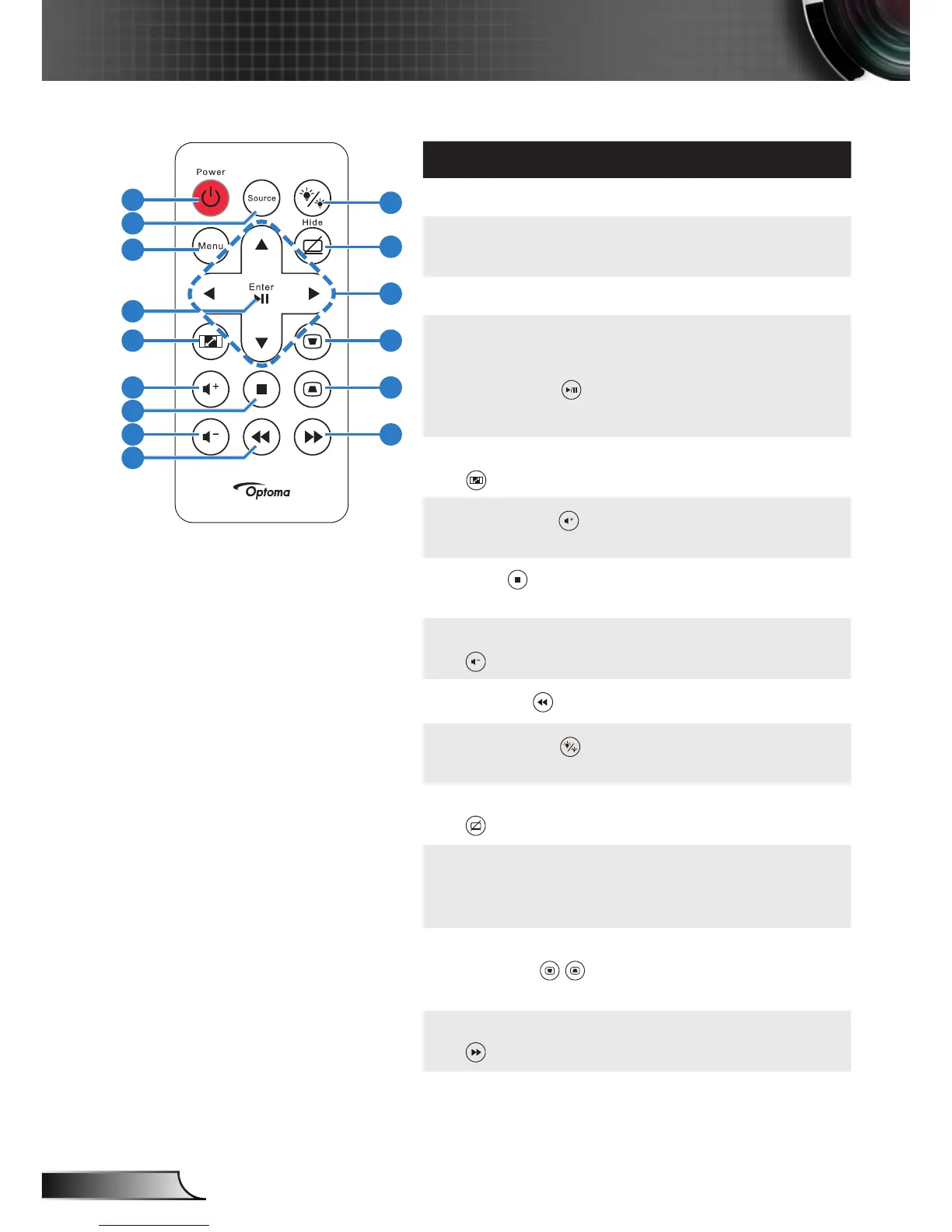
Remote Control
# Name Description
1 Power Turns the projector on or off.
2 Source Press to enter Source menu
and select an input source.
3 Menu Press to activate the OSD.
4 Enter
Play/Pause
Press to confirm the selec-
tion.
Press to play/pause media
file.
5 Aspect Ratio Press to change aspect ratio
of a displayed image.
6
Volume up
Press to increase the vol-
ume.
7
Stop
Press to stop playing media
file.
8 Volume down Press to decrease the
volume.
9
Rewind
Press to search backward.
10
LED mode
Allows you to select the
display mode.
11 Blank screen Press to hide/unhide the
image.
12 Up/Down/Left/
Right
Press to navigate through
the On-Screen Display
(OSD) Menu items.
13
14
Keystone ad-
justment
Press to adjust image distor-
tion caused by tilting the
projector (+/-40 degrees).
15 Fast Forward Press to search forward.
10
11
13
15
12
14
1
2
3
4
5
7
8
9
6



 To Next Page