52
THE OFFICIAL ORANGE PI USER'S GUIDE
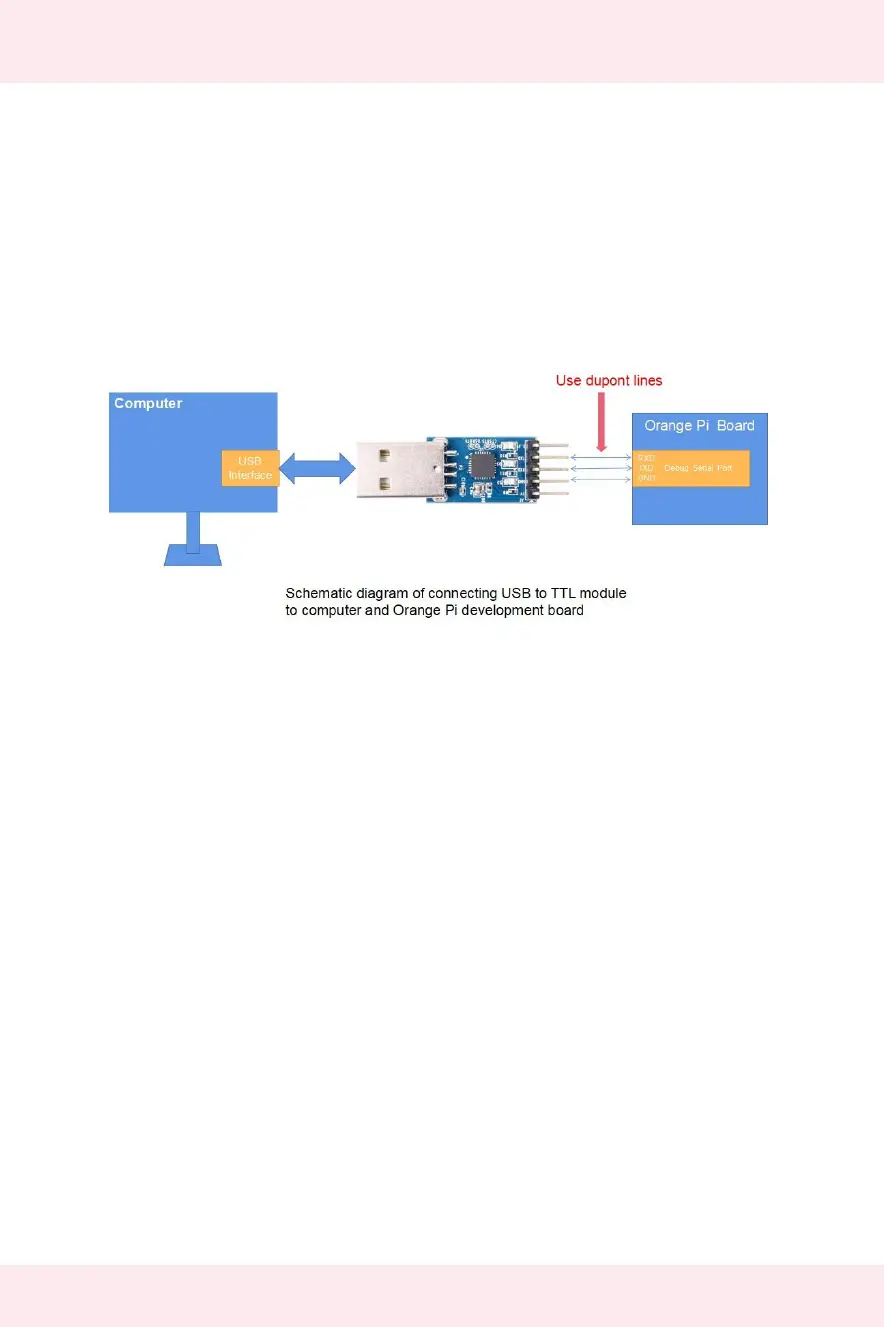
The GND, TX, and RX pins of the USB to TTL module need to be connected to the
debug serial port of the development board through a Dupont cable
a. Connect the GND of the USB to TTL module to the GND of the board
b. Connect the RX of the USB to TTL module to the TXD of the board
c. Connect the TX of the USB to TTL module to the RX of the board
The schematic diagram of connecting the USB to TTL module to the computer and
the Orange Pi development board is shown below
How to use the debug serial port on the Ubuntu
platform.
1) If the USB to TTL module is connected normally, you can see the corresponding
device node name under /dev of Ubuntu PC, remember this node name, you will use
it when setting up the serial port software later
test@test:~$ ls /dev/ttyUSB*
/dev/ttyUSB0
2) Many serial debugging tools that can be used under Linux, such as putty,
minicom, etc. The following shows how to use putty
3) First, install putty on Ubuntu PC
test@test:~$ sudo apt update
test@test:~$ sudo apt install putty
4) Then run putty, remember to add sudo permissions
test@test:~$ sudo putty
5) After executing the putty command, the following interface will pop up


 To Next Page