10
Operation
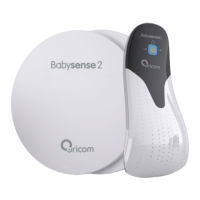
Babysense2 is ready for operation and use once the installation is
complete. To operate, follow the instructions below:
• Place your baby in crib/cot.
• Turn control unit on by pressing On/Off button.
• Red control lights switch on briefly and a double click sound is heard.
• The blue movement indicator light shows that the control unit is turned
on and monitoring baby (it does not represent babies breathing rate).
• Acoustic and visual red alarm light are activated if baby's breathing
movement rate stops or slows significantly (below 10 breaths per
minute).
• If red low-battery warning light flashes, replace all batteries as soon as
possible. If an additional clicking sound is heard, all batteries must be
replaced immediately.
• Turn off by pressing the On/Off button before taking your baby out of
cot.
• Failure of the sensor pads to be directly against the mattress. A
mattress of a stiff material such as polystyrene foam could cause false
alarms.
Operation


 To Next Page