14
Emergency Channel (EMG)
The EMG button gives instant access to emergency channels 5 and 35.
To access the emergency channel
1. Press the EMG button, Channel 5 I selected and displayed on the
LCD.
2. If you press the EMG button a 2nd time the channel changes to 35.
3. If you press the EMG button a 3rd time the unit return to the original
channel.
Priority Channel (PRI)
You can select a priority channel which is used during scanning
functions and can be accessed immediately via the INS button on the
Microphone.
To Select the Primary Channel
1. Select the desired primary channel using the channel control,
including any CTCSS or DCS code.
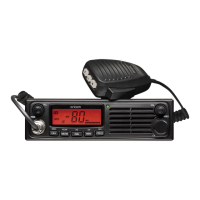
2. Press the PRI button on the unit or press and hold the INS button
on the Microphone.
To switch to the primary Channel
1. Press the INS button on the Microphone.
Dual Watch
Dual watch allows you to continually monitor two channels.
1. Select the first channel you wish to monitor using the CH control.
2. Press and hold DW for 2 seconds, DW appears on the display.
Select the second channel you wish to monitor using the CH control.
When a transmission is heard on one of those channels the UHF088
Operation
UHF088-UG.indd 14 2012-2-8 15:44:45


 To Next Page