EasyManua.ls Logo

Osram e:cue SYMPL Core S - User Manual

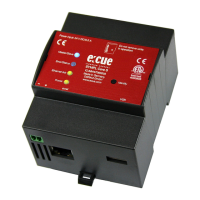
Osram e:cue SYMPL Core S
23 pages
Print Icon
To Next Page IconTo Next Page
Loading...
AB447060035
e:cue SYMPL Core S
Setup Manual
Our Brand
www.osram.com/ecue
Light is OSRAM
Question and Answer IconNeed help?

Do you have a question about the Osram e:cue SYMPL Core S and is the answer not in the manual?

Summary

Security Instructions

Symbols

Exclamation mark warns of device damage. Information symbol gives handling hints.

General Security Instructions

Connect cables when powered down. Use certified SELV Class 2 power supply. Max cable length is 30 m.

General Device Description

Identify Button: Identification & Reset & Update

Describes the functions of the identify button for device identification, reset, and firmware updates.

Installation

Network Configuration

Firmware Update

HowTo Update SYMPL Core S with an USB Memory Stick

Procedure for updating the SYMPL Core S firmware using a USB memory stick, including requirements and steps.

HowTo Update SYMPL Core S Image Directly to SD Card

Detailed steps for creating an SD card image for firmware update using an updater tool and Win32 Disk Imager.

Dismounting

Product Specifications

Summary

Security Instructions

Symbols

Exclamation mark warns of device damage. Information symbol gives handling hints.

General Security Instructions

Connect cables when powered down. Use certified SELV Class 2 power supply. Max cable length is 30 m.

General Device Description

Identify Button: Identification & Reset & Update

Describes the functions of the identify button for device identification, reset, and firmware updates.

Installation

Network Configuration

Firmware Update

HowTo Update SYMPL Core S with an USB Memory Stick

Procedure for updating the SYMPL Core S firmware using a USB memory stick, including requirements and steps.

HowTo Update SYMPL Core S Image Directly to SD Card

Detailed steps for creating an SD card image for firmware update using an updater tool and Win32 Disk Imager.

Dismounting

Product Specifications

Osram e:cue SYMPL Core S Specifications

General IconGeneral
Ethernet10/100 Mbps
ProtocolArt-Net
USB1x USB 2.0
Power Supply12V DC
Operating Temperature0°C to 40°C
Storage Temperature-20°C