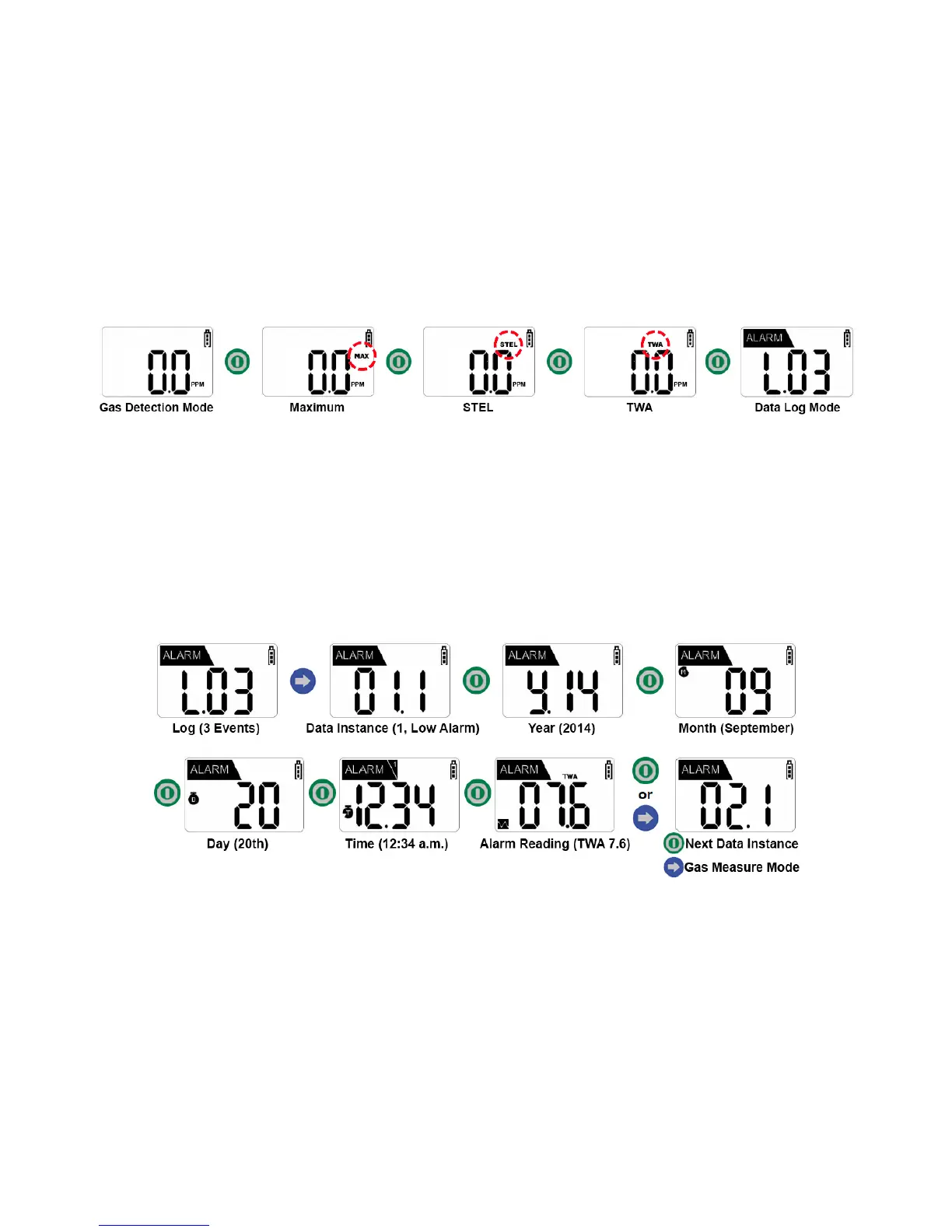
Data Logging (Alarm Data)
1. Press the green power button four times while in Gas Measure Mode (Data Log Mode is
displayed after minimum, maximum, STEL, and TWA readings).
NOTE: If an alarm event has not yet been recorded on the device, the Data Log
Mode screen will not appear. Instead, the device will return to Gas Measure
Mode following the final green power button press.
2. Press the blue arrow to enter Data Select Mode. In this mode, data is selected and
a record is confirmed.
3. Press the green power button to confirm the year, month, day, time and alarm of
the recorded event.
4. To return to the Data Select Mode, press the blue arrow button while the year,
month, day, and time are shown on the display screen. To return to Gas Measure
Mode, press the green power button.
EXAMPLE: In the reading “L.03” the “L” indicates Log and “03” indicates the
number of data. Therefore, in the reading “L.03” there are three events that have
been logged.
In Data Select Mode, with “01.1” displayed on the screen, “01” indicates the data
instance and “1” indicates the type of alarm that occurred (1 = Low Alarm, 2 =
High Alarm). Therefore, in the three instances of data that occurred, the first
instance was of a Low Alarm.


 To Next Page