To view the second, third, etc. sets of recorded data, press the blue arrow button.
After the last data reading has been displayed, press the blue arrow button to
return to Gas Measure Mode.
NOTE: Up to 20 data events can be stored on a device. Once 20 events are
stored, data is removed automatically in the order that it was received (starting
at Event 1).
Fresh Air Calibration
NOTE: Initial calibration is performed on all devices prior to shipment. Once
received, calibration should be performed monthly (or quarterly) depending on
frequency of use.
NOTE: Calibration should be performed in a fresh-air environment that is free from
any influence of other gases (since calibration is assumed to be performed in an
environment with a concentration of 20.9% Oxygen). It is also recommended that
calibration be performed in a space that is not enclosed.
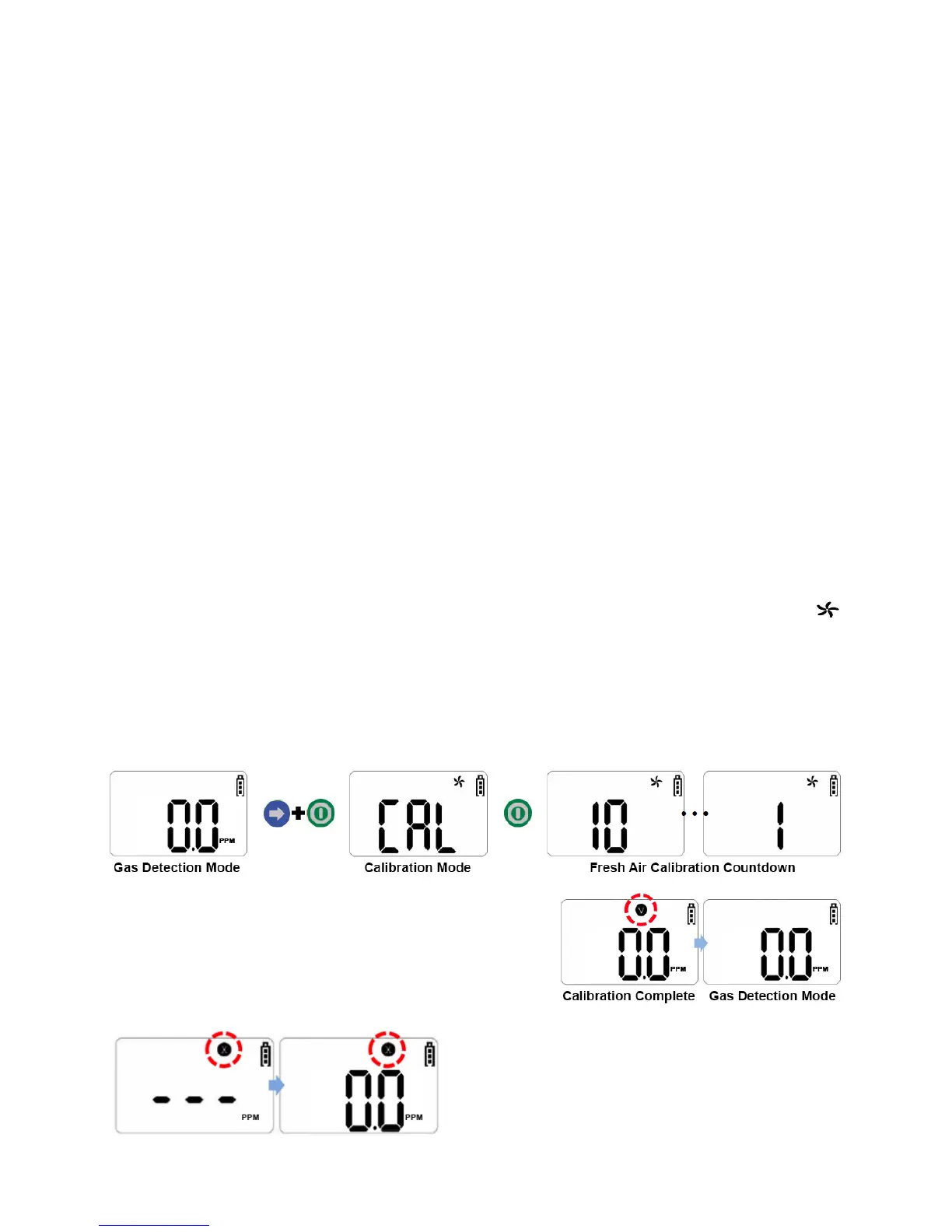
1. To enter Fresh Air Calibration Mode, press and hold the blue arrow button. While
holding down the blue arrow button, quickly press and hold the green power button.
After approximately three seconds, the display screen will show “CAL” and a
icon will appear and flash.
2. Press the green power button to begin calibration. When calibration begins, a
countdown (starting at 10) will appear on the display screen. Once completed, a “V”
icon will blink several times on the display screen (as shown circled in red below).
Then, the device will return to Gas Measure Mode.
NOTE: If the device fails to enter Calibration
Mode, an “X” icon will appear on the display
screen. If this continues, please contact the
sales representative of this product.


 To Next Page