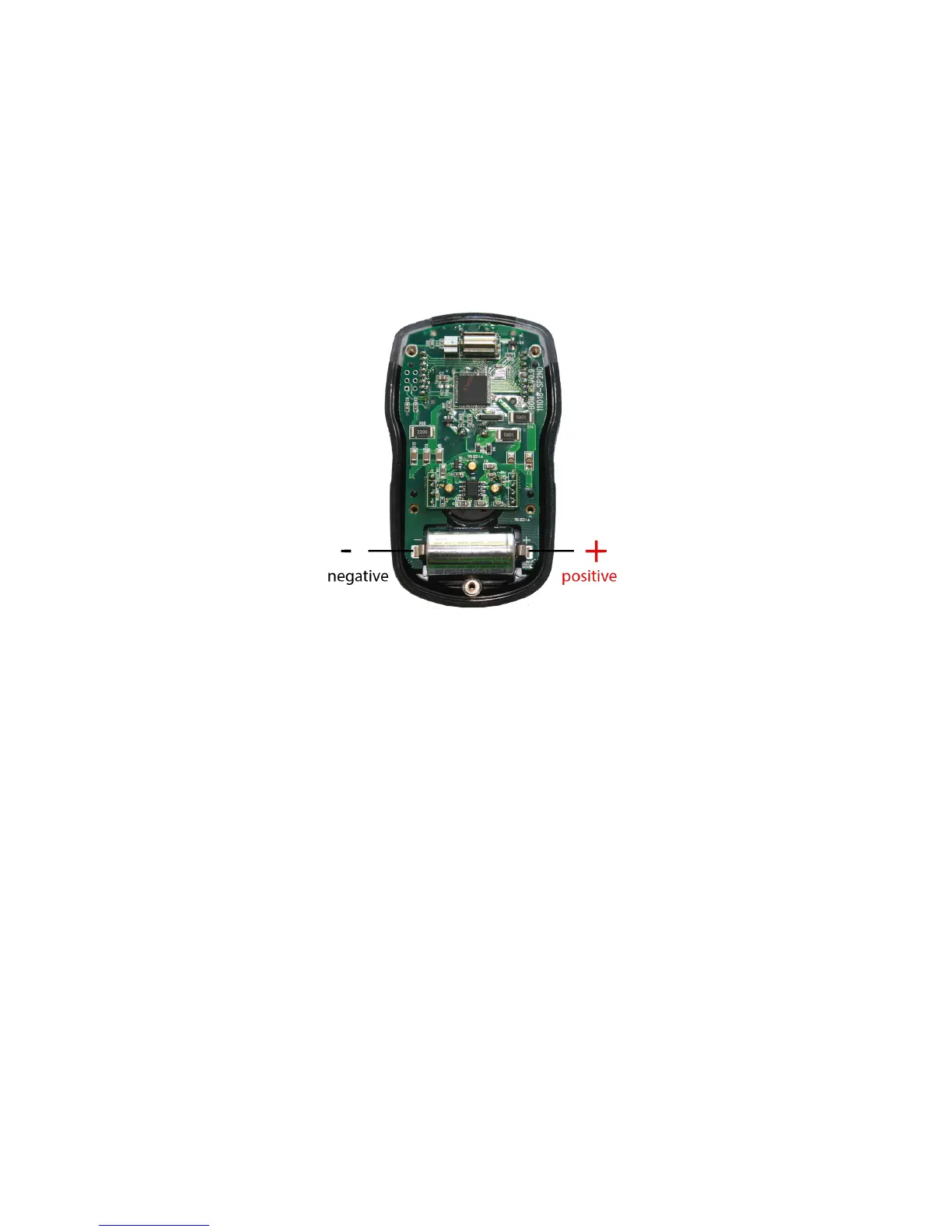
1. Remove the five machine screws located on the rear cover of the device.
2. Separate the rear cover from the front cover by gently pulling them away from
each other.
3. Using your thumb and forefinger, pull the battery out of the terminal board.
4. Slide a new battery into the terminal board.
5. Verify that the “+” and “-” sides of the battery are facing the correct direction
(and touching the battery contacts on the terminal board).
6. Place the front and rear covers together, then replace the five machine screws.
Sensor Element Replacement
Sensor replacement is recommended every two years (or whenever the “X” icon appears on
the display indicating that either the automatic sensor test on start-up, or the “fresh air”
calibration process, has failed).
Required Items:
• Phillips-head Screwdriver
• Replacement Sensor Element = Senko SS series
• Replacement Filters
NOTE: Replacement of components can hinder intrinsic safety function.
NOTE: Replacement sensor elements should be purchased from the same
retailer that the device was originally purchased from.
NOTE: The device must be recalibrated following battery or sensor element
replacement.
NOTE: Before disassembling, power off the device according to the instructions
in this operation manual.


 To Next Page