Power On
!
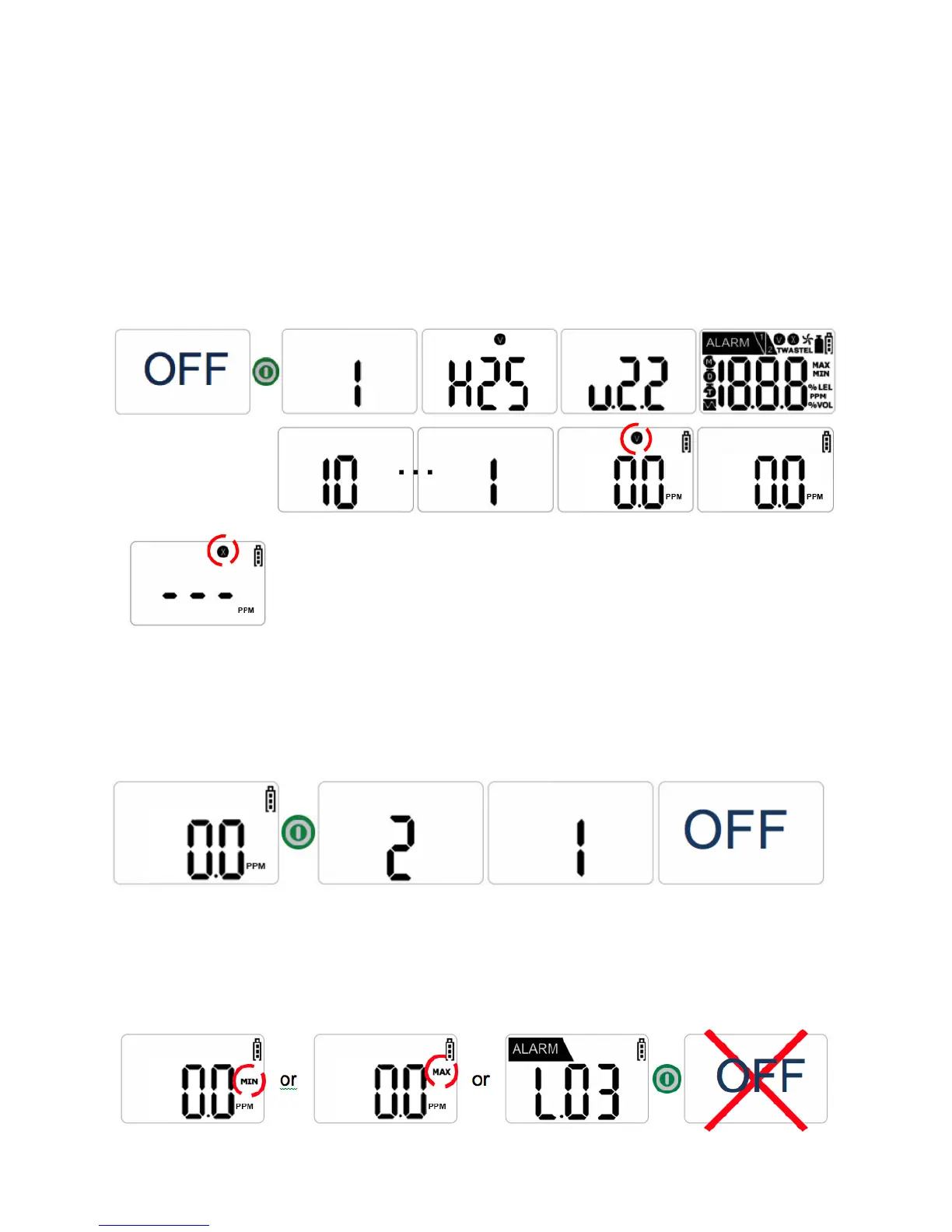
To power on the device, press and hold the green power button for approximately three
seconds.
When powered on, the device will vibrate, flash, and sound an audible alarm to verify
that those features are active. After a 10 second countdown, a “V” icon will flash on the
display screen and the current level of measured gas in ambient air will be shown.
When in Gas Detection Mode (Normal Operating Mode), the “V” icon will disappear
(after blinking several times).
NOTE: In the event that stabilization of the device fails, Gas
Measure Mode will not be entered. Instead, a blinking “X” will
appear on the display screen. The “X” indicates that calibration
of the sensor, or aftercare of the instrument, is required.
Power Off
!
To power off the device, press and hold the green power button for approximately three
seconds. The display screen will countdown the number of seconds remaining until the
device is “OFF.”
NOTE: If the green power button is pressed while the device is not in Gas
Measure Mode, or if the green power button is not held down for the required
amount of time for powering off the device, the device will remain on.


 To Next Page