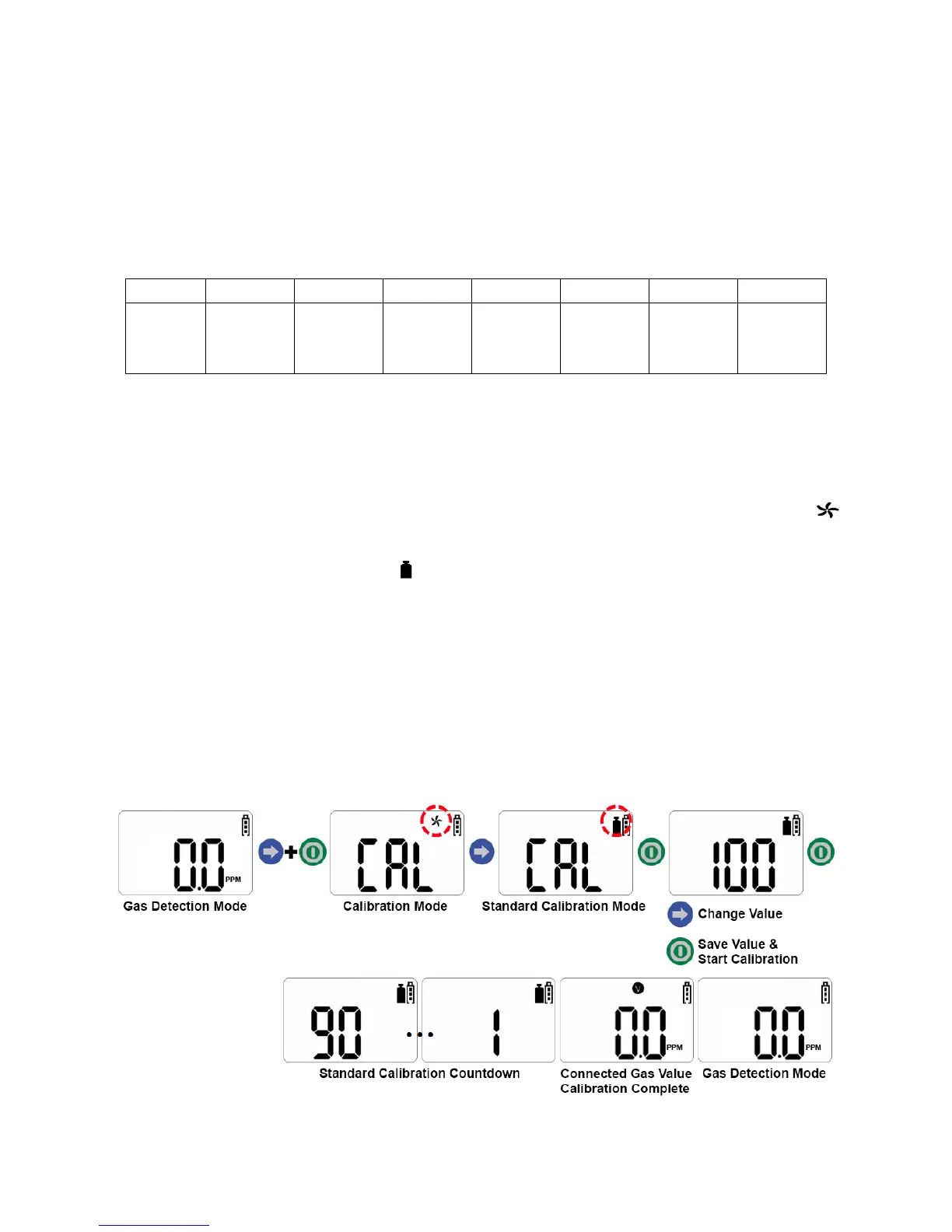
Standard Gas Calibration
NOTE: Initial calibration is performed on all devices prior to shipment. Once
received, calibration should be performed monthly (or quarterly) depending on
frequency of use.
Pre-Set Concentration of Calibration Gas
1. To enter Standard Gas Calibration Mode, press and hold the blue arrow button. While
holding down the blue arrow button, quickly press and hold the green power button.
After approximately three seconds, the display screen will show “CAL” and a
icon will appear and flash.
2. Press the blue arrow button. A icon will appear.
3. Press and hold the green power button for several seconds. The current calibration
gas value will appear on the display screen. Press the blue arrow button to change the
value to match the calibration gas (if necessary).
4. Press the green power button to save each of the three values and start calibration. A
90 second countdown will begin. If the calibration is normally executed, the
concentration value of the connected gas is indicated on the display screen with a “V”
icon.


 To Next Page