41
Maintenance
2. Remove the Sonde body, then slide the sleeve off of the Sonde. Avoid damage to the
circuit board.
3. Carefully remove the foil shield.
4. Detach the 10-pin connector ribbon cable.
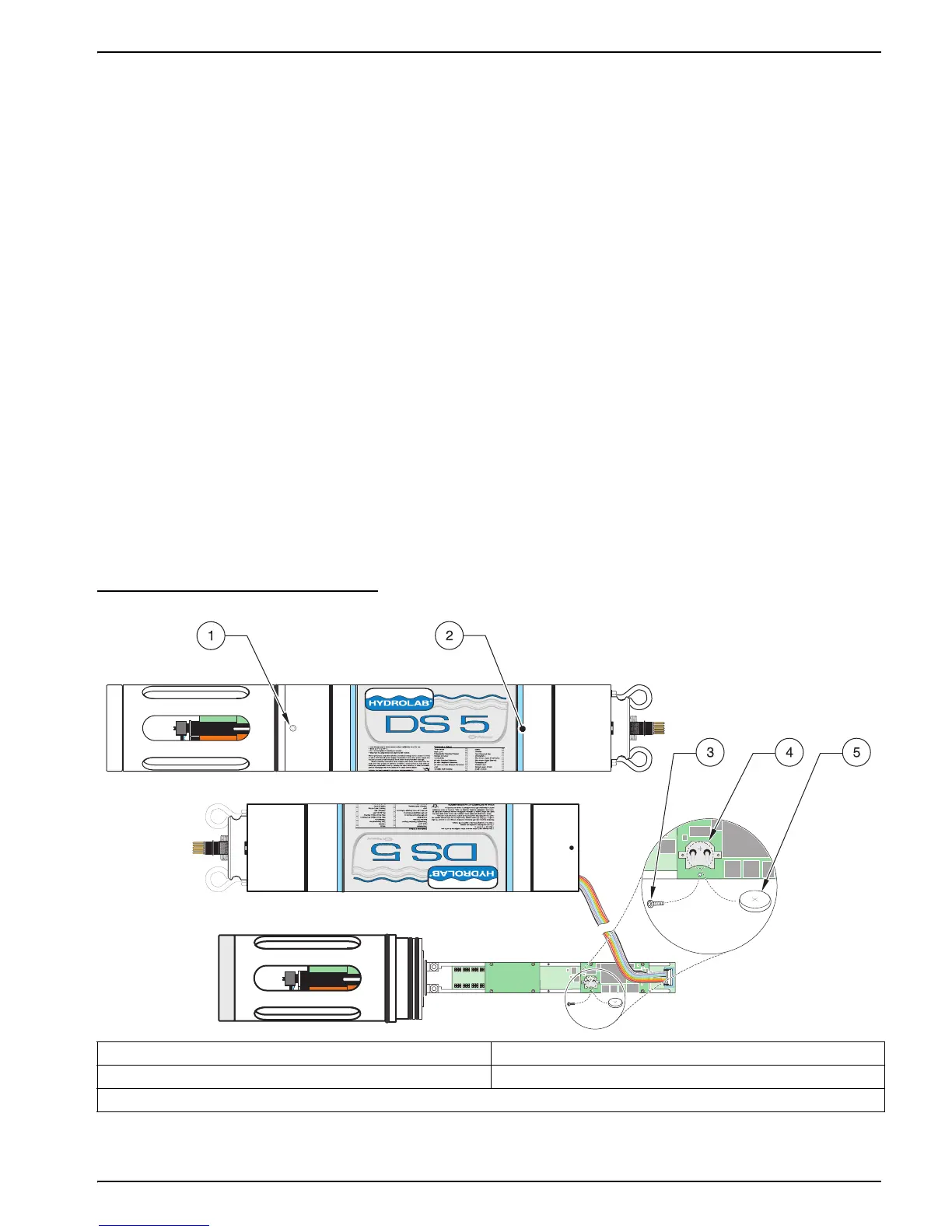
5. Remove the retaining screw next to the battery clip (Figure 17 and Figure 18).
6. Push the battery out of the battery clip using a small screwdriver.
7. Insert the new battery (Panasonic reference: CR 2032, or equivalent) with the positive
sign facing up. Replace and tighten the retaining screw.
8. Reattach the 10-pin connector and replace the foil shield.
9. Apply silicone grease to the sensor cap O-rings.
10. Carefully insert the circuit board and sensor cap assembly.
11. Tighten the Allen screws. Do not overtighten.
12. Reset the time and date after replacing the lithium battery. Then enter the time of the
location and press
ENTER.
13. Discard batteries according to local regulations.
Figure 17 Replacing the Lithium Battery on the DS5 or DS5X
1. Allen Screw 4. Battery Clip
2. Housing 5. Lithium Battery
3. Retaining Screw


 To Next Page