62
External Communications
B.5 Using a Modem with Multiprobes
Field Modem
All multiprobes require a modem adapter to enable communications with a commercial
telephone modem. The modem adapter provides the necessary handshaking and
connections to allow a modem to properly answer the incoming call and power down the
multiprobe when the call is terminated. The Modem Adapter has a connector (labeled
modem) that connects to the RS232 connection of the modem. The other connector
(labeled multiprobe) on the Modem Adapter connects to the multiprobe using a Interface
cable and Underwater cable, or a Calibration cable. A 25 to 9 pin adapter is also required
for the cables.
The Modem Adapter does not require a power supply, however, the multiprobe and the
modem will require power. Usually, commercial modems are supplied with a wall-cube
power supply that converts ac mains voltage to 9–12 volts DC. Most modem can use the
multiprobe power supply by making a cable with the corrector connector for the modem
power input.
The modem, Modem Adapter, power supply, and associate cabling are not water-proof,
and should be installed in a water-tight enclosure. If AC power is used, then a GFI (ground
fault interrupt) device should be installed in the ac wiring to prevent electrocution. Program
the modem as follows:
Office Modem Installation
The office modem is connected to the computer serial port using a standard RS232
connection. Program the modem as follows:
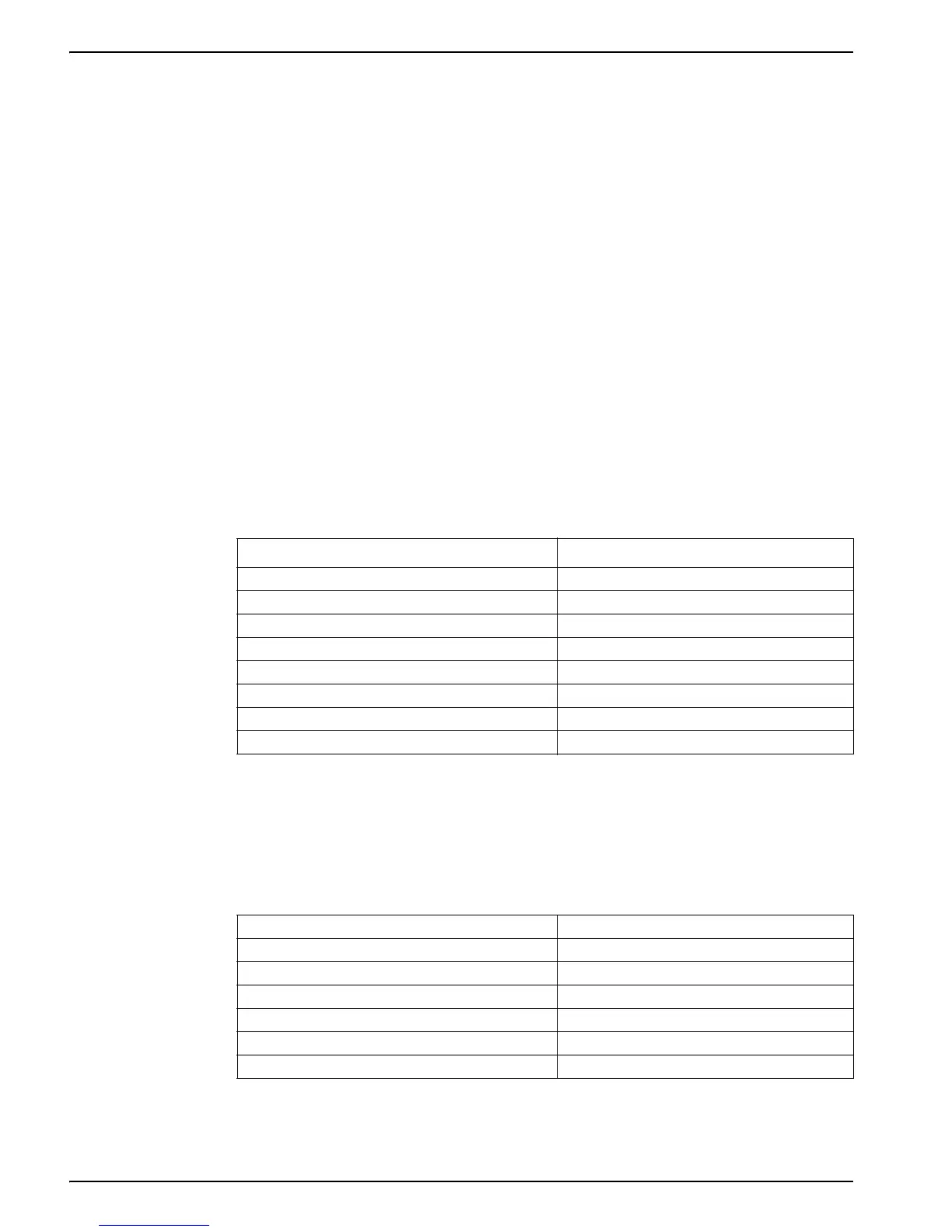
Table 7 Field Modem Commands
1
1
The modem will automatically use this setup every time it is powered on.
Command Function
AT&C1 Enable carrier detection
AT&D3 Enable DTR detection
AT&K4 Enable XON/XOFF handshaking
AT&Q0 No error correction or buffering
AT&S0 Force continuous DSR
AT%C0 Disable data compression
ATS0=1 Answer on first ring
AT&W0 Save current settings
Table 8 Office Modem Commands
1
1
The modem will automatically use this setup every time it is powered on.
Command Function
ATW1 Report connection speed & protocol
AT&C1 Enable carrier detection
AT&K4 Enable XON/XOFF handshaking
AT&Q0 No error correction or buffering
AT%C0 Disable data compression
AT&W0 Save current settings


 To Next Page