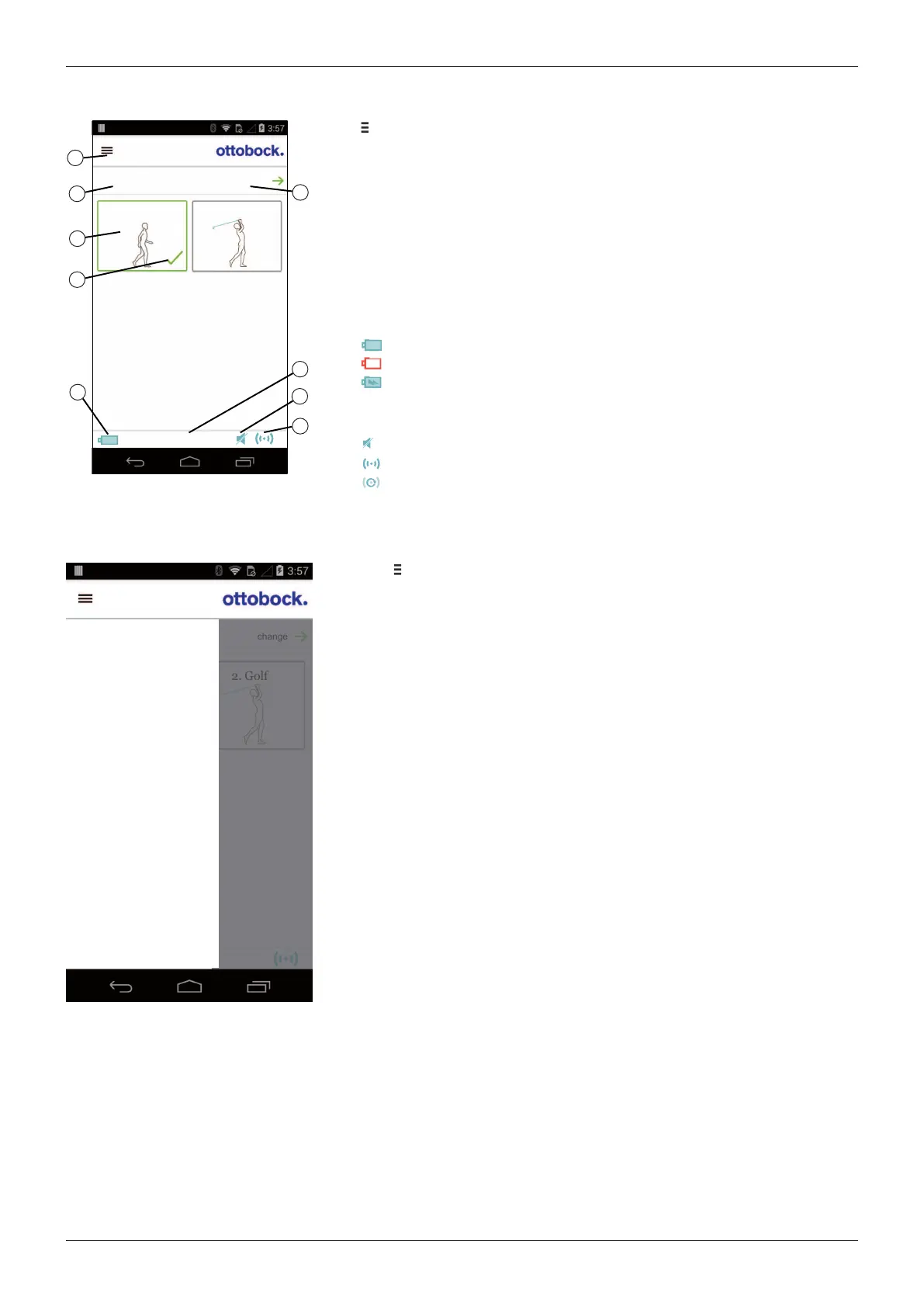
8.3 Control elements for cockpit app
1
2
3
4
5
6
7
8
9
Product
change
2. Golf
1. Basic Mode
1. Basic Mode
100%
1. Call up the navigation menu (see Page80)
2. Product
The component name can only be changed with the adjustment soft
ware.
3. If connections to more than one component have been saved, you can
switch between the saved components by tapping the entry change.
4. MyModes configured with the adjustment software.
Switching the mode by tapping the corresponding symbol and confirm
ing by tapping "OK".
5. Currently selected mode
6. Charge level of the component.
Component battery fully charged
Component battery empty
Component battery is being charged
The current charge level is also displayed in %.
7. Display and name of the currently selected mode (e.g. 1. Basic Mode)
8. Mute mode is activated
9. Connection to component has been established
Connection to component has been interrupted. The app is attempt
ing to re-establish the connection automatically.
8.3.1 Cockpit app navigation menu
2. Golf
change
MyModes
Functions
Settings
Status
General
Manage components
Imprint/Info
Product
Tap the symbol in the menus to display the navigation menu. Additional
settings for the connected component can be configured in this menu.
Product
Name of the connected component
MyModes
Return to the main menu to switch MyModes
Functions
Call up additional functions of the component (e.g. turn off Bluetooth) (see
Page88)
Settings
Change settings of the currently selected mode (see Page85)
Status
Query status of the connected component (see Page88)
Manage components
Add or delete components (see Page80)
Imprint/Info
Display information/legal notices for the cockpit app
8.4 Managing components
Connections with up to four different components can be stored in the app. However, a component can only be
connected to one device at a time.
The following points need to be observed before establishing the connection:
• Bluetooth of the component must be switched on (see Page88).
• Bluetooth of the device must be switched on.
• The device must not be in "flight mode" (offline mode), otherwise all wireless connections are turned off.
• The device must be connected to the internet.
80
Cockpit app
Genium 3B1-3/3B1-3=ST





 To Next Page